






Webflow vs Readdy: which AI builder suits you in 2026
Comparing Webflow and Readdy in 2026? See how Webflow pricing, Webflow AI, design control, SEO and code export compare, and which one suits your website.
Kael is an editor and content strategist covering AI tools, website creation, and online growth. Interested in how people build and share on the internet, Kael writes practical content around digital products and modern web experiences.
Quick answer:
For most small businesses, solo founders and marketing teams, Readdy is the better choice. It builds a working website from a plain description, lets you edit it by asking or clicking, and includes hosting, a domain, a backend for customer logins, payments and SEO tools in one subscription, from $15 a month on an annual plan. Webflow suits professional designers who want to hand-build every layout and are happy to learn its editor.
Do you need to be a designer to use Webflow? It certainly helps. Webflow is built around the way designers and developers already work, so before you can build much, you'll need to get comfortable with things like page structure, spacing settings and styles you reuse across the site. Flow Ninja, an agency that builds Webflow sites for a living, says even the basics can take several days or a few weeks to learn.
Webflow has added an AI site builder to help with the first draft, but it only drafts up to five pages before handing you over to the full editor to finish the job. You'll also need to work out which of its two kinds of plan you need, one for the website and one for the workspace you build it in, before you can publish on your own domain.
Readdy was built for people who would like to skip all of that. You describe your business in your own words, Readdy builds a complete, working site, and you keep changing it by asking for what you'd like or clicking on any part of the page. Hosting, a domain, forms, payments and customer logins all come in one plan, so you can have your site live the same day you start.
What is Webflow?
Webflow is a visual website builder for designers, where you lay out each page by hand in an editor that mirrors the code underneath, and it then hosts the finished site for you. It first launched in 2013, and today it runs around 0.8% of all websites.
A Webflow website is built in the Designer, which is the main editor. You place boxes on the page, set their size and spacing, give them reusable styles called classes, and add animations that play as people scroll. There's a built-in CMS, which is where blog posts and other regularly updated content live, and an online store option that comes on its own set of plans. More recently, it has added a set of AI tools, called Webflow AI, that draft pages, write copy and suggest SEO fixes.

What is Readdy?
Readdy is an AI website builder that creates a complete, working website from a description of what you need and then lets you change it by asking in plain words or clicking on the part you'd like to edit.
Everything a business website usually needs comes included. Hosting and a domain are part of the paid plans. There's a backend too, which is the part of a website that remembers things, so customer logins, saved details and form submissions all work without any extra tools. Bookings, payments through Stripe or Shopify, SEO settings and analytics are built in as well, and you can export any project as HTML, React, Vue or Figma files whenever you like. There are over 500 templates to start from, and support is available around the clock.
Webflow vs Readdy feature comparison
Readdy is the quicker route to a finished, working business website, and Webflow suits designers who want to build every layout by hand.
Webflow AI vs Readdy AI: how each builds your website
Webflow AI drafts a starting point that you then finish by hand, whereas Readdy's AI builds the whole site and stays with you for every change you make afterwards.
Webflow AI website creation
Webflow AI website creation starts in the dashboard, where you pick the AI site builder and describe your business, the look you'd like and what the site is for. It suggests pages and sections, then generates the designs and copy for up to five pages on a paid plan, or two on the free one. From there, the site opens in the Designer, where any further layout changes happen by hand, and copywriting and SEO suggestions draw on a monthly allowance of AI credits, starting at 200 a month on the free workspace.
How Readdy generates a site
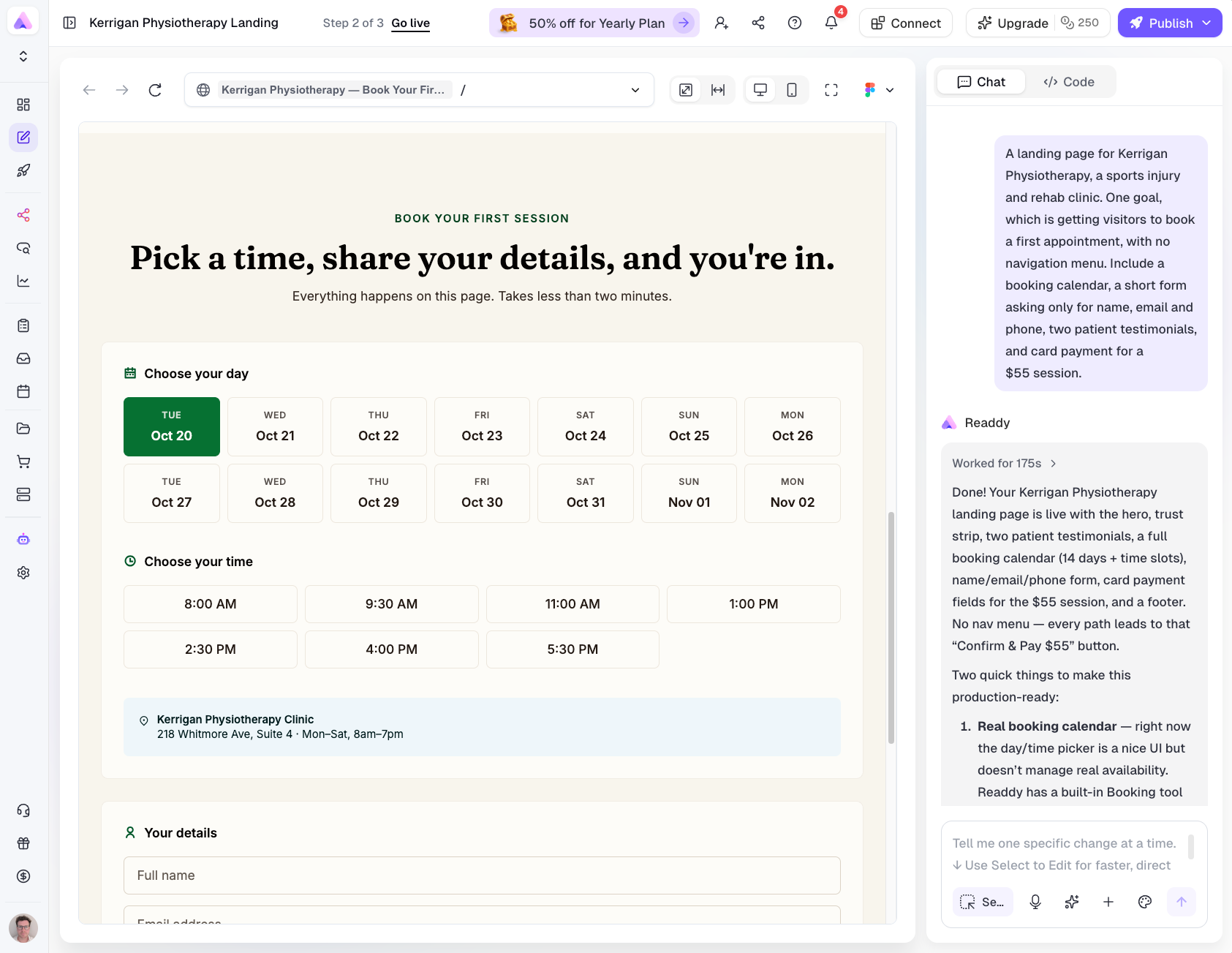
Readdy builds the whole site from your description, including the pages, the copy, the images, a layout that works on phones and the working parts behind it, like forms and logins. You can describe it in a sentence or two, upload a screenshot of a design you like, bring in a Figma file, or paste the link to your current site and have it rebuilt as a project you can edit.
After that, you carry on in exactly the same way. Ask for a new pricing page, a booking form or a darker header, and Readdy makes the change, or click on any part of the page and edit it yourself. Our guides on how to build a website from text with AI walk through the whole process.
Design control and learning curve
Webflow gives you more detailed design control, and Readdy is far easier to learn. For most business websites, being able to build and update the site yourself from day one is the bigger advantage.
In Webflow, you're working with the same building blocks a developer would use, like nested boxes, flexible layouts and reusable classes, just shown visually. That's what lets designers create unusual layouts and detailed animations, and it's also why the basics can take several days or a few weeks to learn. Even small jobs, like moving a section or tidying up the spacing on mobile, mean knowing which setting to look for.
Readdy takes that part off your hands. You click on whatever you'd like to change or simply describe it, and every page adjusts to phones and tablets automatically. If you're new to building websites, browsing the templates is a good way to see what ai website builders for beginners like Readdy can produce before you start.
Forms, backend, e-commerce and integrations
Readdy includes forms, a backend, payments and bookings as standard. Webflow covers forms and online stores itself, and relies on other tools or custom code for customer accounts and anything more involved.
Webflow's forms are easy to add, and every paid site plan accepts unlimited submissions. Its e-commerce runs on separate plans, starting at $29 a month on an annual plan with a 2% transaction fee on the Standard tier. Customer logins are where things have changed. Webflow switched off its User Accounts feature on January 29, 2026, so a members' area now means adding a third-party tool like Memberstack or Outseta, or paying a developer to build a custom app on Webflow Cloud. Extra features come from its apps marketplace, although each app tends to be another subscription to keep track of.
Because Readdy is a no-code AI website builder with a backend built in, a members' area is simply another part of your site. The database, user logins and sign-up pages are created along with everything else, and form submissions are stored for you automatically. You can take payments, sell digital downloads or set up subscriptions through Stripe or Shopify, and bookings, analytics and connections to tools like Calendly, Mailchimp and Google Sheets are all available from the same editor.
Code ownership, export and lock-in
Readdy lets you export your complete project, while Webflow's export gives you the page files without the parts that make the site work, like the CMS content, forms and checkout.
Webflow's code export is only available on a paid workspace plan, and what you get is the HTML, CSS and JavaScript for each page. Once those files leave the platform, blog lists show up empty, forms stop sending and the shop no longer works, so moving the site elsewhere means rebuilding those parts. You can download your CMS content separately as spreadsheet files, but leaving is usually a bigger job than it first looks.
Readdy exports the whole project as HTML, React, Vue or Figma files on every paid plan, and the higher plans sync with GitHub, so a developer can pick it up whenever you need one and your work stays yours if your plans change.
SEO and GEO: getting found in Google and AI answers
Both platforms give you the SEO controls you need to rank in Google. The difference is in AI search, where Readdy includes GEO tools on its Agency plans and a free checker anyone can use, while Webflow keeps its dedicated AI search product for Enterprise customers.
GEO, short for generative engine optimization, simply means getting your website mentioned in the answers that tools like ChatGPT and Google's AI Overviews give, and you'll also see it called AEO, or answer engine optimization.
Traditional SEO controls
On Webflow, you set page titles, descriptions, URLs, redirects and image alt text yourself, and it creates a sitemap automatically. The controls are thorough, though they assume you already know what each one is for.
Readdy covers the same ground, with editable titles, descriptions, URLs and indexing settings, an automatic sitemap and robots.txt file, and Google Search Console verification. As it builds each page, it also sets up the heading structure, compresses the images and adds structured data, the behind-the-scenes labels that help search engines understand a page, so the groundwork is done before you open a single setting.
AI-search (GEO/AEO) tooling
Google says there are no extra requirements to appear in AI Overviews beyond good SEO, so clear headings and direct answers help with both. On standard plans, Webflow AI can suggest SEO and AEO fixes using your monthly credits, while the full AEO product, with citation tracking and AI agents, is Enterprise only.
Readdy's Agency plans include AI SEO analysis along with AEO and GEO tools, and anyone can check how their current site looks to AI search with the free GEO Score Checker on Readdy's ai website generator tools page.
Webflow pricing vs Readdy pricing
Readdy is one subscription that covers building, hosting, a domain and a backend, while Webflow pricing is split between site plans for each published website and workspace plans for the people building them. Both start at $15 a month on an annual plan, though they include very different things at that price.
Paying annually works out 40% cheaper than paying month to month, when the same plans cost $25, $40, $120 and $199.
Webflow's site plans start with a free Starter plan, which is limited to two pages on a webflow.io address. Basic is $15 a month on an annual plan for a site without the CMS, and Premium, which replaced the old CMS and Business plans in May 2026, is $25 a month. Paying monthly takes those to $25 and $39, and online stores have their own plans from $29 a month. Workspace plans sit on top, from free up to $49 a month, and you'll need a paid one for code export.
So a small business with a blog would typically pay $25 a month for the Premium plan, plus a workspace plan if anybody needs to export the code. If you're comparing costs for an AI website builder for small businesses, Readdy's Starter plan at $15 a month already includes the backend, code export, a free domain and 1,000 leads a month.
Which should you choose?
Readdy is the better choice for most people, including beginners, small businesses, marketing teams and agencies. Webflow makes more sense if you're a designer or developer who wants to build everything by hand, or a large company that already runs on it. If you've been looking at Webflow alternatives because of the learning curve or the pricing, Readdy is likely to be the one that fits.
Beginners and solo founders
Readdy is the clear pick here. You can have a site live the same day without learning a design tool, and the free plan lets you build and test everything before you pay anything.
Small businesses
Readdy suits most small businesses, because bookings, payments, forms and customer logins are already there, so you won't need to bolt on separate tools as the business grows.
Marketing teams
Teams that want to launch landing pages and campaign sites without waiting on a designer will find Readdy much quicker, since anybody on the team can make changes by asking. Webflow tends to suit teams with a dedicated web designer and a design system they want to keep tight control of.
Designers and developers
Webflow is the natural fit if you want to control every element by hand and build detailed animations. Readdy can be handy for developers too, because you can generate a working site in minutes and then export it as React or Vue to carry on in your own setup.
Agencies and freelancers
Readdy's Agency plans include client management, and Agency Pro adds white labeling and up to ten published sites, which makes turning around client websites much faster. Webflow suits design-led agencies whose clients are paying for fully custom builds.

Enterprise
Webflow has a longer track record with large companies, with Enterprise plans, its AEO product and the publishing workflows big teams tend to need. Readdy's Ultimate plan covers unlimited sites and projects for larger organizations that want to move quickly.
Frequently asked questions
Is Readdy a Webflow alternative?
Yes, and for most business websites it's the simpler one. Readdy builds the whole site from a description and lets you change it by asking or clicking, so there's no design editor to learn. Hosting, a domain, a backend, payments and SEO tools are all included, which covers most of the reasons people look for Webflow alternatives.
Does Webflow have AI website creation?
Yes. Webflow's AI site builder creates a page structure, designs and copy from a description, with up to five pages on a paid plan. Once it's generated, you finish and edit the site by hand in Webflow's Designer, and AI copywriting and SEO suggestions use up a monthly allowance of credits.
How much do Webflow and Readdy cost?
Both have free plans and paid plans from $15 a month on an annual plan. Readdy's Starter plan includes hosting, a domain, a backend and code export. Webflow's Basic plan has no CMS, so a site with a blog needs Premium at $25 a month, plus a paid workspace plan for code export.
Which is better for SEO and GEO?
Both give you solid SEO controls, and Readdy also sets up the heading structure, structured data and image compression for you as it builds. For AI search, Readdy includes GEO and AEO tools on its Agency plans and a free GEO checker for everyone, while Webflow's dedicated AEO product is only available to Enterprise customers.
Can I export my site from either?
Yes, though the two exports are very different. Readdy exports your whole project as HTML, React, Vue or Figma files on any paid plan. Webflow exports HTML, CSS and JavaScript on a paid workspace plan, but CMS content, forms and the shop stop working outside Webflow, so those parts would need rebuilding somewhere else.
Which is easier for beginners?
Readdy is much easier to start with, because you describe the site you'd like and change it by asking or clicking. Webflow's editor is built around how web pages are put together underneath, and Flow Ninja, a Webflow agency, says the basics can take several days or a few weeks to learn.
Can Readdy handle e-commerce?
Yes. You can take payments, sell products and digital downloads, and set up subscriptions through Stripe or Shopify, with checkout, receipts and recurring billing handled for you. If you're planning a very large shop with thousands of products and complicated stock levels, a dedicated e-commerce platform may still suit you better.
Key takeaways
- Readdy suits most small businesses, solo founders, marketing teams and agencies, because it builds a working site from a description and includes hosting, a domain, a backend, payments and SEO tools in one subscription.
- Webflow AI drafts up to five pages and then hands you over to the Designer, while Readdy's AI builds the full site and handles every change you make after that.
- Webflow retired its User Accounts feature in January 2026, so customer logins need a third-party tool, whereas Readdy includes them as standard.
- Both start at $15 a month on an annual plan, but Readdy's Starter plan includes the backend and full code export, and Webflow's export leaves out CMS content, forms and the shop.

Kael
Kael is an editor and content strategist covering AI tools, website creation, and online growth. Interested in how people build and share on the internet, Kael writes practical content around digital products and modern web experiences.