






Hostinger vs Readdy in 2026: which AI website builder fits your business
A 2026 Hostinger review and comparison with Readdy, covering AI builder quality, pricing after renewal, backend features and code ownership.
Kael is an editor and content strategist covering AI tools, website creation, and online growth. Interested in how people build and share on the internet, Kael writes practical content around digital products and modern web experiences.
Both of these leading AI website creation tools will hand you a finished, snazzy-looking website from a sentence or two of rough description. Where they part company is what happens next, once the site exists and you need it to take bookings, hold customer data, or move somewhere else entirely.
Hostinger is a web hosting company that has an AI website builder sitting inside a much larger catalog of shared hosting, WordPress, VPS, cloud, email and domains. Readdy is an AI website building and publishing platform, built to carry you from an idea to a live, responsive site with a working backend behind it.
Quick answer: Readdy is the stronger fit for most businesses, since a database, authentication, bookings and payments come on every paid plan, you can download your code at any point, and the price you sign up at is the price you keep paying. It has a free plan and a Starter plan at $25 per month, or $15 per month billed yearly (Readdy pricing). Hostinger is the better buy when cost is the deciding factor and the site is a simple brochure or small store, starting at $2.99 per month on a 48 month prepaid term and renewing at $10.99 (Website Builder Expert).
What is Readdy?
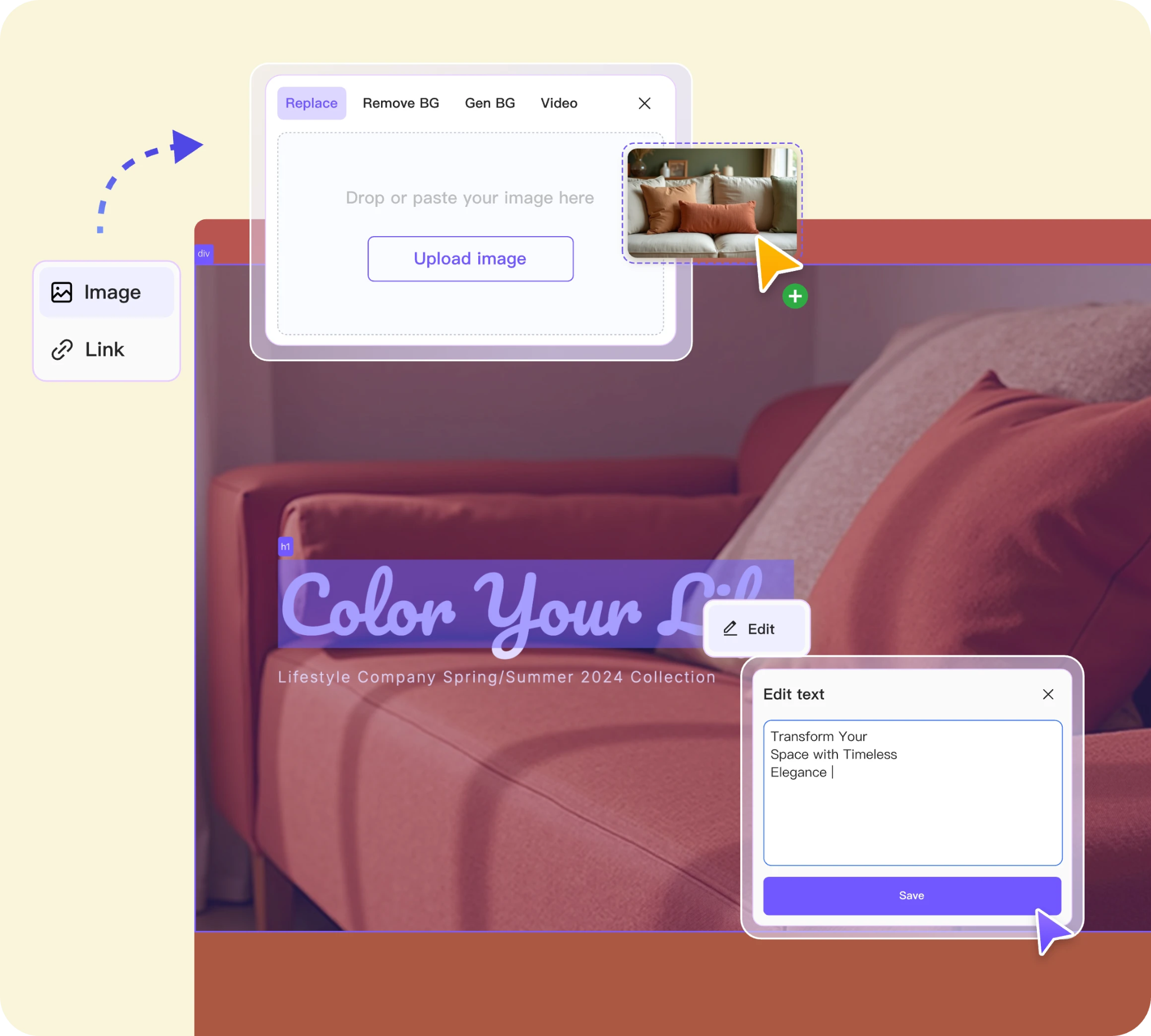
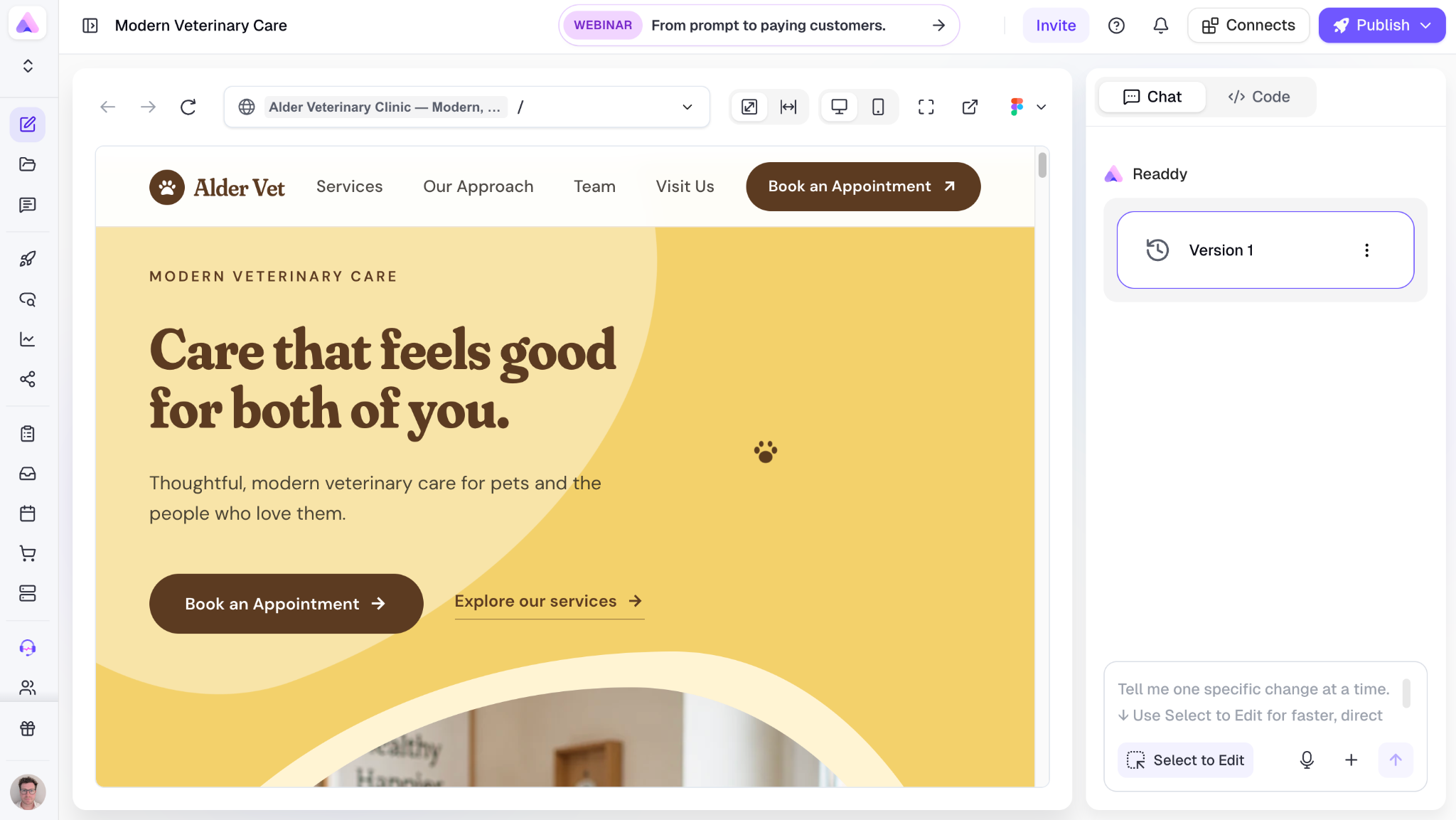
Readdy is an AI website builder that generates a complete, responsive, publishable site from a text prompt, a screenshot, a Figma frame or a reference URL, with a database, authentication and server functions included as standard. You edit by asking the AI for changes or by clicking any element on the page.
The part that separates it from most builders in this category is what sits underneath. Readdy Backend covers databases, functions and secrets with no external setup, so a site can handle user accounts, saved records, bookings and payments without you wiring up a third party service (Readdy docs).
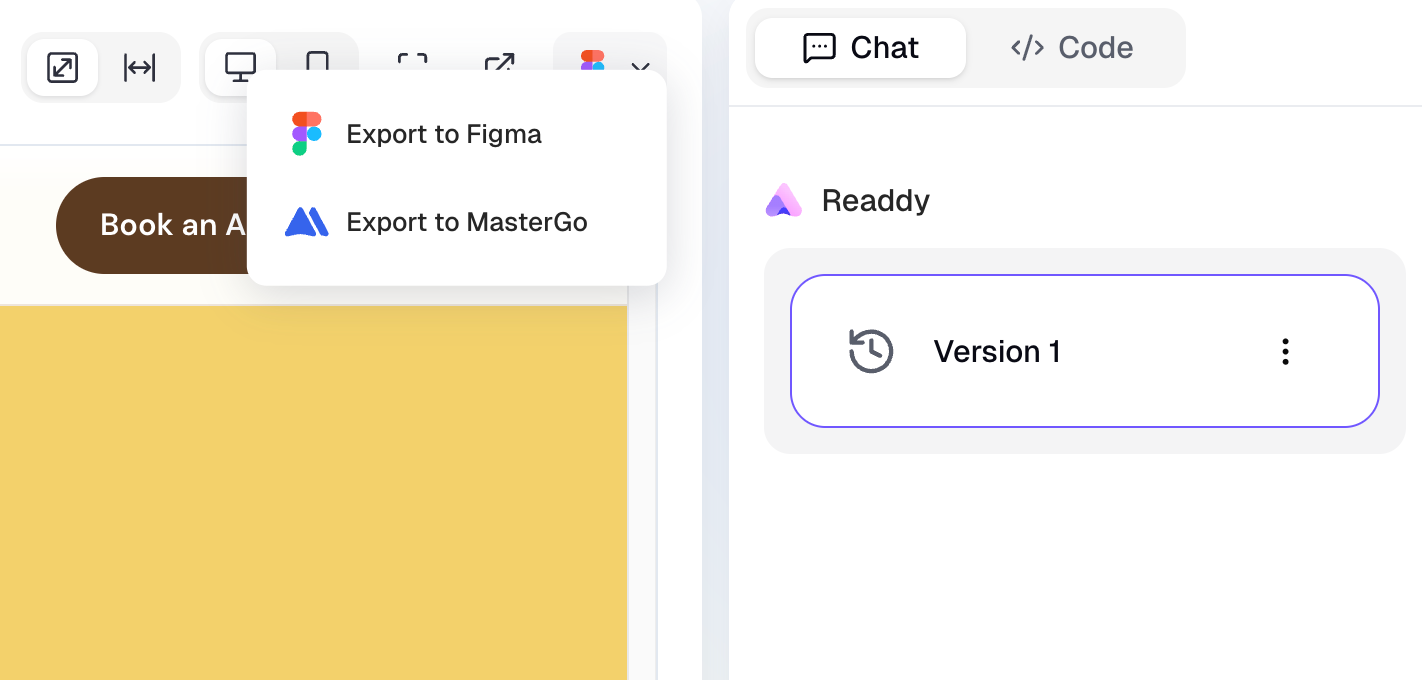
You can also download the code or export the design to Figma on any paid plan, which is unusual in this market and becomes relevant the moment you think about moving.
What is Hostinger AI Website Builder?
Hostinger AI Website Builder is a drag and drop site builder bundled into Hostinger's hosting plans, which generates a complete site from a short description in under 60 seconds (BestGuide). It comes with the hosting, so there's no separate subscription for the builder itself.
The wider company is a hosting business first. Alongside the builder you get shared hosting, managed WordPress, VPS, cloud plans, email hosting and domain registration, all managed through their own hPanel dashboard. For a lot of buyers that breadth is the whole appeal, since one account covers the website, the mailboxes and the domain.
The builder itself offers over 100 templates, an editor that reviewers describe as a simplified version of Wix, and a set of AI tools covering copywriting, image generation and logos (Tooltester).
Hostinger vs Readdy at a glance
Hostinger review: features and pricing
Most of what you'll read in a Hostinger review starts with price, and fairly, since the gap between Hostinger and everything else in this category is wide. Premium Website Builder starts at $2.99 per month and Business Website Builder at $3.99, both on a 48 month prepaid term, with Cloud Startup at $7.99 (Website Builder Expert).
Hostinger pricing works on introductory terms, so unfortunately those headline numbers only hold for the first contract. Renewals run roughly three to three and a half times higher, so the $2.99 plan comes back at $10.99 and the Business plan lands somewhere between $13.99 and $16.99 (Max Productive). Fortunately, this is easy to plan for once you know, and the honest way to compare is total cost across three or four years, with the signup rate set aside.
AI generation runs on a credit system too. Plans include somewhere between 5 and 15 build credits, and top up packs run from $4.99 for 10 credits up to $299.99 for 1,000 (Max Productive). If you iterate heavily on a design, budget for a pack.
On features, you get 24/7 live chat, an AI assistant called Kodee, and ecommerce on the Business plan with a 1,000 product limit and a 50GB storage cap. There's no app marketplace, so adding functionality the platform doesn't already have is difficult (Website Builder Expert). Reviewers also note the blogging tools are thin and there's no member area.
Customer sentiment is strong. Hostinger holds a Trustpilot score of about 4.7 out of 5 from more than 71,000 reviews, and the most common complaint concerns renewal pricing, with the product itself well reviewed (Max Productive).
Readdy review: features and pricing
Readdy's pricing is simpler, because the price you sign up at is the price you keep paying. The free plan gives you 250 credits a month and two projects, Starter is $25 per month or $15 billed yearly, and Pro is $40 (AI website builder for small businesses). Each generation or edit costs 25 credits, so a Starter plan's 2,500 monthly credits covers around 100 actions.
Starter includes the backend, a custom domain, code download, Figma export, analytics and removal of Readdy branding. Pro adds unlimited projects, higher form limits, AI SEO analysis and branded email. Agency plans bring white labeling, which lets freelancers deliver client sites under their own name.
The AI website builder handles technical SEO automatically, generating semantic heading structure, Open Graph metadata, JSON-LD schema, image compression and lazy loading. Integrations cover Stripe, Supabase, Calendly, Google Analytics and others.
What is the real difference between Hostinger and Readdy?
The real difference is category. Hostinger is a hosting company that sells you server space and includes a website builder with it. Readdy is a website building platform where hosting happens to be included.
That sounds like a technicality until you need something the platform wasn't built around. Ask Hostinger for a members area and you're pointed toward WordPress. Ask Readdy for the same thing and it's a database table and a login form.
That distinction drives almost every practical difference that follows. Hostinger's roadmap serves a customer who needs a domain, mailboxes, a WordPress install and perhaps a VPS later, so the builder is one product among many and gets developed accordingly. Readdy's whole product is the building and publishing of sites, so the investment goes into generation quality, editing, the backend and the export path.
It also explains the pricing shapes. Hosting is a commodity sold on introductory rates and renewal margin, which is why $2.99 becomes $10.99. Software is sold on a flat subscription, which is why Readdy's $25 stays $25. Neither approach is wrong, and knowing which one you're buying into saves an unpleasant surprise in month thirteen.
Head-to-head comparison
Ease of use and building experience
Both are built for people who have never touched code, and both will produce a usable site inside an hour. Readdy gives you two ways to edit at once. Click any element and change it directly, or type what you want in plain English and watch the page update. Asking for "make the booking section clearer and move it above the testimonials" takes a few seconds, which changes how often people bother to improve a page at all.
Hostinger AI Website Builder gives you a simplified drag and drop canvas that reviewers consistently describe as beginner friendly, and its AI produces a decent looking design from very few prompts (Tooltester). The trade is customization depth, which shows up once you want a layout the templates don't already cover.
Backend functionality and databases
Readdy includes a real backend and Hostinger's builder does not, which is the sharpest divide between them. Readdy gives you a database, authentication and server functions on every paid plan, so a site can hold member accounts, store submitted data, run scheduled logic and process payments while staying one project in one tool. For a small team without a full stack developer, that removes the usual scramble to assemble three services and keep them talking to each other.
Hostinger handles forms and, on the Business plan, store data, which covers a brochure site or a small catalog comfortably. Anything past that, like customer logins, saved records or custom application logic, means adding WordPress and plugins or bringing in a developer.
Pricing and total cost
Hostinger has the lower sticker price and Readdy has the more predictable one. Four years of Premium Website Builder prepaid at $2.99 comes to roughly $143, which is less than a single year of Readdy Starter at $180 billed annually, so on a simple site Hostinger wins the arithmetic outright.
That comparison holds if the site stays simple, and plenty of sites do. It stops holding once you add the things Readdy includes as standard, since replicating a database, authentication and booking logic on Hostinger means WordPress plugins, a separate service, or development time.
There's a cash flow point too. That cheapest rate needs all 48 months paid upfront, so the monthly figure arrives as a single bill on day one, while Readdy's monthly plan can be cancelled at the end of any month. Price the job you need doing, and over the term the gap narrows considerably.

Hosting and security
Both include hosting and SSL, and both perform well. Hostinger runs LiteSpeed servers with global data centers and independent benchmarks confirm fast load times and strong uptime (TechSifted). Readdy publishes to its own infrastructure with one click and handles SSL automatically.
Hostinger's advantage is breadth. Email hosting, domain registration, staging and VPS all live in the same account, which is convenient when you want one bill and one dashboard. Note that daily backups and staging sit on higher tiers, so check what your plan includes.
Code ownership and migration
Readdy lets you download the full project code and export the design to Figma on any paid plan. Hostinger's builder has no code export, so leaving means rebuilding the site somewhere else from scratch.
For a personal site this rarely comes up. For a business, an agency, or anyone who expects the site to outgrow its first platform, it's the difference between a migration and a rebuild. Worth deciding early, since the cost of the choice only appears years later.
SEO and GEO capabilities
Both generate clean, crawlable sites with editable metadata. Readdy handles the technical layer automatically and adds AI SEO analysis plus dedicated AEO and GEO tooling on higher plans, and the ai website generator surfaces suggestions as you work, without being asked for them.
Hostinger includes an AI SEO assistant on the Business plan, and reviewers note the advanced SEO controls are limited compared with dedicated platforms (Tooltester).
Getting found in AI search
Search has stopped being only Google, and buyers now arrive from ChatGPT, Gemini and AI Overviews. Those systems reward clean semantic structure, a direct answer near the top of a page, valid schema markup and fast loading.
Readdy generates semantic headings, Open Graph tags and JSON-LD schema automatically, which covers the technical half of that work before you write a word. The content half stays with you either way, since no builder can supply the first-hand knowledge that gets a page quoted.
Hostinger AI Website Builder produces crawlable pages and leaves more of the structural work manual, which is workable if someone on your side knows what to add.
When Readdy makes more sense
Pick Readdy when the site has a job to do beyond describing your business. Bookings, logins, saved customer data, payments and custom logic all come as standard, and the ability to download your code means the decision is reversible. It's also the stronger choice for agencies, since white labeling and 150 projects on one plan fit client work better than a stack of separate hosting accounts.
When Hostinger makes more sense
Pick Hostinger when the budget is the deciding factor and the site is a brochure, portfolio or small catalog store. It's also the better choice when you want email hosting, a domain and a website in one account, when you expect to run WordPress alongside it, or when you're comfortable prepaying four years to lock in the cheapest rate.
Website creation and design workflow
Building a site with Hostinger AI Website Builder
You answer a few questions about the business, pick a brand name, and the AI produces a site in under a minute. From there you work in the drag-and-drop editor, moving sections around, swapping images and editing text.
The flow is familiar to anyone who has used Wix or Squarespace, and beginners tend to get on with it quickly. Customization has limits, and reviewers point out that navigation subpages are restricted to one level (Tooltester).
Building a site with Readdy
Readdy gives you four ways in. Describe the business in plain language, upload a screenshot of a layout you like, bring in a Figma frame, or paste the URL of an existing site to convert a website link into an editable project. There are also over 500 templates if you'd rather pick a starting point, which is the route most ai website builders for beginners take.
Editing runs two ways at once. Click any element to change it directly, or tell the AI what you want and watch it apply across the page. Responsive behavior is generated automatically, and version history means an experiment that goes wrong costs you nothing.
Adding pages, connecting a form to the database, wiring up Stripe and publishing to a custom domain all happen inside the same project. When you want the code, you download it.
For agencies, the same workflow scales sideways. One Agency plan holds 150 projects with white labeling, so client sites sit together under your own brand, with no separate hosting account per client.
Frequently asked questions
Is Hostinger good for beginners?
Yes. Hostinger is built for first-time site owners, with a guided setup, a drag-and-drop editor, and an AI builder that produces a complete site in under a minute. The hPanel dashboard is more approachable than traditional hosting control panels, and 24/7 live chat covers most questions quickly.
How much does Hostinger really cost after renewal?
Renewal rates run roughly three to three and a half times the introductory price. The $2.99 per month Premium plan returns at $10.99, and Business plans land between $13.99 and $16.99 (Max Productive). Budget on the renewal figure and the total across three or four years.
Can Readdy build a fully functional website and not only a static page?
Yes. Readdy includes a database, authentication and server functions on paid plans, so sites can handle user accounts, saved records, bookings and payments. Stripe, Supabase, Calendly and Google Analytics integrations connect without code, and the AI Receptionist captures leads through live chat.
Do I need coding knowledge to use either tool?
No. Both are designed for non-technical users. Hostinger works through a drag-and-drop editor, and Readdy works through plain language instructions and direct element editing. Readdy adds the option of editing or downloading the code later, which suits teams who bring in a developer as they grow.
Can I export or move my site if I switch hosts later?
With Readdy, yes. Paid plans include full code download and Figma export, so the project moves with you. Hostinger's website builder has no code export, so switching platforms means rebuilding the site elsewhere, which is worth factoring into a long prepaid term.
Key takeaways
- Readdy includes a database, authentication and server functions on every paid plan, so bookings, logins and payments run on the site without extra services or a developer.
- Code export is the clearest practical split. Readdy hands over the full project as code or a Figma file, and Hostinger's builder has no export, which makes leaving a rebuild.
- Readdy's price holds after year one. Hostinger's introductory rate renews around three times higher, so compare total cost across three or four years.
- Hostinger is a hosting company with an AI builder attached, and Readdy is a website building platform with hosting included. That category difference explains most of what follows.
- Choose Hostinger for the lowest cost on a simple site sitting alongside email and domains. Choose Readdy when the site needs to do real work and you want the option to take it with you.

Kael
Kael is an editor and content strategist covering AI tools, website creation, and online growth. Interested in how people build and share on the internet, Kael writes practical content around digital products and modern web experiences.