Relume vs Readdy: Which AI Website Tool Actually Gets You to Launch?

Relume vs Readdy: Both use AI for website creation, but only one gets you to a live site. Here's a comparison of features, pricing, and who each tool is really built for.

Frank Zhu
Frank is the founder of Readdy.ai. A developer-turned-founder with 10+ years of product experience, Frank loves great design, and he's building the tools he wishes he had when launching his first startup.
AI website tools have made it easier than ever to create websites, but not every tool takes you all the way there. Relume and Readdy both use AI in the website creation process, and on the surface, they can look like direct competitors. However, they are solving different problems for different people.
This comparison will walk you through what each tool does, where it excels, and where it falls short. If you're trying to decide between the two in 2026, here's everything you need to make that call.
Relume vs Readdy: Quick Facts (2026)
- What is Relume?
Relume is an AI-powered design system and wireframing tool built for web designers and agencies. It generates sitemaps, wireframes, and style guides from text prompts, then exports them to Figma or Webflow.
- What is Readdy?
Readdy is a full AI website builder that takes you from a text prompt, screenshot, or URL all the way to a live, hosted website, no separate tools required.
- Does Relume publish live websites?
No. Relume creates design assets. To publish, you have to export to Webflow or Figma and complete the build there.
- Does Readdy publish live websites?
Yes. Readdy handles design, hosting, SEO, and deployment in one workflow.
- Which tool is better for beginners?
Readdy is more beginner-friendly. It requires no design background or knowledge of Figma or Webflow. Relume is built for professional designers who already work in those platforms.
- Is Relume an AI website builder?
Not exactly. It is a design acceleration tool, not a complete website builder.
- Which is cheaper, Relume or Readdy?
Relume is cheaper, starting at $18/month. Readdy starts at $25/month for monthly plans, with 40%, 50%, and 60% off the 1-year, 2-year, and 3-year plans, respectively.
- Who should use Relume?
Web designers and agencies who work in Webflow or Figma want to speed up the wireframing and planning stage.
- Who should use Readdy?
Business owners, freelancers, and agencies who want to build a website with AI and get a complete site live, without waiting on a dev team.
What Is Relume?
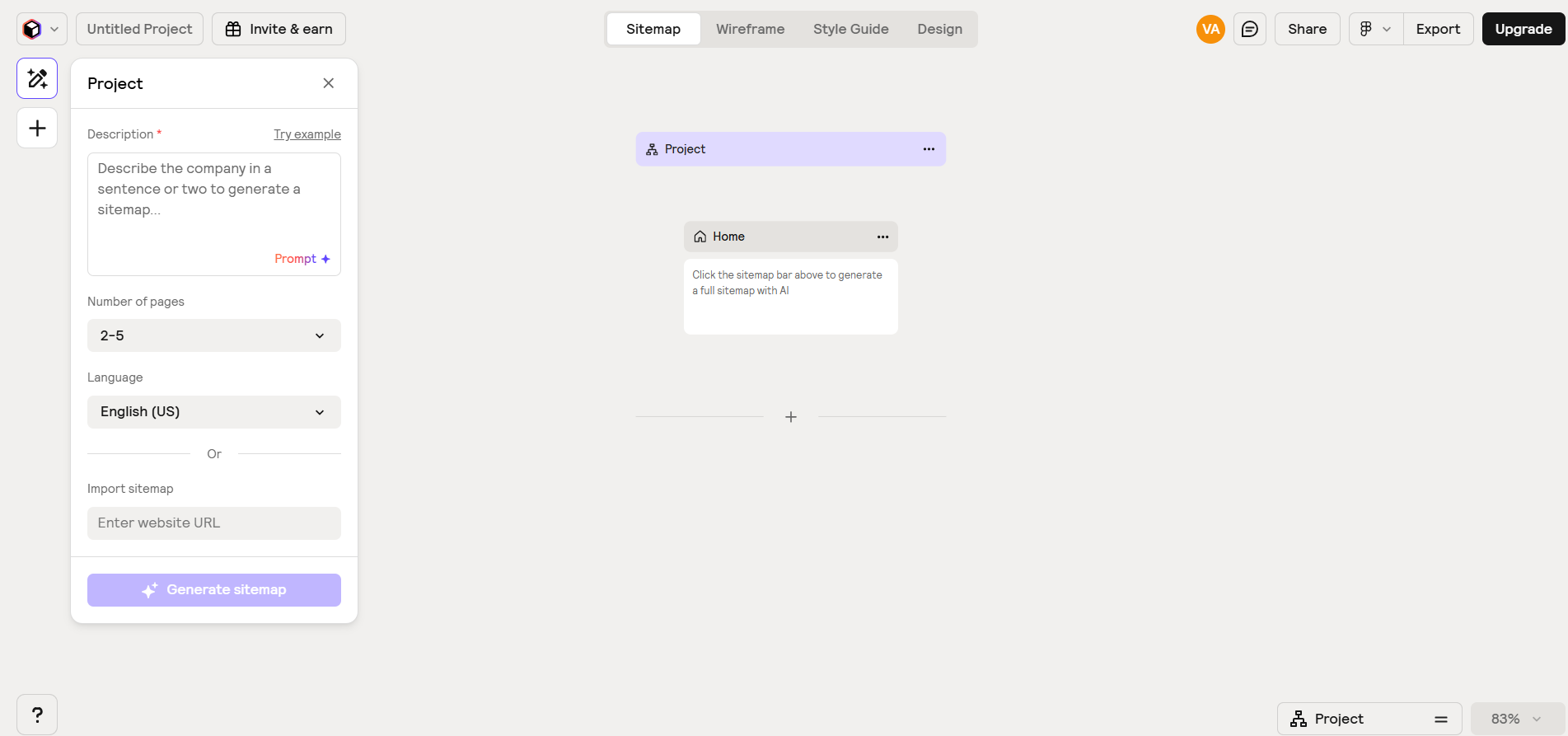
Relume launched as a component library for Webflow designers and evolved into an AI-powered design planning tool that covers the early stages of website development. Instead of spending hours mapping out pages and building wireframes by hand, you type a few sentences about your project, and Relume generates a complete sitemap in seconds.
From there, you can convert that sitemap into low-fidelity wireframes with one click. Relume pulls from its library of over 1,000 professionally designed components to populate those wireframes, and the AI even writes placeholder copy to go with them. It also includes a Style Guide Builder that lets you define colors, typography, and UI elements, then export the whole system to Figma or Webflow.
The tool is built specifically for professional web designers. It plugs directly into existing agency workflows, supports collaboration and client comments, and outputs clean, Tailwind CSS-based components. If your stack already includes Webflow or Figma, Relume fits in without much friction.
The catch is that Relume stops at wireframes. There is no hosting. There is no publishing. The output is a design file, not a website. Once you finish in Relume, the actual building work begins somewhere else. That is fine for a seasoned Webflow designer who just wants the planning phase to go faster, but it means Relume is not a solution for anyone who needs a live website at the end of the process.
What Is Readdy?
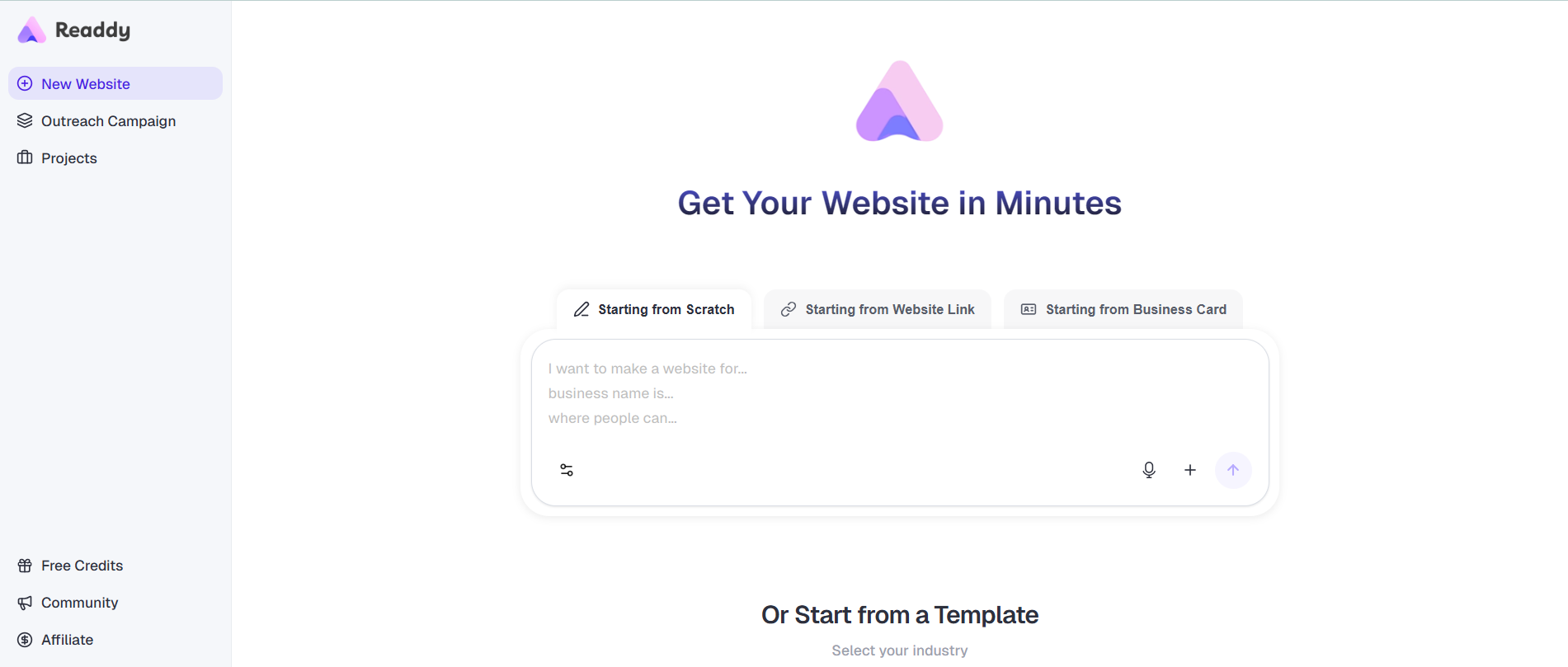
Readdy is a no-code AI website builder that takes a plain-language description of what you want and produces a complete, multi-page website. It produces a real, live website with layout, copy, images, and responsive design, ready to publish.
You can start a project in a few different ways. Type a prompt describing your business. Upload a screenshot of a site you like. Paste a URL and convert a website link into an editable project. Or start from one of 500+ templates. Whichever path you choose, Readdy generates the full site automatically and opens it in a drag-and-drop visual editor for you to refine.
Beyond the generation itself, Readdy includes built-in hosting, domain connection, SEO tools, a backend with database and authentication support, and one-click publishing to Google Search Console. It also supports AI-generated SEO and GEO optimization, which helps sites show up in both traditional search results and AI-powered search tools like ChatGPT and Perplexity. For agencies and teams, there are collaboration tools and the option to export full React, Vue, or HTML code, so clients are never locked in.
One of Readdy's most practical features is the ability to build a website from a screenshot. You upload an image of an existing site or design mockup, and Readdy recreates the layout as a fully editable project. It also lets you build a website from text with no technical vocabulary required.
Relume vs Readdy: Key Differences at a Glance
| Relume | Readdy | |
| What it produces | Wireframes and design files | Live, published websites |
| Hosting | None (requires Webflow or Figma) | Built-in |
| Design knowledge required | Yes (Webflow / Figma) | No |
| AI generation input | Text prompt | Text prompt, screenshot, URL, template |
| Backend | None | Built-in (DB, auth, storage) |
| SEO tools | Basic copywriting only | Full AI + manual SEO, GEO optimization |
| Code export | React, HTML, Figma, and Webflow | React, Vue, HTML, Figma |
| Starting price | $18/month | $25/month, with discounts for the yearly plans |
| Best for | Professional designers in the Webflow ecosystem | Business owners, SMBs, and agencies who need a complete site fast |
Relume is a tool for people who already know how to build websites and want to plan faster. Readdy is a tool for people who want the whole job done, design, build, and launch, without needing to know how any of that works.
Feature Comparison: Relume vs Readdy
AI Capabilities
Both tools use AI, but for different purposes.
Relume's AI generates sitemaps and wireframes from text prompts. It also writes contextual placeholder copy for wireframe sections and assists with style guide creation. The AI experience is good for what it does, but it is narrow. You still do a significant amount of manual work in Figma or Webflow after the wireframes are done.
Readdy's AI handles the entire front-to-back generation. It reads your prompt, or your screenshot, or your URL, and produces a complete multi-page site. After that, the AI stays active inside the editor, suggesting improvements to SEO, content, and structure proactively. The AI also powers the image generation, copy refinement, and layout adjustments throughout the editing process.
For anyone looking for a true AI-powered website builder, Readdy runs deeper. Relume uses AI as a planning aid, while Readdy uses it as the engine for the entire workflow.
Design Workflow
Relume's design workflow is structured and professional-grade. Sitemap → wireframe → style guide → export. It is a clear sequence, and each stage feeds logically into the next. For agencies managing multiple client projects with consistent design systems, that structure is genuinely valuable.
Readdy's workflow is more direct. Prompt → generated site → editor → publish. There is less structure to learn because the AI handles more of the decisions upfront. You spend your time refining the output rather than building from scratch.
The tradeoff is control. Relume gives designers more granular control over the planning process. Readdy prioritizes speed and accessibility.
Customization and Flexibility
Relume's component library of 1,000+ professionally designed elements gives designers a solid starting point. Everything follows the Relume design system and uses Tailwind CSS, which makes the output clean and consistent. That said, deeper visual customization still happens in Figma or Webflow, not inside Relume itself.
Readdy supports code-level editing, drag-and-drop visual changes, and full HTML/React/Vue export for developers who want to take things further. It also supports Figma export directly from the platform. For non-technical users, the visual editor handles most customization needs without needing to touch code. For developers, the code export allows you more control.
Code and Output Quality
Relume exports Tailwind CSS-based components to Figma and Webflow. The code is clean and follows a consistent design system. However, Relume alone does not produce a complete codebase; it produces components.
Readdy exports a full project codebase in React + Tailwind + TypeScript. What you get is a complete, deployable project that can live on any platform. As a production-ready website generator, Readdy handles more of the stack, including hosting, SSL, and backend, so the gap between "generated" and "live" is much shorter.
Integrations and Ecosystem
Relume integrates primarily with Figma, React, and Webflow. If your workflow lives in those tools, Relume slots in well. If it does not, Relume simply does not apply to you.
Readdy integrates with Stripe and Shopify for e-commerce, Google Search Console for SEO publishing, Supabase for extended backend needs, and GitHub for code sync. It also connects with common domain registrars, and the code export means you can take the project anywhere. The integration list is quite extensive, and it covers the essentials for small business websites,
Pricing Comparison: Relume vs Readdy
Relume Pricing
- Free plan ($0/month for one person): 1 project, 1 wireframe page, 30 Webflow components, 30 React components, 1,000+ Figma components, Figma export only, limited AI usage
- Starter ($18/month for one person): 1 project, 5 wireframe pages, 1000+ Webflow components, 1000+ React components,1,000+ Figma components, Figma, Webflow, and React export included
- Pro ($40/month for one person): Unlimited projects, unlimited wireframe pages, 1000+ Webflow components, 1000+ React components,1,000+ Figma components, Figma, Webflow, and React export included
- Team ($36/month per person, minimum of 3 people): Each user accesses Pro features, branded sharing, and team workspace
Readdy Pricing
- Free plan: 250 credits/month, 2 projects, 200 MB storage/project
- Starter ($25/month for the monthly plan, $15/month for 1 year, $12/month for 2 years, $10/month for 3 years): 2,500 credits/month or 30,000/year, 10 projects, custom domain, Figma export, 1 GB storage/project, and more
- Pro ($25/month for the monthly plan, $15/month for 1 year, $12/month for 2 years, $10/month for 3 years): 6,000 credits/month or 72,000/year, unlimited projects, custom domain, expanded lead capture, 5 GB storage/project, GitHub connection, and more
- Agency (from $149/month): Available on request with unlimited credits and full features
At first glance, Relume's $18/month Starter plan looks cheaper than Readdy's $25/month entry point, but that comparison does not hold up once you look at what you actually get.
Relume's Starter plan limits you to a single project, so the moment you need to work on more than one site, you are forced onto the Pro plan at $40/month, which is already more expensive than Readdy's Starter tier. And that Readdy Starter plan gives you ten projects, a custom domain, hosting, and a live published website. With Relume, none of that is included at any price point. You still need separate subscriptions for Webflow or Figma to finish the build, plus hosting and a domain on top of that.
When you add it all up, Relume's total cost of ownership is considerably higher than it appears, and at the end of it, you have done most of the work yourself. Readdy's pricing, especially on annual plans, reflects the full value of a tool that takes you from idea to live site without requiring anything else.
Use Case Breakdown: Who Should Use Each Tool?
For Beginners and Non-Designers
Relume is not built for beginners. To get value from it, you need to know how wireframes work, what a design system is, and how to use either Figma or Webflow. For someone who just wants to get a website live, the learning curve is steep, and the output does not include a finished site anyway.
Readdy is one of the strongest AI website builders for beginners in 2026 because it asks almost nothing of you technically. You describe your business, pick what you like from the generated output, and publish. The editor is visual, and the interface is guided. Most people can go from blank screen to live site in an afternoon.
For Designers and Agencies
Relume is genuinely useful for professional Webflow designers who handle multiple client projects and want to speed up the sitemap and wireframe phase. If that describes your daily work, the cost pays for itself in time saved.
Readdy works well for agencies, too, but from a different angle. Instead of replacing Figma or Webflow inside a design-first workflow, Readdy handles the entire build for clients who do not need that level of design precision. Agencies using Readdy report launching client sites significantly faster, and some use it to start their own agencies after seeing how much the platform can do on its own.
Real Workflow Comparison: From Idea to Live Website
Here is what the path actually looks like in each tool.
With Relume:
- Write a prompt describing your project
- Review and edit the AI-generated sitemap
- Convert sitemap to wireframes
- Customize wireframes in the Relume editor
- Build a style guide
- Export to Figma or Webflow
- Complete the full design in Figma or build it out in Webflow
- Purchase hosting and connect a domain separately
- Publish
That is a 9-step process, and step 7 alone could take days. For a professional designer, this is a familiar workflow. Relume just makes the early steps faster. For anyone else, it is a lot of ground to cover.
With Readdy:
- Describe your site in plain language (or upload a screenshot, or paste a URL)
- Review the AI-generated site and make edits in the visual editor
- Connect your domain and configure SEO
- Publish
Most of the work happens in the first two steps, and the whole process can take a matter of hours. That is what makes Readdy the closest thing on the market to a complete AI website generator that covers everything from the first idea to a live URL.
FAQs: Relume vs Readdy
Is Relume better than Readdy?
They serve different purposes. Relume is a better tool for professional web designers who work in Webflow or Figma and want to plan projects faster. Readdy is a better tool for anyone who wants a complete, live website without a design background or a separate build process.
Which tool is easier for beginners?
Readdy is significantly easier for beginners. It does not require knowledge of any other design platform and produces a finished website. Relume assumes existing design skills and does not produce a live site on its own.
Can Readdy replace designers?
For standard business websites, landing pages, and portfolios, Readdy handles a large portion of what a designer would do. For complex brand identity work, custom illustrations, or highly specific visual requirements, a designer's judgment still matters. Readdy works best when the goal is a clean, functional, professional site.
Does Relume generate production-ready code?
Yes. Relume generates wireframe-level components that are exported to Webflow or Figma. The code quality is solid and uses Tailwind CSS, but the output is components, not a complete production codebase. You still need to build and host the site separately.
Which tool is faster?
Readdy is faster. From prompt to published site, the process can take a few hours. With Relume, the sitemaps and wireframes come quickly, but the total time from start to live website is significantly longer because the actual build happens in another tool.
Final Thoughts
Relume vs Readdy is not really a head-to-head competition between two identical products. They are tools built for fundamentally different users at different stages of the website-building process.
Relume does what it does well. For web designers already working in the Webflow and Figma ecosystem, it takes one of the most time-consuming early stages of a project, mapping out pages and building wireframes, and compresses it into minutes. The component library is high-quality, the design system is consistent, and the collaboration tools are solid.
The limitation is clear, though. Relume does not get you to a live website. It gets you to a design file, and the rest of the work still needs to happen somewhere else. Relume also assumes you already have separate subscriptions for Webflow or Figma, which means the total cost of the stack is higher than it looks at first.
Readdy covers the entire journey. From the moment you describe your idea, or paste a URL, or upload a screenshot, to the moment your site goes live, Readdy handles the design, the build, the backend, the hosting, and the SEO. It is the best AI website builder for anyone who wants to skip the multi-tool stack and just get something live.
If you are a professional Webflow designer, Relume is worth having in your workflow. If you are a business owner, freelancer, or agency that wants to build a website with AI without a team of designers and developers, Readdy is the tool that gets you there.
Frank Zhu
Frank is the founder of Readdy.ai. A developer-turned-founder with 10+ years of product experience, Frank loves great design, and he's building the tools he wishes he had when launching his first startup.