







Best AI Tools for Small Business in 2026 (Free & Paid Options)
Discover the best AI tools for small businesses in 2026. Compare website builders, marketing, sales, and customer support tools to boost productivity and growth.
Frank is the founder of Readdy.ai. A developer-turned-founder with 10+ years of product experience, Frank loves great design, and he's building the tools he wishes he had when launching his first startup.
Best AI Tools for Small Business in 2026
Small businesses usually have limited budgets and resources. On top of that, finding qualified talent is another challenge. In a recent survey, around 47% of small business owners said they couldn’t find the right talent for various roles. With all these constraints, many small business owners end up doing multiple roles themselves. Luckily, AI tools for small businesses have made things easier.
There are various AI tools now available for small businesses. Whether you want an AI website builder to create a professional website without any coding, project management tools for automatic task assignment, or you want to automate customer support tasks, there are many great options available for every use case.
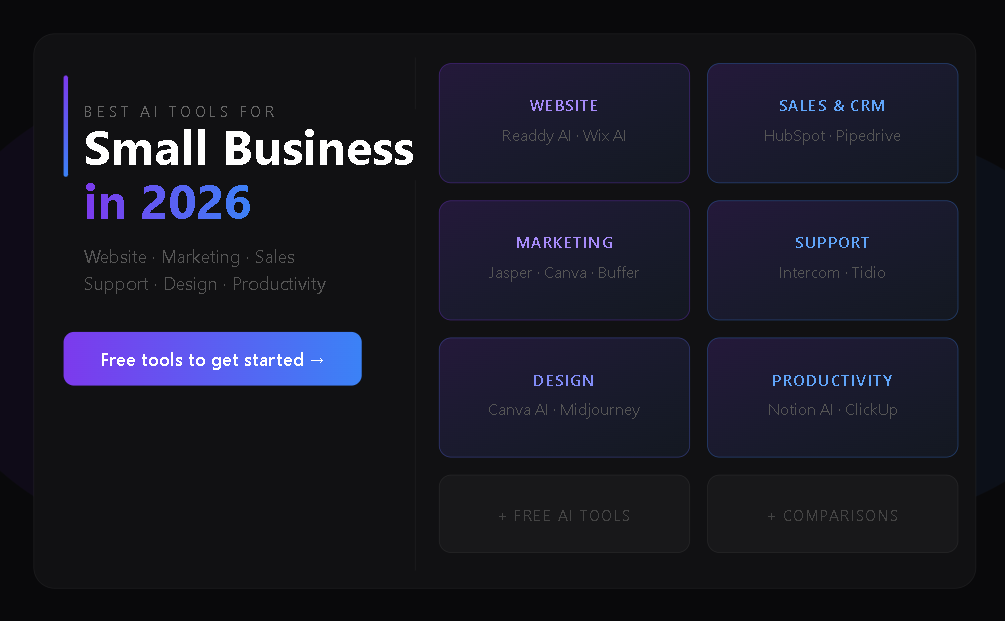
But with so many options, finding and choosing the right tools for your business can be overwhelming. To make things easier for you, we’ve created a checklist for choosing the right AI tools for your small business. We have also curated a list of the best AI tools for small businesses in 2026, covering various core categories, such as website building, sales, marketing, and customer support.
What are AI Tools for Small Businesses?
AI tools for small businesses automate tasks, such as building websites, creating content for email and marketing, assigning tasks, and handling common customer queries. By handling these repetitive and time-consuming tasks, AI tools improve productivity, reduce costs, and save time, all of which are critical, especially for small businesses.
For example, you can use an AI website builder to create a professional website for your business without any coding. You don’t need to hire specialists or learn technical skills.
How to Choose the Right AI Tools for Your Small Business
The best AI tools for small businesses in 2026 are the ones that are easy to use, budget-friendly, require no technical skills, easily integrate with your existing tools, and have responsive, reliable customer support when you need it most.
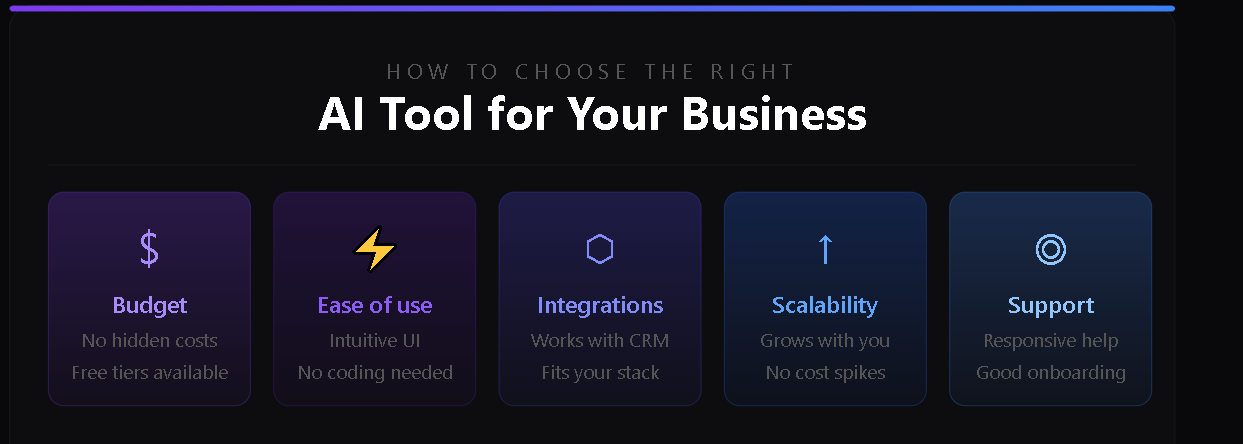
Here’s what you need to consider when choosing AI tools for your small business:
Budget
Most small businesses already operate under tight budget constraints. The last thing they need is a tool with hidden costs that keep spiraling. Integration fees, high charges per API call or automation run, and scaling costs can burn through a budget quickly.
A small-business-friendly AI tool offers genuinely usable free tiers and affordable subscription plans. And it doesn’t bombard you with extra costs that weren’t clearly outlined upfront.
Ease of Use
The best AI tools for small business owners are designed to be user-friendly. They offer intuitive interfaces and let you get started quickly. If you spend days learning how to use a tool, it defeats the purpose of using AI in the first place. AI tools should improve productivity and save time, not add unnecessary complexity.
Integration with Existing Tools
Most AI tools for small businesses don’t provide much value as standalone products. You need to integrate them with your existing systems to truly benefit from them. An AI chatbot (customer support tool) is only useful if it’s properly integrated with your CRM so it can read customer history, past tickets, and purchases, and provide personalized replies instead of giving generic answers.
Poor integration only creates more manual work instead of reducing it.
Scalability
Using an AI tool that can’t handle your growing user base or data requirements puts you behind right from the start. You need a tool that can grow with your business without performance issues or sudden cost spikes.
Customer Support
A good AI tool for small businesses is easy to use and integrate, but that doesn’t mean you won’t face occasional issues. Small glitches, downtime, or unexpected outputs can still disrupt your workflow. Strong documentation, smooth onboarding, and responsive customer support make it much easier to resolve these problems quickly.
Best AI Tools by Business Function
AI tools are not one-size-fits-all. You need specialized tools for specific business functions, such as website creation, marketing, sales, and customer support. Each category solves different problems by automating workflows and reducing manual effort.
Below, we break down the best AI tools by function so you can quickly identify what fits your business needs.
AI Website Builders
A website is one of the first things you need when you’re ready to launch your business. You may have a great product that solves a real problem, but you still need a website to showcase it. And you need it quickly. You don’t have time to learn complex website builders while you’re also focusing on growing your business.
Small businesses need an AI website generator that allows them to create production-grade websites quickly without any technical skills or high costs.
Here are our top picks for AI website builders for small businesses:
Readdy AI
Readdy is the most reliable option for most small businesses in 2026 because it focuses on practical needs. It’s an AI-powered website builder that lets you build professional-looking websites in minutes without any technical skills.
While many no-code website builders are available, most rely on drag-and-drop interfaces or visual editors. With these tools, you need a basic understanding of web design principles to create a professional website.
Readdy takes a completely different and easier approach. It lets you create a complete website from a single text prompt. You describe your business, the problem it solves, and your target audience, and the platform generates the whole website with multiple pages, layouts, and images. You get professional and responsive designs in minutes. Or you can choose from Readdy’s huge library of professionally-designed templates (5000+).
From there, you can fine-tune your website (style, components, layout, and content) through prompts or using a simple visual editor. You can select any element and prompt it to change: "make this section more minimal," or "rewrite this copy for a younger audience." With the visual editor, you simply click the component you want to edit.
No matter how you make changes, you see them in real time, and the updates are automatically optimized for mobile and tablet devices.
For small businesses, it makes a big difference. There is no need for dedicated developers or designers. Any non-technical member in your team can create a responsive website and make changes as needed with a few clicks.
Readdy also simplifies technical setup by providing built-in hosting and custom domain support. It handles complex things like versioning, SSL, and DNS. Built-in SEO takes care of heading structure, metadata, sitemap.xml, and indexing.
The platform also integrates with most of the tools small businesses commonly use, including Stripe, Shopify, Calendly, Mailchimp, Google Analytics, and Supabase. A generous free plan (250 credits/month, 2 projects, and 200 MB storage per project) provides a starting point. And affordable subscription plans let you grow your business online without straining your budget.
Wix AI
Wix AI is not a standalone tool, but is built on top of the decade-old core Wix website builder. The purpose is simple: help small businesses get online faster, without starting from a blank canvas.
But with Wix, you’re not taking a truly AI-first approach to website creation. The AI gives you a starting point. It asks you a few questions about your business, goals, and design preferences, and generates your initial website from these prompts. This removes the hard part of choosing templates, deciding structure, and figuring out layout from scratch.
After that, you're in the traditional Wix drag-and-drop editor. If you want to change a section, you drag and drop. If you want to rewrite copy, you click into a text block and type. If you want a new layout, you browse through options manually. There are AI tools scattered around the editor, such as an AI text generator and an AI image tool, but they’re not built into the workflow; you have to use them separately.
Wix's extensive ecosystem of integrations (500+ apps) is a major advantage. If you need third-party tools, such as bookings, e-commerce, and email marketing, you will find everything you need within the platform.
From a technical standpoint, Wix handles hosting, security, and updates automatically. It also includes a solid SEO toolkit, such as meta tags, Search Console integration, structured data, 301 redirects, and mobile optimization.
Best AI Website Builders for Small Businesses: Comparison Table
Here’s a quick comparison between Readdy AI and Wix AI:
| Readdy AI | Wix AI | |
| Core approach | Fully AI-first (AI does most of the work; creates a complete website from prompts) | AI at setup only; chatbot creates the initial site, then traditional editor takes over |
| Website generation inputs | Text prompt, screenshot, Figma file, or competitor URL | Conversational chatbot (questions only) |
| Setup speed | A few minutes (near-instant) | Fast, but iterative (can take hours to days) |
| Coding Required | None | None |
| Editing | AI-driven, prompt-based editing with a visual editor as an option | Traditional drag-and-drop (same editor Wix has had for years) |
| Templates | Support | Support |
| Integrations | Limited, but covers most of the tools small businesses need | More than 500+ in the Wix app market |
| Free plan | Yes (250 credits/month, 2 projects, Readdy branding) | Yes (Wix ads, no custom domain) |
| Best for | Freelancers, creatives, and early-stage businesses needing a fast, design-quality site | Small businesses needing bookings, store, marketing, and CRM in one place |
AI Marketing and Content Tools
Small businesses need marketing more than already established businesses. They need to show people that they exist and what their product does. AI marketing and content tools help small businesses create copy, visuals, and social media content faster without needing large creative teams.
Here are the top AI marketing tools for small businesses:
Jasper (AI Copywriting Tool)
Jasper is the tool you need when you want to create copy for blogs, ads, email campaigns, and product messaging. Reusable tone settings are one of the standout features that allow you to maintain a consistent brand voice even at scale. Features such as shared workspace, real-time editing, and role-based workflow are added advantages that make collaboration smooth across teams.
But as with other AI tools, the output from Jasper requires editing. Most of the time, you cannot use the copy as-is. That said, Jasper handles much of the initial creative work, leaving you to refine and polish the final content.
Canva AI (Design & Visual Content)
Canva AI extends the traditional Canva design tools with AI-powered features, such as Magic Design, text-to-image generation, and automated layout creation.
With the recently introduced Canva AI 2.0 interface, you can turn a basic idea into a polished visual in minutes through prompts. You describe what you want in plain language, and the AI-powered interface gives you structured, editable designs in seconds. Instead of starting from a blank canvas, most of the creative work is already structured. You are not dealing with templates or drag-and-drop editing.
One of the key advantages of Canva AI lies in how it’s becoming more context-aware. It can work with brand kits, existing assets, and connected content sources to generate designs that stay consistent with your company’s visual identity.
It’s worth knowing that while Canva AI can generate impressive first drafts, the output is not always production-ready without refinement.
Buffer (AI Social Media Management)
Buffer is the dominant tool for small businesses and agencies that want to stay active on platforms like Instagram, LinkedIn, X, and TikTok without manually posting every day.
You can plan content in advance, queue posts, and automatically publish them at optimized times. On top of that, it provides a clean calendar view and basic analytics so teams can track what’s working without getting overwhelmed by complex dashboards.
Buffer’s AI Assistant is one of its most notable features for small businesses. The AI assistant is tightly integrated into the publishing workflow. It works inside the post composer by generating captions, rewriting content for different platforms, adjusting tone, and repurposing a single idea into multiple post variations.
It’s worth noting that Buffer is not a content creation platform. Its AI assistant is most useful when you already have content, and you need to adapt it quickly for different social media platforms. For visuals and long-form copy, you use tools like Canva and Jasper.
Bonus: Readdy Free AI Tools
Readdy also provides a set of free AI tools that support early-stage content and website creation workflows. These tools are useful for quick content generation and lightweight marketing tasks, especially for small businesses just starting out.
AI Customer Support Tools
Customer support is one of the most important yet challenging areas for small businesses. AI tools make it easier through automation.
Here are the best AI tools for small businesses
Intercom
If you treat customer support as a core part of the product experience rather than just a service function, Intercom is a strong option. It stands out as an all-in-one tool for SaaS companies and digital-first businesses that want to combine support, messaging, onboarding, and customer engagement in one system.
One of its key advantages is the tight connection between AI-powered support and customer lifecycle data. Support interactions are not generic; they are linked with user behavior, product usage, and account history, providing contextual and personalized responses that feel relevant to each user.
Tidio
Tidio is another solid option for small businesses that want to automate customer support tasks. It combines live chat, helpdesk features, and its AI agent (Lyro) into a single, lightweight platform designed for quick deployment.
Tidio’s AI agent pulls data from the company’s existing knowledge base to generate accurate responses related to common customer queries such as order tracking, shipping updates, product availability, and FAQs.
AI Sales and CRM Tools
With AI sales and CRM tools, you can automate lead management and reduce manual CRM work while increasing conversion rates.
Pipedrive AI
Pipedrive AI is a strong choice for simple, visual sales pipeline management. Its AI Sales Assistant analyzes pipeline activity and gives you the most promising deals to focus on. Deal summaries, identifying risks in the pipeline, and real-time performance updates all come as part of the platform.
HubSpot AI
HubSpot AI is the tool you need when you want a fully integrated sales, marketing, and CRM system where AI helps with every stage of the customer lifecycle. Unlike standalone tools that sit on top of a CRM, HubSpot AI is built natively into the platform. It can automatically analyze customer data, generate outreach, and update CRM records without manual input.
HubSpot’s AI capabilities are strongest in predictive lead scoring, sales forecasting, and automated workflow generation.
Project Management and Productivity AI Tools for Small Businesses
Tasks such as automatic task assignment, progress tracking, and meeting notes are all possible through AI project management and productivity tools.
Here are the top AI tools for small businesses:
Notion AI
If your project management is tightly connected to documentation, knowledge sharing, and flexible workspace organization, Notion AI is a good choice. It doesn’t rely on rigid task tracking. It gives you docs, databases, and AI assistance in one environment, making it especially useful for teams that manage projects through written context.
Notion’s AI capabilities are worth noting. It can summarize meeting notes and transcripts into key decisions and action items. From there, you can turn them into tasks inside the same workspace. It can also help break down project briefs into structured steps, so you’re not manually organizing work.
ClickUp
ClickUp is a well-known project management tool for end-to-end project execution, and its AI features provide strong automation across tasks, timelines, and team workflows.
Its AI capabilities automate the major parts of the task lifecycle. It can generate tasks from chat messages, documents, or meeting notes, assign them to the right people, set priorities based on urgency and context, and continuously update progress as work evolves. It can even convert messages or documents into structured tasks with due dates, subtasks, and owners.
AI Design and Creative Tools
AI design tools give you the capability to create professional visuals, videos, and branding assets at speed without relying on traditional design teams or long production cycles.
Canva AI
Canva is a go-to tool for small businesses when it comes to design. With its AI features, it’s easier than ever to create professional-looking visuals even if you don’t have design skills. Since it’s a top tool for visual content, we’ve covered Canva AI features in more detail in the “AI Marketing and Content Tools” section above.
Midjourney
Midjourney is the right tool for you when the priority is high-end visual creativity and artistic image generation rather than structured brand design workflows. You can generate highly detailed visuals from text prompts, making it ideal for concept art, advertising ideation, mood boards, and creative storytelling.
Leveraging Free AI Tools to Get Started
For many small businesses, the biggest challenge to adopting AI tools is not capability; it’s the cost and uncertainty about where to begin. Free AI tools remove this barrier. They provide a practical starting point to experiment with automation, content creation, and design without committing to expensive subscriptions or complex setups. You can test workflows, understand what actually adds value, and gradually build a more advanced AI stack over time.
Readdy’s free tools collection is worth mentioning in this space. It brings together a wide range of AI utilities designed specifically for early-stage businesses and non-technical users, covering everything from branding and content generation to design support and marketing essentials.
These include practical tools, such as AI logo generation, business name creation, slogan writing, color palette generation, invoice creation, and email signature design. These are not standalone enterprise systems but lightweight, focused tools that cater to very specific early-stage business needs.
Common Mistakes to Avoid When Adopting AI Tools
Many small businesses struggle with AI, not because the tools are ineffective, but because of how they are implemented and used. A common mistake is using AI tools without any planning. AI tools won’t deliver measurable value if you don't clearly define the business problems you're trying to solve.
Over-automating critical processes too early also creates problems. Relying fully on AI for decisions that still require human judgment can create operational risks. Ignoring integration with existing systems like CRMs, email platforms, or accounting tools also leads to fragmented workflows and more manual work.
FAQs
Do small businesses really need AI tools?
Yes. In most small business setups, one person (often the owner) is handling multiple tasks, which leaves them with little time to focus on business growth. AI tools help small businesses automate repetitive tasks and operate more efficiently, even with limited resources.
I have no technical background, can I use these tools?
Yes, most modern AI tools are designed for non-technical users and require no coding or setup experience. They work with simple interfaces, prompts, or drag-and-drop systems. For example, Readdy is the best AI website builder that lets you build complete, professional-looking websites with simple prompts in plain English.
With a limited budget, which tool should I start with?
It depends on what you want to automate. If you want to build websites automatically from prompts, Readdy is the strongest option with affordable plans. For design and creativity, Canva is a solid choice.
Are free tools sufficient?
Free AI tools give you a starting point. They are great for testing ideas and handling basic tasks. Most businesses eventually upgrade once they need more advanced capabilities.
How long does it take to implement AI tools?
The best AI tools for small businesses take minutes to set up. Readdy, for example, creates a complete, professional-looking website from prompts within a few minutes.
What is the best free AI tool?
It depends on what you need the AI tool for. If you need an AI website generator, Readdy is the best choice. Its free plan supports 250 credits/month, 2 projects, and 200 MB storage per project.
How much do AI tools cost?
Different AI tools have different pricing plans. Some are budget-friendly while others are designed for enterprises. In this article, we’ve reviewed the best AI tools for small businesses.
Want to create a production-ready website for your business today? Sign up for Readdy to get started!

Frank Zhu
Frank is the founder of Readdy.ai. A developer-turned-founder with 10+ years of product experience, Frank loves great design, and he's building the tools he wishes he had when launching his first startup.