






WordPress vs Readdy for small business websites in 2026
Choosing between WordPress and Readdy? Here's how they compare on WordPress hosting, pricing, SEO and ease of use, and which suits your website in 2026.
Kael is an editor and content strategist covering AI tools, website creation, and online growth. Interested in how people build and share on the internet, Kael writes practical content around digital products and modern web experiences.
Should your new website be built on WordPress? If you've asked around, you've probably been told yes, and that makes sense. WordPress runs around 40% of all the websites on the internet, so it's the name most people know, and choosing anything else can feel like a bit of a risk simply because so many people have already gone with it.
WordPress is a good tool, and for some sites it's still the best one going. If you're publishing articles every day with a team of writers, for example, it's very hard to beat. What doesn't always come up in the conversation, though, is what happens after the site goes live. With WordPress, you're responsible for the hosting, the updates, the backups and the plugins that add things like contact forms and security, or you pay somebody to look after all of that for you. For a small business that simply needs a good-looking site that brings in enquiries, that can feel like a lot to take on.
Readdy was built for people who would rather spend that time on their business. You describe the site you'd like in your own words, Readdy builds a working version for you, and you can then change anything just by asking for it. Hosting, a domain, forms and the SEO settings are all included, so there's nothing extra to set up or keep on top of later.
Quick answer: For most small businesses, freelancers and marketing teams, Readdy is the easier choice. It builds your website from a description, lets you change it just by asking, and includes hosting, a domain, forms and SEO settings in one subscription, from $15 a month on an annual plan. WordPress is the better pick for large publishing sites, sites that need a particular plugin, or teams with a developer who wants full control. The software is free, but hosting, a domain and most add-ons cost extra.
What is WordPress?
WordPress is free, open-source software for building and running websites, which you install on web hosting you arrange yourself. It started out in 2003 as a blogging tool, gradually grew into a general website platform, and today it runs 40% of all websites.
You might also come across a paid version that hosts the software for you, but when people talk about WordPress hosting, themes and plugins, they usually mean the free one we're comparing here.
On its own, the software handles your pages, blog posts, users and images. Most other features come from plugins, which are add-ons made by other developers for things like contact forms, online shops, booking calendars, search engine optimization (SEO), backups and security. There are tens of thousands of them, and that choice is a big part of why so many people love it.
Design works in a similar way. You choose a theme for the overall look, and because the built-in editor can only do so much, around 60% of WordPress sites also use a page builder on top. So when someone searches for a WordPress website builder, it's usually one of these page builder plugins they have in mind.
What is Readdy?
Readdy is an AI website builder that creates a complete, working website from a short description of what you need. Once it's built, you can change anything by typing what you'd like in plain words or by clicking on the part you want to edit, so there's no settings menu to learn your way around.
Readdy also comes with a backend, which is the part of a website that remembers things, like a customer's account, a booking or a form someone has filled in. Many website builders don't include one, so if you'd like customers to be able to sign in and see their own details, Readdy lets you build that yourself without hiring a developer.
Hosting is included; you can connect your own domain and publish in a click, and bookings, payments and SEO settings are all part of the platform, so there are no plugins to install. Your work stays yours, too, because any Readdy project can be exported as HTML, React, Vue or Figma files or synced with GitHub if you ever want to take it elsewhere.
WordPress vs Readdy at a glance
Readdy suits people who want a working site quickly without managing the technical side, and WordPress suits people who want complete control and have the time, or the developer, to make the most of it.
Ease of use and launch speed
Readdy is the quicker of the two to get started with because there's nothing to set up before you begin. You describe the site you need, look over what Readdy builds, ask for any changes, then connect your domain and publish. There's no hosting company to choose, nothing to install, and no need to work out which of several contact form plugins is the right one.
With WordPress, there's a bit more to do before you can start on the website itself. You'll buy hosting, install the software, pick a theme and usually a page builder, then add plugins for forms, SEO, backups and caching, which helps your pages load faster. None of it is especially difficult, but it's a lot of small decisions one after another, and the admin area takes a little while to get used to.
The bigger difference tends to show up after launch. WordPress and its plugins all update on their own schedules, and every so often one update clashes with another. Security comes into it too. Patchstack, which tracks WordPress security issues, recorded 11,334 new security weaknesses in 2025, and 91% of them were in plugins, while the core software had just six, all of them minor. So WordPress itself is very solid, but the plugins you add do need keeping up to date. On Readdy, all of that is handled for you, so the time you'd otherwise spend on upkeep can go into the site itself.
Design, customization and website control
WordPress gives you more control if you have a developer, and Readdy gets most people to a good-looking site much more quickly. The right one for you mostly depends on how unusual your design needs to be.
With WordPress, you can change absolutely anything, and with access to the files and the server, a good developer can build almost any design you can imagine. If you're doing it yourself, you'll be working within what your theme and page builder allow, which is usually plenty, though now and again you'll find something it simply won't do.
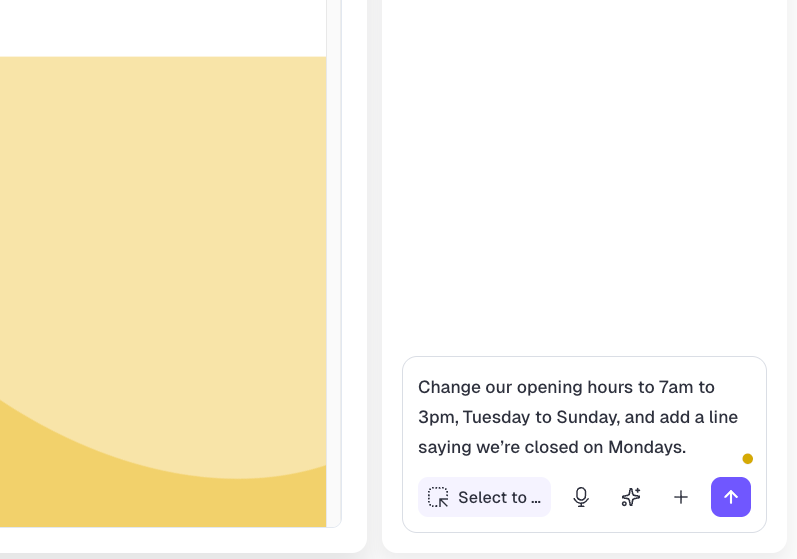
On Readdy, you can click on any part of the page and edit it, or simply describe the change you'd like, so you don't need to know where a particular setting lives. Every layout adjusts to phones and tablets automatically, so there's never a separate mobile version to build. If you're new to all this, browsing the templates is a good way to see what ai website builders for beginners like Readdy can produce.
Which is better for SEO and GEO, WordPress or Readdy?
Both can rank well in Google and show up in AI answers, and on both, what decides it is the quality of your content and how quickly your pages load. Where they differ is how much of the technical side you have to handle yourself.
GEO, if you haven't come across it before, stands for generative engine optimization, and it simply means getting your website mentioned in the answers that tools like ChatGPT and Google's AI Overviews give. A lot of it overlaps with ordinary SEO, since clear headings and direct answers help with both.
With WordPress, you can control everything, usually through an SEO plugin that handles page titles, descriptions, sitemaps and redirects. Speed is where results tend to vary. Google's Core Web Vitals, which check how quickly a page loads and responds, are passed by 45% of WordPress sites on mobile, a little below the 48% average across all websites. Page builders are a big part of the reason, since they add extra code to every page.
Readdy builds the technical side into every page as it's created, including the heading structure, page titles and descriptions, compressed images and structured data, which are behind-the-scenes labels that help search engines understand a page. Its SEO and GEO tools also flag anything that needs attention as you build, and if you're curious how your current site looks to AI search, there's a free GEO score checker among Readdy's ai website generator tools.
Blogging, content marketing and publishing at scale
WordPress is the stronger choice for a serious publishing operation, and this is where it most clearly comes out ahead. It was built for blogging first, and twenty years of work on the writing side really shows.
WordPress for content-heavy SEO websites
If you've got several writers, publish most days or have thousands of articles to manage, WordPress handles it well. Editor roles, scheduled posts, revision history, categories and multiple authors are all built in or a plugin away, and it copes comfortably with very large archives.
Readdy for focused business content and campaigns
Readdy suits publishing where speed and design count for more than a full editorial system, such as a business website, a portfolio, a product launch page, a local service site, a campaign microsite, a lead magnet page or a blog that goes out a few times a month. On sites like these, being able to create a page, tweak it by asking and publish it the same day is far more useful than tools built for a newsroom, and our guides on how to build a website from text with AI show what that looks like in practice.
As a rough guide, if you publish less often than a few times a week, Readdy's speed is the bigger advantage. Beyond that, with a team behind you, WordPress's editorial tools start to earn their keep.
Business tools, lead generation and integrations
Both platforms can give you a contact form, a booking system and a way to take payments. The difference is how many separate things you end up looking after, because Readdy builds these features in, while WordPress adds each one as a plugin you choose, pay for and keep updated.
On Readdy, forms, lead capture, bookings, payments, customer logins and analytics are all part of the platform. Every paid plan includes a monthly allowance for collecting leads, and there's an AI receptionist that can answer enquiries for you. If you're a freelancer or agency building sites for clients, the Agency plan adds tools for managing them too.
On WordPress, each of those is a separate decision, with a plugin for forms, another for bookings, another for payments and so on. You'll nearly always find a plugin that does the job, but you'll end up looking after several separate products, each with its own renewal date and updates.
If you need customer accounts, the gap is biggest of all. A no-code AI website builder with a backend built in treats a members' area as a normal part of the site, whereas on WordPress it usually means a membership plugin and some careful setup.

WordPress pricing vs Readdy pricing, and what each really costs
WordPress is free to download and Readdy has a free plan, so the more useful comparison is what each costs once your site is up and running. Readdy is a single subscription, whereas WordPress pricing is made up of several smaller costs added together.
Paying annually works out 40% cheaper than paying month to month, when the same plans cost $25, $40, $120 and $199.
A WordPress website is priced in parts because you put it together yourself. Hosting is the one cost you can't avoid, ranging from a few dollars a month for basic shared hosting to quite a bit more for managed WordPress hosting with backups and support. On top of that, there's a domain each year, often a premium theme, a handful of paid plugins, and the upkeep, which means either your own time or a monthly fee to somebody else.
To be fair to WordPress, a small site on shared hosting with free plugins can run for very little, and if budget is your main concern, that's a real advantage. The simplest way to compare is to list every subscription a finished WordPress site would need, add a rough value for the hours spent looking after it, and put it side by side with a single AI website builder for small businesses subscription.
Who should choose WordPress?
WordPress is the better choice if you need its huge range of plugins or the complete control it offers, and you've got the time or the help to look after it.
It's a strong fit if you publish often with several writers, if your site depends on a plugin or integration that only exists for WordPress, or if a developer needs access to the files and server to build something very custom. Teams that already have WordPress skills in-house will feel at home too.
If you do go with WordPress, it's a good idea to choose reliable hosting and decide early on who'll handle the updates, since most of the frustrating stories people tell come back to one or the other.
Who should choose Readdy?
Readdy is the better choice if you'd like a professional, working website without having to manage the technical side yourself.
If you run a small business or work for yourself, it gets you a site that looks the part without it turning into a building project. Marketing teams can put together landing pages without waiting on developers, and agencies and freelancers can build client sites quickly, and if you need payments or customer logins, they're already built in.
If that sounds like you, you can start on the free plan, build the site you have in mind, and only upgrade when you're ready to connect your domain and go live.
Frequently asked questions
Can Readdy replace WordPress for a small business website?
For most small businesses, yes. If you need a few pages, a contact form, maybe bookings or payments, and somewhere customers can log in, Readdy has all of that built in, along with hosting and a domain. WordPress still makes more sense if you publish a lot of articles or rely on a particular plugin.
Does Readdy include hosting and a domain?
Yes, both come with every paid plan, starting with Starter at $15 a month on an annual plan. Your site is hosted for you, so there's no separate hosting company to sign up with, and you get a free custom domain that you can connect and publish in a click. The free plan is there for trying things out first.
Can I build an online store with Readdy?
Yes, you can. Payments are built in, so you can add product pages and start taking orders without installing anything extra, and the built-in database keeps track of customer accounts and orders for you. If you're planning a very large shop with thousands of products and complicated stock, a dedicated e-commerce platform might suit you better.
Does using AI to build a website harm Google rankings?
It shouldn't, as long as your pages are useful. Google cares about how helpful a page is to readers, and its spam policies are aimed at low-value pages churned out in bulk, however they were made. A site built with AI that's clear, helpful and quick to load can rank just as well as one built by hand.
Does Readdy include a built-in backend?
Yes, and it's one of the main things that sets Readdy apart from many website builders. The backend is the part of a site that remembers things, so with a database, user logins and server functions already built in, you can let customers sign in, save their details or see content meant just for them, without hiring a developer.
Key takeaways
- Readdy suits most small businesses, freelancers and marketing teams, because hosting, a domain, a backend, forms and SEO settings come in one platform, and you can change your site just by asking.
- WordPress runs 40% of all websites and is still the better choice for large publishing sites, very custom builds and teams with a developer.
- Most WordPress upkeep comes after launch. Patchstack found that 91% of the WordPress security weaknesses recorded in 2025 were in plugins, which need regular updates.
- WordPress is free software with hosting, plugins and upkeep on top, while Readdy starts free and costs from $15 a month on an annual plan.

Kael
Kael is an editor and content strategist covering AI tools, website creation, and online growth. Interested in how people build and share on the internet, Kael writes practical content around digital products and modern web experiences.