







Squarespace vs Readdy: The Best Website Builder in 2026
Squarespace vs Readdy: Compare both platforms on features, pricing, SEO, e-commerce, and more to find the right platform in 2026.
Kael is an editor and content strategist covering AI tools, website creation, and online growth. Interested in how people build and share on the internet, Kael writes practical content around digital products and modern web experiences.
Squarespace is a traditional template-based website builder that requires manual design and editing. Readdy is an AI-powered website builder that generates a complete website from a text description, screenshot, or URL, with a backend already included.

If you’re confused about which platform is best for you, you need to consider your workflow, technical knowledge level, and how fast you need to launch. Keep reading so you can make an informed decision.
What Is the Difference Between Squarespace and Readdy?
The difference between Squarespace and Readdy is that Squarespace is a drag-and-drop website builder with pre-designed templates, while Readdy is an AI-native platform that generates a complete website from a prompt, including layout, content, images, and a functional backend.
With Squarespace, you pick a template from a library of over 190 designs, then customize it manually using a block-based editor. You move sections around, swap out images, rewrite copy, and configure settings like SEO and navigation one step at a time.
With Readdy, you start by describing what you want. The AI reads your prompt and builds the first version of your site, multiple pages, copy, layout structure, and imagery, in minutes. You can also input a screenshot of another website to use as a reference or convert a website link into an editable project by pasting a URL. The AI generates the starting point, and from there, you refine.
Here's a side-by-side overview of both platforms:
| Feature | Squarespace | Readdy |
| Starting price | £12/month (approx. $16) | $15/month |
| Free plan | ❌ Trial only | ✅ Up to 2 projects, 250 credits |
| Build approach | Manual template editing | AI prompt-based generation |
| AI site generation | ✅ AI assistant | ✅ Full AI generation |
| Input modes | Template selection | Text, screenshot, URL |
| Backend (DB, auth) | Limited | ✅ Built-in |
| E-commerce | ✅ Up to 50K SKUs | ✅ AI product backend + Shopify |
| SEO tools | Built-in | Built-in + GEO and AEO |
| Templates | 190+ | 500+ |
| Code export | ❌ | ✅ React, Vue, HTML/CSS |
| Figma export | ❌ | ✅ |
| GitHub sync | ❌ | ✅ |
| Multi-language | ❌ Workarounds required | ⚠️ Code-based |
| Collaboration | ✅ Enterprise-level | ✅ Team support |
| Support | Email/chat | 24/7 chat, email, community |
| Best for | Creatives, portfolios | Startups, SMBs, agencies |
The core philosophical difference is that Squarespace assumes you want to design your site. Readdy assumes you want a site, and it builds one for you.
What Is Squarespace Best Known For?
Squarespace is best known for its high-quality design templates and its all-in-one platform structure, which bundles hosting, SEO, e-commerce, analytics, and marketing tools under a single subscription.
Founded in 2003, Squarespace has built a reputation among creatives, photographers, designers, bloggers, wedding businesses, and independent artists. Its templates are consistently rated among the most visually polished of any website builder on the market, and the drag-and-drop editor makes it possible to customize those templates without coding.
The platform is also comprehensive from a business tools standpoint. You get built-in blogging, appointment scheduling, email campaigns, member areas, and e-commerce features, all without needing third-party apps for basic functionality. That consolidation is a plus if you want to manage your online presence from one dashboard.
Squarespace pricing in 2026 has four plans, all billed either monthly or annually:
| Monthly Pricing | Annual Pricing | Features | |
| Basic | £16 (approx. $21) | £12/month (approx. $16) |
|
| Core | £24 (approx. $32)
| £17/month (approx. $23) |
|
| Plus | £36 (approx. $48) | £29/month (approx. $38) |
|
| Advanced | £89 (approx. $119) | £79/month (approx. $106) |
|
Squarespace offers a 14-day free trial, but no permanent free tier. Domain registration costs extra after the first year, and professional email runs $7 to $22 per user per month on renewal.
One recurring limitation in user reviews is design flexibility. Squarespace templates are beautiful, but customizing outside the template's intended structure takes effort. You can't switch templates after you've built your site without starting over. The desktop and mobile layouts are linked, so drastically different designs between the two views aren't easy to achieve. For most users, these constraints are fine, but they tend to pose a problem for advanced designers or developers.
What Is Readdy Best Known For?
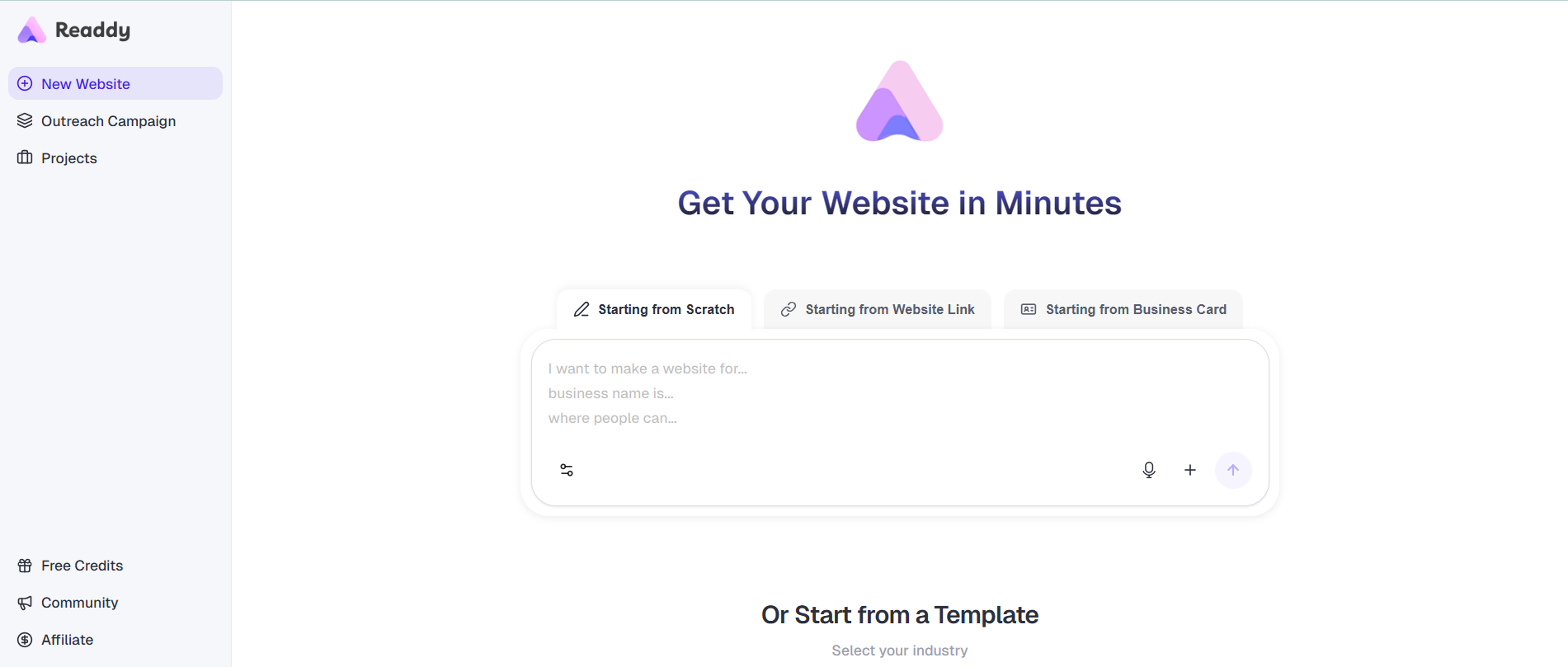
Readdy is best known for generating complete, deployable websites from plain text descriptions in minutes, with no manual layout work or developer required.
Readdy is a no-code AI website builder that was designed from scratch around AI generation, not an AI assistant bolted onto an existing template system. When you type a prompt, the AI builds an entire site with multiple pages, consistent visual design, written copy, structured navigation, and imagery. It produces a working website that you can publish the same day.
Readdy supports three input modes: text prompts, screenshots, and URLs. You can upload an image of any site, a competitor's page, a design mockup, or a Figma frame, and Readdy rebuilds a functional version of it that you can edit. The URL feature does the same thing, allowing you to use a live link as a reference for your website.
One of Readdy's most practical strengths is that it includes a real backend. Database, user authentication, and file storage are built into the platform, with Supabase integration available for teams that need more control. This matters because most website builders, including Squarespace, don't offer this. Builders like Wix and Durable provide CRM and form tools, but they don't give you a general-purpose database or user auth system out of the box. Readdy does.
The platform also supports full code export at any time, React, Vue, HTML/CSS, and Figma. If you outgrow Readdy or want a development team to take the site further, you leave with the actual project files. That's a meaningful difference from most hosted builders, where migrating away means rebuilding from scratch.
Another feature that stands out is proactive AI suggestions. As you work on your site, the AI regularly surfaces recommendations for SEO improvements, content changes, and structural updates, without you having to ask.
Readdy offers a free plan, offering 250 credits/month, 2 projects, and 200 MB storage/project. Here are the details for the paid plans:
| Monthly Plan | 1-Year Plan | 2-Year Plan | 3-Year Plan | Features | |
| Starter | $25 | $15/mo | $12/mo | $10/mo |
|
| Pro | $40 | $24/mo | $20/mo | $16/mo |
|
| Agency | From $149 |
|
Integrations include Stripe, Shopify, Calendly, Mailchimp, Google Analytics, and GitHub sync. For teams that want to build a website with AI and connect it to their existing tools, the integration coverage handles the most common workflows.
Squarespace vs Readdy: Feature Comparison
Site Building
Squarespace uses a drag-and-drop editor built on pre-designed templates. You pick a layout, swap out content, and adjust sections manually. It works well, but the full process takes time.
Readdy is fully AI-generated. You type a description, and the AI builds a complete multi-page site from it. Layout, copy, images, and navigation come ready out of the box.
Design
Squarespace has some of the best-looking templates in the industry, which is why photographers, designers, and creative brands gravitate toward it. The downside is that you're locked into the template's structure. Changing it significantly takes custom CSS or starting over.
Readdy generates a unique layout based on your prompt rather than pulling from a fixed template. The results are unique, clean, and mobile-ready.
SEO
Both platforms cover the basics: meta titles, descriptions, URL editing, and Search Console integration. Readdy adds GEO and AEO tools to help pages appear in AI-generated search results from tools like ChatGPT and Perplexity, which Squarespace doesn't support at all.
E-commerce
Squarespace handles larger stores well, with support for up to 50,000 SKUs, subscriptions, and abandoned cart recovery on higher plans. Readdy is better suited to smaller stores and connects natively with Shopify.
Backend and Portability
Squarespace is a closed system. There's no database, no user auth, and no way to export your code. Readdy includes all three, and you can export the full project in React, Vue, or HTML/CSS at any point.
Pricing
Squarespace starts at around $16/month with no free plan. Readdy has a free tier and paid plans from $15/month annually.
Ease of Use: Which Platform Is Better for Beginners?
Both Squarespace and Readdy are built for non-technical users, but Readdy gets a beginner to a live site faster because it is AI-generated. You never have to decide how to structure a page from scratch.
Building a Website With Squarespace
Building a website with Squarespace starts with browsing and selecting a template. The library is organized by industry and use case, and most templates are of high enough quality to use with minimal modification. Once you pick one, you enter the block-based editor where you can click into sections to change text, images, layout, and styling.
The editing interface is logical and well-organized. Most users get comfortable with it within a few hours. You can add new content blocks, adjust spacing, change colors, and reorganize sections by dragging them up or down the page. For people who've used any visual design tool before, the learning curve is manageable.
The more time-consuming part is optimization and content. You'll write your own page copy, fill in meta titles and descriptions, set up navigation links, and check how pages look on mobile. Squarespace provides templates and prompts to guide you, but the decisions are yours to make. If your selected template doesn't support the layout you want, say, a specific hero style or a multi-column feature section, customizing beyond the template's structure usually requires either workarounds or custom CSS code.
Building a Website With Readdy
Building a website with Readdy starts with a text prompt. You describe your business or project, its name, purpose, and a few details about what you want visitors to do, and the AI generates a complete multi-page website with layout, copy, images, navigation, and page structure in minutes. The site is visually coherent and mobile-responsive from the start.

After generation, you edit using either the selector mode or the drag-and-drop editor. Selector Mode lets you click any element and type a natural language instruction on what you want to change, and the AI updates the site immediately. You can use the drag-and-drop editor for precise manual adjustments, the same way you'd work in any visual builder.
You follow the same pattern to build a website from a screenshot. Upload an image of a site you want to reference, and Readdy reconstructs a working version of that layout for you to edit. Paste in a URL, and the same thing happens from a live page.
SEO and GEO Capabilities: Is Readdy Good for AI Search and GEO?
Readdy supports both traditional SEO and GEO (Generative Engine Optimization). It has built-in too to help businesses be found through AI-powered search tools like ChatGPT, Perplexity, and Google's AI Overview in addition to standard search.
Generated sites on Readdy start with a semantic structure that's designed to be retrieved by AI tools, and the platform provides specific settings for optimizing how your content appears in AI-generated search results. It also offers one-click publishing to Google Search Console and built-in meta configuration.
Squarespace covers the foundational SEO checklist well. You can edit meta titles, descriptions, and page URLs. However, it doesn’t have built-in GEO tools, so you will have to manually optimize that.
For any business looking to get found by customers who are asking questions through AI tools, which is increasingly common in sectors like professional services, e-commerce, and SaaS, Readdy's GEO support is a practical advantage that Squarespace currently doesn't have.
How to Choose Between Squarespace and Readdy
The choice between Squarespace and Readdy comes down to what kind of site you're building, how fast you need it live, and whether you plan to keep it on the same platform long term.
Choose Squarespace if you're a creative professional, a visual artist, or an independent designer who wants a premium-looking online portfolio with fine-grained control over visual details. Squarespace's template quality in these categories is hard to match, and the editor is built for people who want a specific layout. If your site's primary job is to present visual work beautifully, Squarespace delivers on that.
It's also the stronger pick for high-volume e-commerce operations. The Advanced plan supports up to 50,000 product SKUs, subscription selling, abandoned cart recovery, and real-time carrier shipping rates. That infrastructure is built for stores with a large volume of orders.
Choose Readdy if you need to get online fast without a development team. It’s best for founders, freelancers, marketers, or an AI website builder for small businesses. Readdy's generation pipeline compresses what would normally take days of design work into a morning.
Readdy is also the better option if the site you're building needs a backend. Forms, user accounts, databases, and lead capture are built in, so you don't need to wire up external services or hire someone to build that layer. And because Readdy exports full project code, you're never locked into the platform. The site belongs to you in the literal sense.
For teams comparing costs, Squarespace pricing starts at $16 per month on annual billing, with no free tier. Readdy has a functional free plan and paid tiers starting around $15 per month (annual). Over two or three years, Readdy is more cost-effective for most use cases that don't require Squarespace's high-volume e-commerce features.
Frequently Asked Questions
Is Readdy easier to use than Squarespace?
Yes, Readdy is easier to use than Squarespace. With Readdy, you don’t need to make layout and structure decisions upfront. You describe your site, and the starting point is created for you. Most users can go from a blank prompt to a published website in under an hour. Squarespace has a more traditional editor that some users find more familiar, but the full process, template selection, manual content entry, section customization, and SEO configuration, takes longer overall.
Which platform is better for SEO?
For full-coverage search optimization, Readdy has the edge. Both platforms handle standard SEO well. Readdy goes further by including GEO (Generative Engine Optimization) and AEO tools, which help your site get cited and retrieved by AI search tools like ChatGPT and Perplexity.
Can AI website builders replace traditional builders?
For most standard use cases, business sites, portfolios, landing pages, blogs, and simple online stores, an AI website builder now covers everything a traditional builder offers, plus generates the starting structure for you.
Which platform is better for startups?
Readdy is the better platform for startups. Readdy lets a founder go from idea to published site without a designer or developer, iterate quickly on messaging using natural language edits, and export the code if and when a dev team takes over. The built-in backend also means you can add user accounts, forms, and data storage without building additional infrastructure. Squarespace can support a startup's basic marketing site, but its manual editing process and lack of code export features make it less suitable for teams that need to move fast and stay flexible.
Final Verdict: Is Readdy a Better Squarespace Alternative?
Readdy is a better Squarespace alternative for most business owners, startups, freelancers, and agencies building websites in 2026. Being able to build a website from a prompt compresses a process that used to take days into something that takes under an hour. The built-in backend, full code export, GEO optimization, and low platform lock-in make it a more capable and flexible tool for the majority of use cases.
Squarespace is still worth considering if visual design quality is your top priority, specifically for portfolios, creative agencies, and brands where visuals and presentation are important. Its templates remain among the best-designed in the industry, and the editor is well-built for people who want that level of hands-on control. Squarespace pricing is also reasonable for creative professionals who will get years of use from a single well-designed site.
But for small business owners, founders, marketing teams, or anyone who wants a complete, production-ready site without a dev team, Readdy is the stronger choice. It's faster to launch, cheaper at comparable feature levels, and it gives you your code back when you need it.

Kael
Kael is an editor and content strategist covering AI tools, website creation, and online growth. Interested in how people build and share on the internet, Kael writes practical content around digital products and modern web experiences.