



How to Redesign Your Website with AI
A step-by-step guide to redesigning your website with AI in 2026, including costs, timelines, tools, and mistakes to avoid.
Kael is an editor and content strategist covering AI tools, website creation, and online growth. Interested in how people build and share on the internet, Kael writes practical content around digital products and modern web experiences.
A website redesign used to mean weeks of work, including discovery calls, a designer handing off static mockups, and a developer converting those mockups into code and a full website overhaul. In 2026, that timeline has been significantly reduced thanks to AI website builders. Non-technical business owners can now build or redesign a website with AI by simply providing text prompts, a screenshot of a design they like, or even the URL of their current site, and get a working, editable project back in minutes. From there, you can refine and iterate using text prompts until the final site aligns with your goals.
Quick answer: Redesigning a website with AI involves using an AI website builder like Readdy to rebuild your site’s structure, content, and code in hours instead of months. You can provide the URL of your existing site along with text prompts describing how you want to redesign it, and the AI will use that input to generate a new version. You can also provide a screenshot, mockup, or reference image as the input to the AI tool.
AI can now handle much of the manual work a redesign traditionally required, including analyzing your existing site, drafting new copy, generating new layouts, and delivering a working, deployable version so you can focus on strategy and brand decisions.
What is a website redesign? (And how AI changes it)
A website redesign means completely rebuilding your site's structure, visual design, content, and code, rather than a small update to what already exists, such as colors and images. Before AI tools, most of the work, including audit, wireframes, copywriting, and writing the code, required a separate specialist for each step. AI now automates most parts of every phase, so even a non-technical person can move from audit to a live, production-ready website in just a few hours.
AI doesn't replace the strategy behind a redesign. You still need to define the purpose of the redesign, your target audience, and your content strategy. However, AI can accelerate the execution time dramatically.
The table below shows a quick comparison between Traditional vs. AI-Assisted Redesign:
What's actually changed isn't the definition of a redesign, but its cost and timeline. A full redesign used to involve a discovery phase, a design phase, and a development phase, each handled by a different specialist. AI combines those phases into a single workflow so the same prompt can generate the new page structure, copy, and the working code behind it in minutes.
Website refresh vs. website redesign
A website refresh is an aesthetic update, such as new colors, fonts, images, and minor copy edits. A redesign, on the other hand, is a full rebuild of your site.
If you're only changing a headline or swapping a hero image, that's a website refresh. But if you're rebuilding the structure, navigation, design, content, and the underlying code of your site, that's a redesign.
A website refresh is usually handled by the site owner or a single designer in a matter of hours, and it's usually not tied to a specific conversion or SEO goal. A website redesign, however, is based on a clear business goal like getting more leads, a rebrand, or switching platforms. It can take hours, days, or even weeks, depending on the approach and tools you use.
AI's role in website refresh and redesign also differs. In a refresh, you can use AI tools to swap images, adjust copy, or tweak layout through a click-to-edit interface or prompts, while in a redesign, you can use AI website builders to generate the entire structure, content draft, and code from a prompt, screenshot, or URL.
6 signs it's time to redesign your website
Most sites don't need a redesign on a regular basis. Here are some common signs that suggest your site needs a redesign:
- Your design looks outdated compared to competitors
Visual trends change quickly, and an outdated layout also makes a business look outdated, even if it’s not. Dated visuals, such as small fonts, cluttered layouts, and low-quality images, drive visitors away even before they read a single word of your website copy.
- Your site is slow or breaks on mobile
Page speed and mobile usability affect both conversions and how you rank in search. A site that takes several seconds to load, or that is not optimized for mobile devices, loses visitors before they see what you're offering.
- Traffic is steady, but conversions aren't
If your site is ranking well on search engines and people are visiting it but not taking action (subscribing, signing up, or contacting), it usually means your messaging is unclear, or the site structure is confusing users. In such cases, the site needs a redesign so you can communicate your business value and next steps more clearly.
- Updating the site requires a developer for every small change
If even a simple copy edit or adding a new page requires a developer, it means your site’s underlying platform is too complex and holding the business back. Switching the platform can make things simpler and quicker.
- Your site runs on outdated code that's become a security risk
Older platforms, unpatched plugins, and legacy frameworks make the website prone to cyber attacks. A redesign on a modern platform doesn't just refresh the look, but it also means shipping on updated, actively maintained code.
- Your competitors have moved to faster-to-update, AI-generated sites
This is a newer signal with the introduction of AI website builders. Businesses that can launch a new page or campaign landing page in a day are outpacing those still waiting in a dev queue for updates. In 2026, using an AI-powered website builder to build, update, refresh, and redesign your site is a huge competitive advantage.
DIY (AI tool), freelancer, or agency: how to choose
There are three practical ways to redesign a website, and each has different costs, timelines, and levels of complexity.
These are broad ranges, and actual pricing on any website redesign service varies with scope, the number of pages, and whether you need custom functionality like e-commerce or booking systems.
Here’s when to choose which path:
- If your site has multiple pages and you have a clear goal for redesigning the website, such as a better landing page, a cleaner service menu, or a rebrand of an existing look, an AI tool can be a budget-friendly, quick way to rebuild your website yourself.
- If you need custom illustration, complex integrations, or ongoing strategic input, a freelancer or a website redesign agency is the better investment. Many businesses also use a hybrid approach where you generate the first draft with AI, then bring in a freelancer to refine specific pages.
Budget and time matter as much as company size here. A well-funded solo founder with no time to manage a project may still prefer an agency, while a small team at a larger company might be perfectly happy using the AI tool themselves.
Hiring a freelancer or agency is the right option only when you can’t handle the complexity, such as custom checkout flows, multi-language sites, or integrations with internal systems. Otherwise, AI can handle most of the work.
How much does a website redesign cost?
Website redesign costs depend on the approach and scope rather than the industry. A DIY AI-assisted redesign is the cheapest route, typically costing $30–$180/month on a subscription rather than a project fee. If you get your website redesigned by a freelancer, it generally costs $500–$8,000 depending on the number of pages and how much custom design work is involved.
An agency-led redesign, which usually includes strategy, custom design, copywriting, and development, is the most expensive option. It can cost roughly $5,000 to $50,000+ for large or highly custom sites.
How to redesign a website with AI: Step-by-step process
AI can now accelerate every phase of a redesign, not just the visual design step. Here's how the process looks, and where AI does the heavy lifting at each stage:
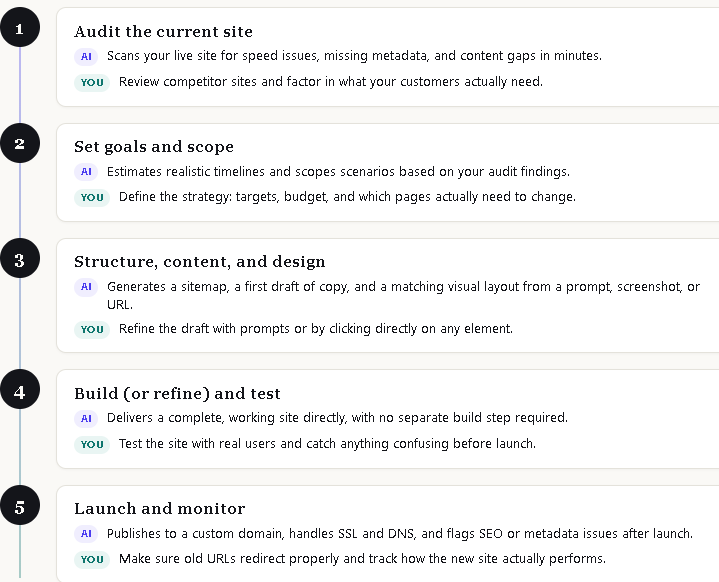
1. Audit the current site
First, you need to identify what’s actually wrong with your website. Is the loading speed slow? Are there broken links? Is the content outdated? Is it not properly optimized for mobile devices? Or is it not ranking well in search engines?
You should analyze your current website for technical performance issues, low conversion rates, user flows, and ranking. To make things easier and faster, you can use AI tools that can scan a live site for speed issues, missing metadata, and content gaps far faster than a manual review. This way, you quickly get a list of what to fix.
You should also analyze your competitors’ websites to see what’s working for them and what’s trending. It’s also important to understand your customers’ demands and create a redesign strategy accordingly.
2. Goals and scope
Turn your research into a clear plan. Set specific targets, such as faster load times, a higher conversion rate, or more qualified leads, and decide which pages and features need to be redesigned. It’s also important to consider your budget and choose the approach that best fits it.
This step still mostly requires human judgment to define the strategy. However, you can use AI tools to estimate realistic timelines and scope different scenarios based on your audit findings, so your plan is backed by actual data instead of guesswork.
3. Structure, content, and design
At this stage, you should plan out the new site's pages, write the content for each one, design how they look, and put together a version you can click through and test.
AI tools are most helpful in this process. They can generate a sitemap, a full first draft of copy, and a matching visual layout in minutes.
With a traditional workflow, you get a prototype at this stage that still needs to be built out separately. AI can turn what used to be four separate steps that required different specialists into a single step where you get a complete, editable website and not a mockup.
You can simply provide your existing website URL or a screenshot, mockup, or reference image along with a text prompt to an AI tool like Readdy, and it will generate a complete, editable website in one step that you can edit and refine through text prompts or by clicking any element you want to edit directly.
4. Build (or refine) and test
If you’re following a traditional workflow, this is the stage where a developer turns your approved design into an actual, functioning website. It is then tested with real users to catch issues like confusing navigation or broken flows before launch.
However, if you’re using an AI website builder like Readdy to generate the site, there's no need for a separate build. When you provide a text prompt along with a URL or screenshot to the AI tool, it gives you a complete working site already. So, this phase becomes mainly about testing and refining what AI provided.
5. Launch and monitor
Publish your new site and make sure old URLs redirect properly. It’s also crucial to track how the redesigned site is performing.
Here, you can use AI-powered SEO and GEO (AI search optimization) tools that can flag missing metadata, suggest structural fixes, and support one-click publishing to a custom domain. For example, Readdy can help with publishing and tracking. It offers one-click publishing to a custom domain and handles SSL and DNS automatically. It also offers built-in SEO tools that manage metadata and sitemaps.
Analytics tools are also helpful for tracking the redesign's actual impact on traffic and conversions after launch. If you’re using Readdy AI website builder for your website design, you can integrate it directly with Google Analytics, so you don't have to manually add tracking code to the redesigned site. You connect your GA4 property once, and Readdy handles the rest: page views, traffic sources, and conversions all start flowing into your Analytics dashboard from day one.
AI website redesign by business type
For small businesses and solopreneurs
For a small business, startup, or solopreneur, speed and keeping the costs within budget are usually the priority. A no-code AI website builder that can generate a full site from a text description, a screenshot, or an existing URL allows anyone, including a non-technical business owner, to create a first version of the redesign.
Using an AI website builder for small businesses, a business owner can publish a redesigned site with a custom domain in just a few hours without requiring any design or coding skills.
For growing businesses and SaaS
A growing business or SaaS company usually needs more than a static redesign, such as logins, a database, integrations, and a design system that can scale as the product does. For these businesses, a built-in backend matters as much as the visual redesign. A platform that generates authentication, data storage, and forms alongside the frontend can save significant time compared to wiring up services like Supabase or Firebase separately.
Collaboration features also matter here, as a website redesign for a growing SaaS business usually involves marketing and product teams reviewing the same project. Multiple editors are usually working on different pages at the same time.
An AI tool like Readdy is a strong option for growing businesses and SaaS companies. Readdy offers a built-in backend stack, including databases, server functions, and app logic that ship alongside the site itself, so you don’t have to separately set up and connect a service like Supabase.
Readdy can also auto-generate authentication and login pages, so gated content doesn't need custom development. For team-based work, Readdy supports role-based collaboration, so multiple editors and viewers can work on the same project.
Readdy also supports bookings, payments, and SEO, so everything lives inside the same platform as the site itself.
For agencies and developers
For agencies and freelance developers redesigning sites on behalf of clients, speed of delivery and ownership of the output are the most important things. White-label options let an agency deliver a redesign under its own brand rather than a third-party tool's.
A website redesign agency handling multiple client sites at once can use AI to generate a solid first draft quickly and then customize it with code instead of starting every project from a blank canvas. Some agencies even white-label an AI website builder entirely, using it as the production layer behind their own branded service so clients never see the underlying platform.
Readdy AI website builder is a solid choice for agencies or developers looking for white-label options. Readdy’s white-label features go beyond hiding its own branding on the finished site. It rebrands the entire client-facing experience, including a custom site domain, the platform's own interface under the agency's branding, custom email templates, and a branded login screen for clients.
That means a client can log in, review their site, and receive notifications without ever seeing Readdy's name, which matters for agencies that want the tool itself to feel like part of their own service rather than a third-party platform they're reselling.
Best tools for an AI-powered website redesign
A single tool usually doesn’t cover every phase of a redesign, so most AI-assisted projects combine multiple AI tools rather than relying on one platform for everything. Here are the best tools for an AI-powered website redesign:
Figma
Best for: Prototyping and design handoff, especially for agencies with an existing design-first workflow.
Figma is the standard for creating UI/UX mockups, wireframes, and interactive prototypes before the actual website is built. It offers deep prototyping control and a large component library for teams that want to design first and build based on that design.
It also offers an AI agent that lets you use natural-language prompts to generate new designs, edit existing ones, or automate repetitive tasks.
Readdy
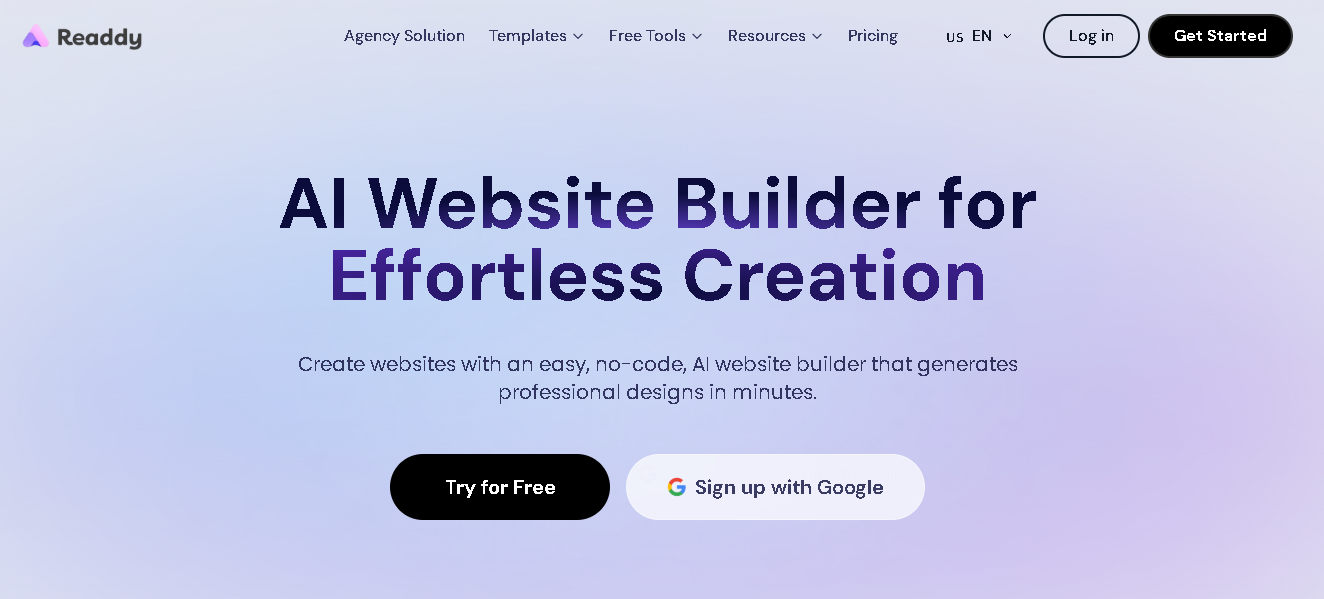
Best for: Generating a full, deployable redesign, including visual design, content, backend, and hosting.
Readdy is an AI-powered website builder that can start from a text prompt, a screenshot, or an existing site's URL and create an editable, production-ready website with a built-in database, authentication, and one-click custom domain publishing. For teams that want to skip the separate build step entirely, it can convert a website link into an editable project or rebuild a website from a screenshot in minutes.
Analytics and Audit tools: Google PageSpeed Insights and Hotjar
Best for: Auditing and monitoring the site before and after the redesign.
Before redesigning your website, it's worth running your current site through AI-assisted audit tools. You can use tools like Google's PageSpeed Insights, Hotjar, and Semrush's site audit to identify performance issues, broken UX patterns, and SEO gaps using AI to get data that is actually helpful for redesigning your site.
Common website redesign mistakes to avoid
- Losing SEO equity: Changing URL structures without setting up redirects, or rewriting page content without keeping the keywords it ranked for, is one of the most common and costly mistakes in a website redesign. It can wipe out months or years of accumulated search rankings almost overnight.
Before launch, export a list of every existing URL and map each one to its new destination, even if the destination is the same page under a new design.
- Redesigning without data or goals: Changing the design because it feels outdated instead of actually auditing your website and checking if specific pages are underperforming means you can't measure whether the redesign actually worked.
You should analyze existing analytics first, such as bounce rate, conversion rate, and time on page by section, so you have a clear before-and-after baseline.
- Ignoring mobile optimization: If you don’t test mobile optimization as thoroughly as desktop during the redesign, the new site can end up worse on the device most visitors actually use. Check the redesign on an actual phone, not just a browser preview, before it goes live.
- Skipping usability testing: Launching a redesigned website for everyone without testing it on a smaller group first means any issues, such as confusing navigation or broken flow, get discovered directly by customers. Usability testing is essential to catch issues.
- Changing everything at once: A full-site relaunch on the same day makes it hard to identify what caused a traffic or conversion change. Rolling out section by section makes it easier to trace and fix the problems.
Frequently asked questions
How long does a website redesign take?
It depends on the approach you choose. A DIY redesign with an AI website builder can provide a working draft in minutes and a fully published site within a day or two. A redesign done by a freelancer can take three to eight weeks. An agency-led redesign, especially one involving strategy and custom development, usually takes four to twelve weeks or longer for large or highly custom sites.
How much does a website redesign cost?
Costs range from roughly $30–$180/month for a DIY AI tool subscription, $500–$5,000 for a freelancer, and up to $ 5,000- $ 50,000+ for a full-service agency engagement. However, the actual cost depends on the number of pages, custom functionality, and content needs.
Will a redesign hurt my SEO rankings?
It can, if it's not done carefully. The main risks are broken URL structures without redirects, deleted content that was ranking well, and slower page speed on the new site.
Can I redesign my website using AI?
Yes. A no-code AI website builder can generate a full redesign from a text description, a screenshot of a design you like, or the URL of your existing site. It gives you an editable, deployable site without writing code in minutes.
Should I hire an agency or use an AI tool?
Use an AI tool if the site is simple and you're comfortable making design decisions yourself. However, if you need custom strategy, complex integrations, or ongoing support beyond the initial build, hiring an agency is the right option. Many businesses use both: generating a first draft with AI, then bringing in a freelancer or agency for specific refinements.
What's the difference between a website refresh and a redesign?
A refresh is an aesthetic update, which includes new images, colors, or minor copy changes. A redesign is a full structural rebuild of the site, including layout, navigation, and underlying code, usually based on a specific business goal.
Do I need coding skills to redesign my site with AI?
No. A no-code AI website builder like Readdy handles the layout, backend, and hosting without requiring any code. You can simply provide a text prompt, a screenshot of a design you like, or the URL of your existing site, and the AI tool will give you the complete site in minutes.
Final verdict
Redesigning your website with AI means providing a text prompt, a screenshot of a site you like, or a URL of your existing site. From there, the AI creates the complete, editable site in minutes that you can refine quickly.
The right AI tool for a website redesign depends on how much complexity and budget you're working with. If you're a small business or solopreneur with a simple site, a no-code AI website builder gets you from an outdated site to a live redesign in a single sitting, at a fraction of the cost of hiring anyone.
If your business is growing and needs a backend and integrations, look for an AI tool like Readdy that generates that infrastructure alongside the design. And if you're an agency or developer delivering redesigns for clients, prioritize tools that offer white-labeling features.
Kael
Kael is an editor and content strategist covering AI tools, website creation, and online growth. Interested in how people build and share on the internet, Kael writes practical content around digital products and modern web experiences.