






How to create a website for your business in 2026
Published:
Updated:
Learn how to create a website for your business in 2026. Compare builders, WordPress and designers, then follow 8 steps to build free with Readdy and go live.
Kael is an editor and content strategist covering AI tools, website creation, and online growth. Interested in how people build and share on the internet, Kael writes practical content around digital products and modern web experiences.
Your business probably already has a few places online where people find it, like a Google Business Profile or a Facebook page. A website is the place those point back to, where people check your prices and see your work before they get in touch. BrightLocal found that 54% of people visit a business's website after reading a positive review, more than any other next step.
Thankfully, building one is much quicker than it used to be. With an AI website builder, you describe your business in a sentence or two, and it creates the pages and a first draft of the words, all laid out to work on a phone. A café owner in Portland, for example, could ask for a menu page and opening hours, then swap the photos or tweak the wording just by asking.
You can build and test your site on Readdy for free. When you're ready to go live, the Starter plan adds hosting and a free custom domain for $15 a month on an annual plan, along with forms and bookings that let customers reach you straight from the page.
Quick answer:
To create a business website, follow these steps: define your goals and essential pages, choose a domain name, select a website builder or hire a designer, and add your content, contact details, and any booking or payment features. Set up basic SEO and, if you serve local customers, a Google Business Profile. Before publishing, test your site’s mobile layout, forms, links, and checkout. Readdy is an AI website builder that helps businesses create and edit websites with AI, with built-in hosting, backend capabilities, payments, and SEO tools to simplify the path to launch.
Key takeaways
- A business website needs to build trust, make the next step obvious and work well on a phone, since that's how Google ranks it and how most people see it.
- AI website builders are the quickest way to create a website for your business, while designers suit bigger budgets and very specific needs.
- You can build and test a site on Readdy for free, then go live with hosting and a free custom domain from $15 a month on an annual plan.
- Specific details, real photos and reviews from real customers build far more trust than general claims or unedited AI text.
- Claim your Google Business Profile, test every page on a phone and set your domain to renew automatically before you launch.
What a business website needs to do
A business website needs to help the right people trust you and take the next step, like booking a table or calling for a quote, and it needs to work just as well on a phone as on a laptop. For a café, that might mean a menu and opening hours people can find in a few seconds, while a consultant needs examples of their work and an easy way to book a call.
Phones matter more than ever, because Google uses the mobile version of your site to decide where it ranks. AI search is the newer part. 45% of people have now used an AI tool to find a local business, and those tools rely on clear, accurate information about what you do and where you are.
It helps to know what to expect from a free site, too. A free plan is a great way to build and test your website, and a professional result usually means a small monthly cost for your own domain, hosting and features like forms and bookings.
Ways to create a business website
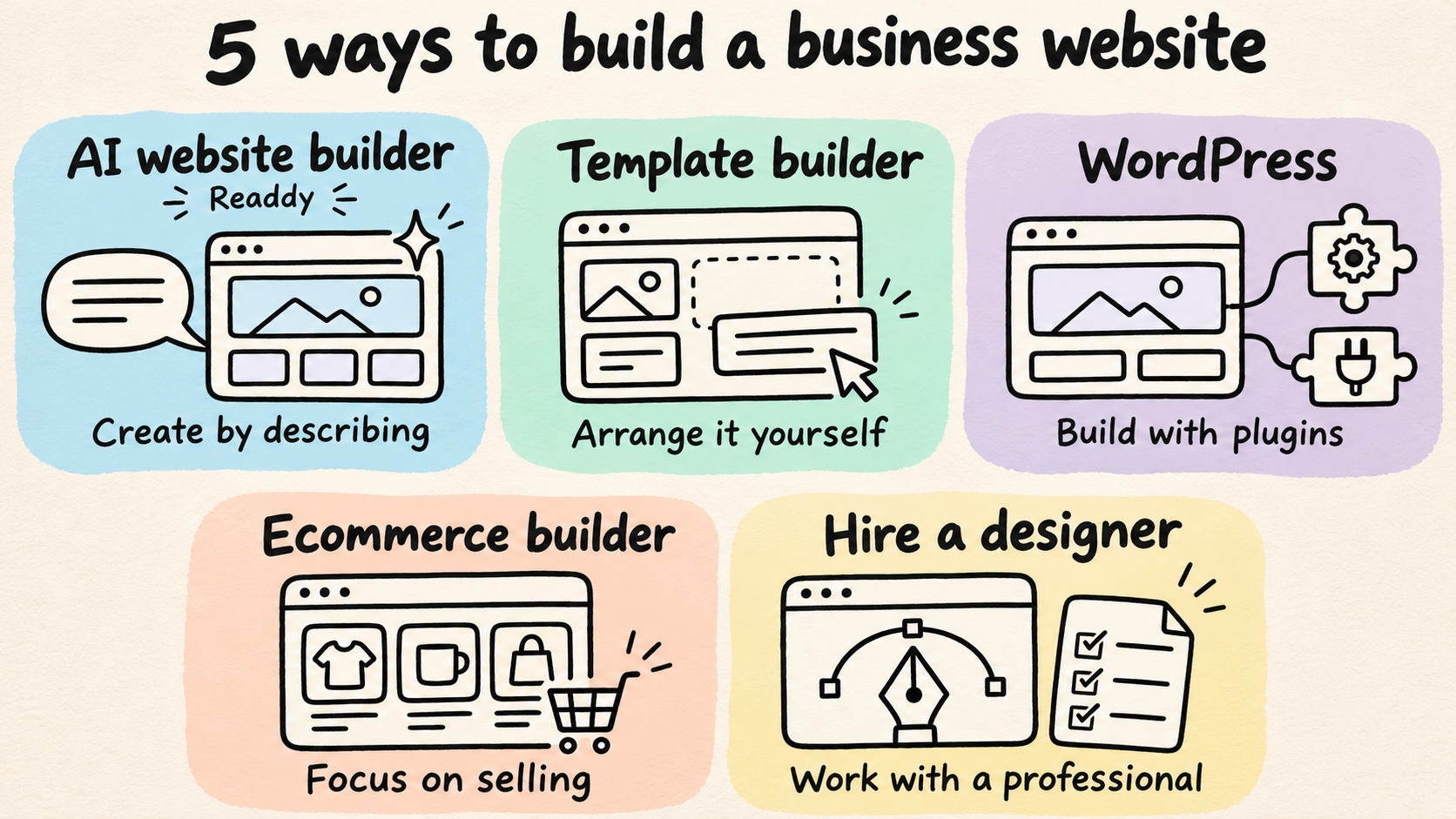
There are five main ways to create a business website, which is usually the first thing people want to know when they search "how to create a website for my small business". The right one depends on how much time you have and what you're happy to spend. AI website builders are the quickest way to get a finished site, while hiring a designer gives you the most custom result at the highest cost.
A free tier on a template builder usually means a web address like yourname.builder.com and the builder's ads on your pages, which is fine for testing an idea and less helpful once customers are visiting. An AI website builder like Readdy works differently, because the AI does the building and the editing for you, and the paid plans include your own domain, hosting and a backend for forms and customer logins.
How to create a website for your business with Readdy step by step
Creating your website with Readdy starts free, and these eight steps cover everything you need for a site that's ready to launch. You can do all of it up to the launch itself on the free plan, then choose a paid plan when you're ready to publish on your own domain.
Step 1: Define your goal and pages
Start with the one thing you'd most like a visitor to do, like booking an appointment or buying a product. That goal decides what goes on your homepage and which button appears on every page.
Most small business websites need four or five pages to begin with:
- A homepage that says what you do, who it's for and where you are
- A services or products page, with prices where you can share them
- An about page that introduces you and your team
- A contact page with your phone number, email, address and opening hours
You can add a pricing page, an FAQ page or a blog later on, once the main pages are working.
Step 2: Choose your business name and logo and register a domain
Your domain is your website's address, like yourbusiness.com, and it works a lot like a street address that customers type in or tap on. Keep it short and as close to your business name as possible, and choose .com if it's available, since it's the ending most people expect.
A .com domain costs a little over $11 a year from most registrars, as the wholesale price rose to $10.97 on November 1, 2026. Every paid Readdy plan includes a free custom domain, and if you don't have a logo yet, a simple version of your business name in a clean font works well until you have one designed.
Step 3: Choose the right way to build your site
Readdy gives you four ways to start, and you can pick whichever is easiest for you:
- Text to website: describe your business in a sentence or two, like "a website for my plumbing business in Phoenix with a page for each service and a quote form."
- Image to website: upload a screenshot of a design you like, and Readdy builds a site in that style with your own content.
- URL to website: paste the link to your current site, and Readdy rebuilds it as a project you can edit.
- Templates: choose from over 500 designs and swap in your own words and photos.
If you're new to all this, browsing the templates is a good way to see what ai website builders for beginners can produce. We've also written a step-by-step guide on how to build a website from a screenshot if you already have a look in mind.
Step 4: Write content that builds trust
The words and photos on your site are what convince people to get in touch, and specific details work much better than general claims. "We've fitted over 400 kitchens in Denver since 2014" tells a visitor far more than "quality service you can trust."
AI will give you a strong first draft, and the best way to improve it is to add things only you know, like your real prices and the areas you cover. Real photos of you, your team and your work build trust much faster than stock images, and a few customer reviews on your homepage help too, as long as they're from real customers with their permission.
Step 5: Add the business essentials
Every business website needs a few practical features that let customers act on what they've read. Depending on what you do, that means a contact form, a booking system, a way to take payments and a map showing where to find you.
On Readdy, form submissions are saved automatically to the built-in backend, and bookings and payments through Stripe, Shopify or PayPal are part of the platform. Paid plans also include an AI receptionist that answers questions and takes bookings by chat or voice. Readdy also has pages for specific industries, which show how the AI-powered website builder sets up these features for businesses like restaurants, salons and consultants.
Remember the legal pages too. If your site collects names or emails, you'll need a privacy policy, and if you sell online, clear terms and a returns policy help customers buy with confidence.
Step 6: Set up SEO/GEO basics and your Google Business Profile
SEO, or search engine optimization, helps people find you on Google, and GEO, or generative engine optimization, helps AI tools like ChatGPT understand and mention your business. Most of the basics are the same for both.
Give each page a clear title and description that includes what you do and where, connect your site to Google Search Console so Google can find every page, and use plain headings that match the questions customers ask. Readdy sets up the page structure, sitemap and Search Console connection as it builds, and you can check how your site looks to AI search with the free GEO Score Checker on Readdy's ai website generator tools page.
Your Google Business Profile is just as important for a local business, since it's what appears on Google Maps. Claim it and fill in your hours, photos, services and new website link.
Step 7: Test and launch
Before you go live, open every page on your own phone and check that everything is easy to read and tap. Then send a test message through each form to make sure it arrives. It's a good idea to ask a friend to try booking or getting in touch too, since a fresh pair of eyes spots things you'll have stopped noticing.
Run your homepage through PageSpeed Insights, which is Google's free speed test, and fix anything it flags as slow. Then choose a paid plan, connect your domain and publish, which on Readdy takes a single click.
Step 8: Promote and measure
Once your site is live, tell people where to find it. Add the link to your Google Business Profile and your social media profiles, and send a short email to past customers letting them know it's there.
Then check how it's doing once a month. Google Search Console shows which searches bring people to your site, and Readdy's analytics show where your visitors come from and how many of them fill in a form or make a booking. If a page gets visitors but no enquiries, that's usually the one to improve first.
How much does a business website cost?
A business website usually costs between nothing and a few hundred dollars a year if you build it yourself, and from a few thousand dollars upward if you hire a designer. Most of the difference is in who does the building.
There are a few extras to plan for, like premium photos, a professionally designed logo or paid apps on some platforms. On Readdy, the Starter plan already includes the domain, hosting, backend, code export and AI receptionist, and you can compare every plan on the pricing page for our AI website builder for small businesses.
Which option fits your business
The best way to create a website depends on what you need it to do and how much time you can give it.
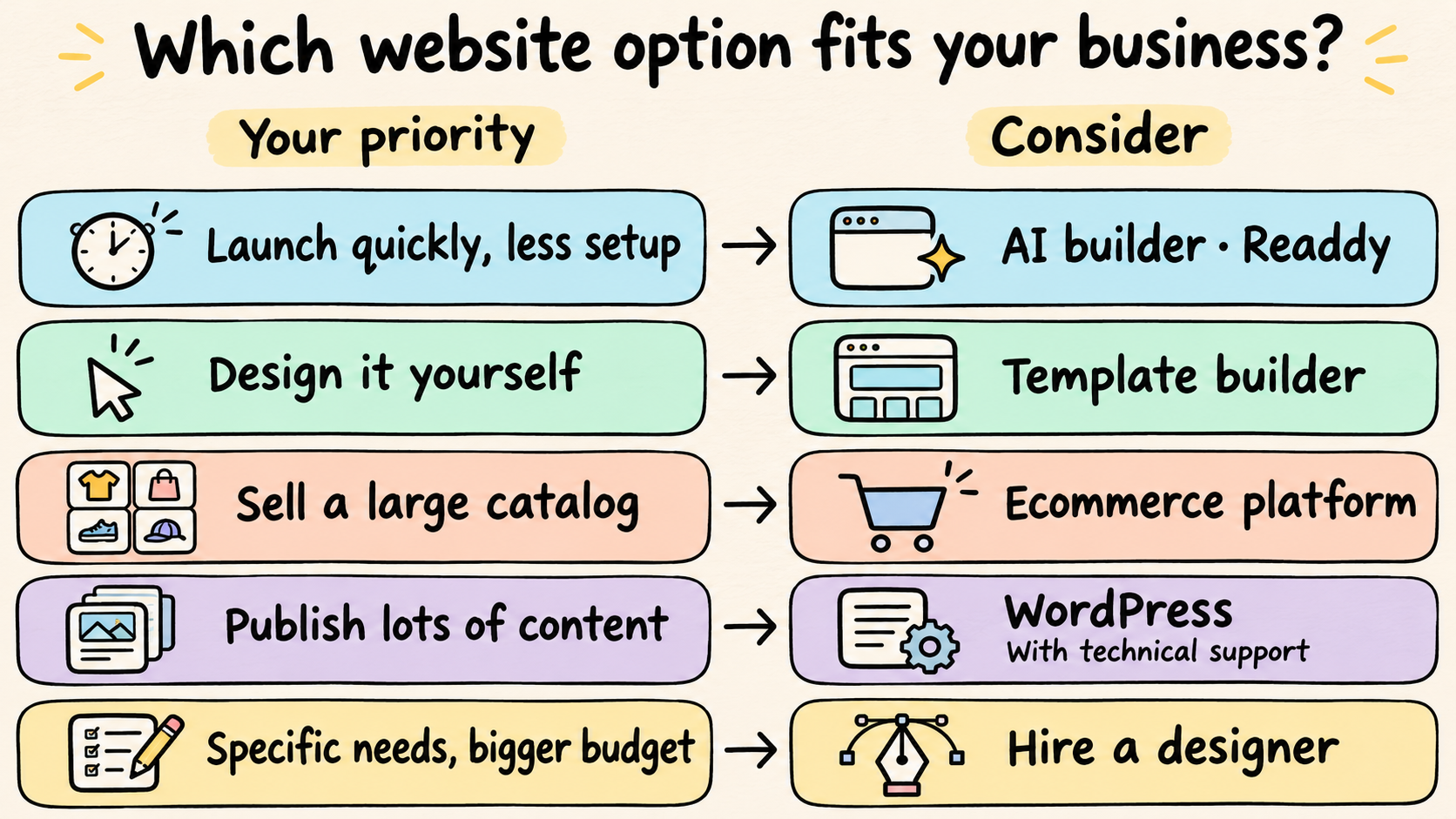
- If you'd like a professional site live this week without learning any software, an AI website builder like Readdy is the quickest route.
- If you enjoy designing and have a few days to spare, a template builder gives you plenty of control over the layout.
- If you sell hundreds of products, a dedicated ecommerce platform is built for large catalogs.
- If you'll be publishing a lot of articles and have someone technical to look after it, WordPress gives you the most flexibility.
- If you have a bigger budget and very specific requirements, hiring a designer gives you a fully custom site.
Common mistakes to avoid
Most new business websites run into the same few problems, and each one is easy to avoid once you know to look for it.
Skipping the mobile test is the most common. Most visitors will see your site on a phone, so check every page on one before you launch. A missing call to action comes a close second, since every page should end with one clear next step, like "Book a table" or "Get a quote."
It's easy to ignore your Google Business Profile once the website is live, though for local businesses it's often seen by more people than the site itself. Domain renewals catch people out too, and setting your domain to renew automatically means your site won't go offline because of a missed email.
Relying on stock text from AI makes your site sound like everyone else's, so always add your own details and examples. And forgetting legal pages can cause problems later, which is why a privacy policy belongs on any site that collects customer information.
Frequently asked questions
How do I create a website for my business?
Decide what you'd like visitors to do and which pages you need, then choose a domain. Build the site with an AI like Readdy, a template builder, WordPress or a designer. Add your contact details and any booking or payment options, test everything on a phone, then publish and add the link to your Google Business Profile.
Can I create a free website for my business?
Yes, you can build one for free. Readdy's free plan lets you create and test your site, and some template builders let you publish on a free subdomain with their ads on it. For a professional site on your own domain, expect a small monthly cost, with Readdy's Starter plan at $15 a month on an annual plan.
How much does a small business website cost?
Building it yourself usually costs between $100 and a few hundred dollars a year, covering your domain, hosting and website builder plan. Hiring a designer costs more, with most projects listed on Clutch coming in under $10,000. Business email adds around $7 per user a month with Google Workspace on an annual plan.
Do I need a domain name?
Yes, if you'd like your business to look professional and be easy to find. A domain like yourbusiness.com is easier to remember than a builder's subdomain, and it lets you set up a matching business email. A .com domain costs a little over $11 a year, and every paid Readdy plan includes one free.
What pages should a small business website have?
Most small business websites need a homepage, a services or products page, an about page and a contact page. Many also benefit from a pricing page and an FAQ page. If your site collects personal information, add a privacy policy, and if you sell online, add terms and a returns policy.
Can AI build a business website?
Yes. AI website builders like Readdy can create a complete business website from a short description, a screenshot or a link to an existing site, including the pages, the words and a layout that works on phones. You can then edit anything by asking in plain words, and add your own details before you publish.
Do I need a business email?
It's a good idea. An address like hello@yourbusiness.com looks more professional than a free Gmail or Yahoo address, and it builds trust with customers who are thinking about getting in touch. Google Workspace costs from $7 per user a month on an annual plan and works with your own domain.
How long does it take to build a business website?
With an AI website builder, you can have a first draft in a few minutes and a finished site live the same day. A template builder usually takes a few days, WordPress can take a few weeks, and hiring a designer often takes one to three months, depending on the size of the project.

Kael
Kael is an editor and content strategist covering AI tools, website creation, and online growth. Interested in how people build and share on the internet, Kael writes practical content around digital products and modern web experiences.