








301 redirect: When to use it and how to set it up

Published:
Updated:
Learn when a 301 redirect is the right choice, plan relevant replacement URLs, configure redirects in Readdy, Apache, or Nginx, and check for common errors.
Kael is an editor and content strategist covering AI tools, website creation, and online growth. Interested in how people build and share on the internet, Kael writes practical content around digital products and modern web experiences.
You've renamed a service page, updated the navigation, and published the new version. Customers still have the old link in an email. A 301 redirect tells their browser that the page has permanently moved and sends them to its replacement. It also signals to search engines that the new address should become the preferred version.
The setup can be straightforward. Choosing where each old link should lead takes more thought. Here's how to make that decision, configure the redirect, and check that your visitors reach a page they can actually use.
Quick answer
- Use a 301 redirect when a page has permanently moved and visitors should use its replacement address.
- Send each old URL directly to a relevant replacement. Test the old address and the final page before moving on.
- Use a temporary redirect for a temporary move. Consider 308 when a permanent redirect must preserve the request method and body.
- Update internal links, canonical URLs, and sitemap entries to support the new structure. A 301 does not guarantee rankings or indexing.
Readdy is an AI website builder that lets users configure 301 redirects through Route Rules for React projects on a custom domain, helping teams send visitors from old URLs to relevant replacement pages without editing server configuration files.
What is a 301 redirect?
A 301 redirect tells a client that a resource has a new permanent address. The response normally supplies that address in a Location header. Browsers typically follow it automatically; the destination then returns its own response.
Say you run a landscaping business. You've replaced a short page at /old-service with a fuller one at /services/garden-design/. A customer clicks the old link, and their browser asks for it:
GET /old-service HTTP/1.1
Host: example.com
The old address responds:
HTTP/1.1 301 Moved Permanently
Location: https://example.com/services/garden-design/
Content-Length: 0
The browser then requests your garden-design page, which should return the intended content, usually with 200 OK. That's the whole journey: one request to find the new address, another to load the page. You need both parts to work.
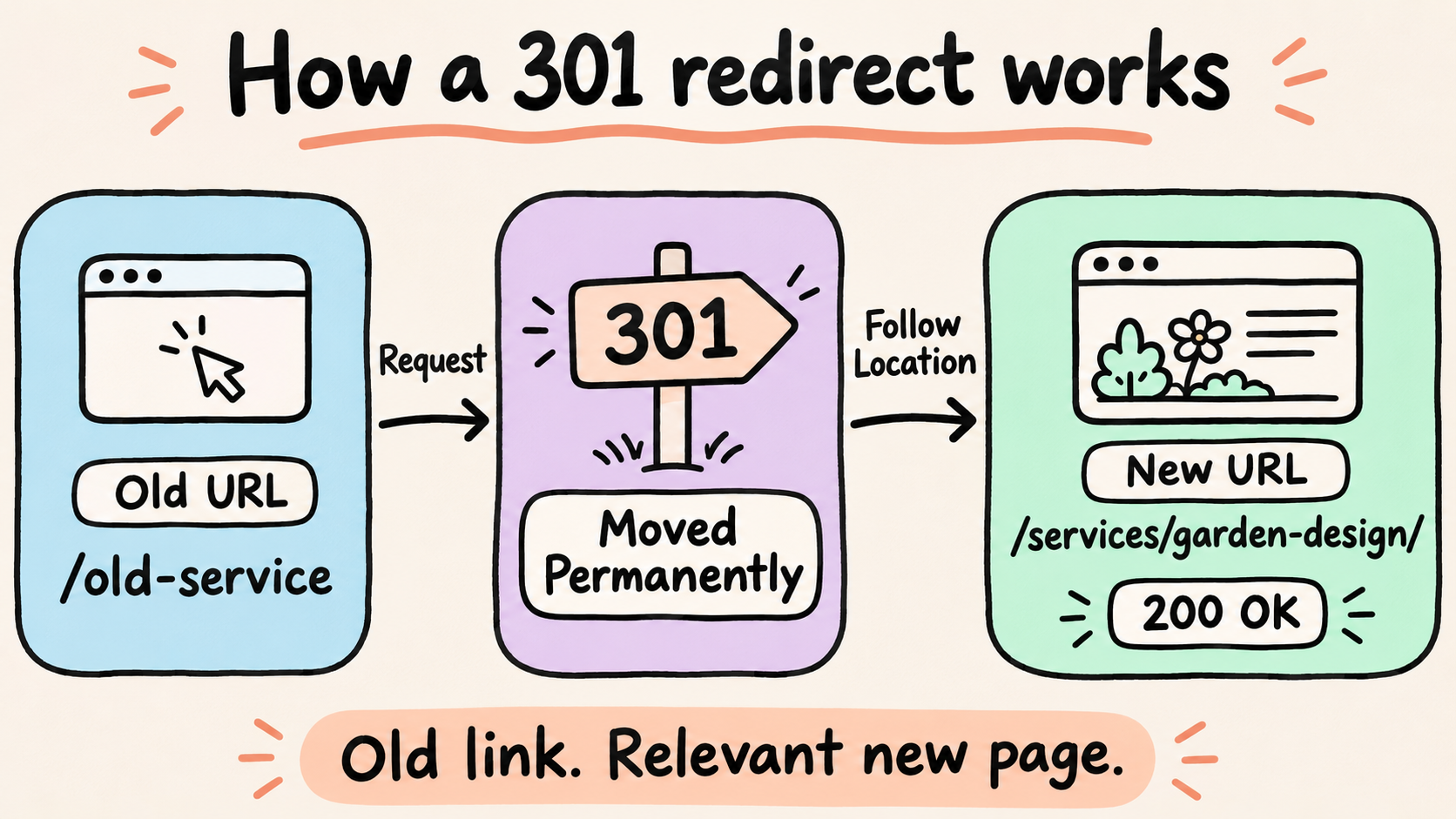
A 301 response points the browser to the new address; the destination returns its own response.
Use 301 for a permanent replacement
Use a 301 when you're changing a page slug, moving content into a new section, merging related articles, or replacing your domain. You may also use permanent redirects to send visitors to your preferred hostname or HTTPS address.
Start with what your visitor came to find. Someone looking for garden-design services should land on the replacement service page. Send them to your homepage and you're asking them to search again. They may have less patience for your new navigation than you do.
Keep working URLs unless you've got a useful reason to change them. Tidier wording alone may not justify the migration work. If customers can't find your pricing or services, fix the content or navigation first. You may be able to solve the problem while keeping the address they already know.
Choose the right status code
| Status | Intended meaning | Method handling | Suitable example |
|---|---|---|---|
| 301 | Permanent move | A POST may become GET | Replacing a public service-page URL |
| 302 | Temporary move | A POST may become GET | Sending visitors to a temporary alternative |
| 303 | Retrieve a separate result | Follow with retrieval, typically GET | Showing confirmation after a submission |
| 307 | Temporary move | Preserve method and body | Temporarily moving an upload endpoint |
| 308 | Permanent move | Preserve method and body | Permanently moving an API endpoint |
For 301 and 302, do not assume a submitted POST will be preserved. If the destination must receive the same operation, choose a method-preserving response appropriate to whether the move is temporary or permanent.
For a public page requested with GET, ask whether the new address is permanent. If you're moving a form, upload endpoint, or API, also ask what the destination needs to receive. A site-wide rule can affect all of these, so test a real submission as well as a page visit before applying it broadly.
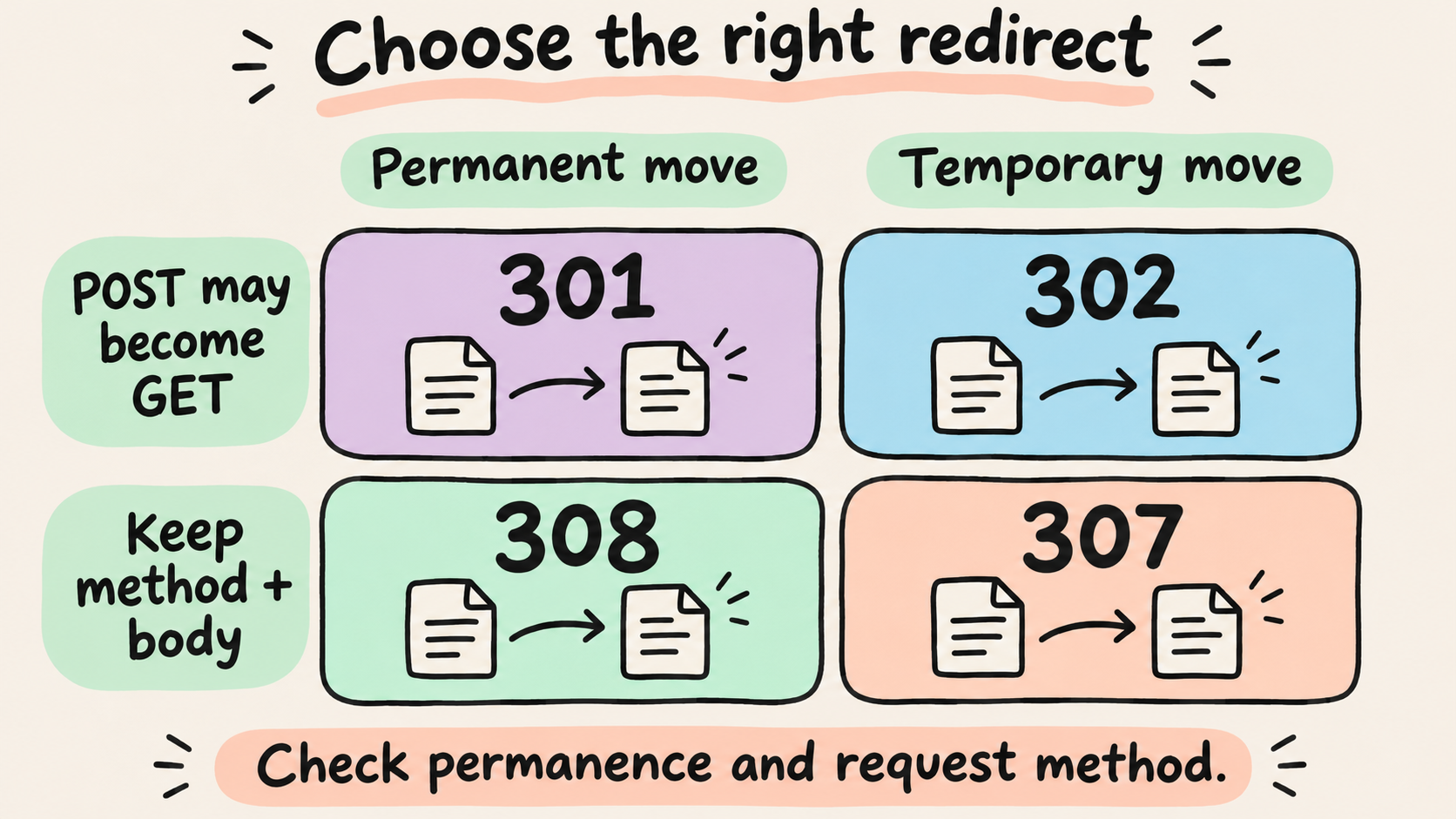
Choose by permanence and method handling. A 303 serves a separate action-to-result workflow.
How to plan a 301 redirect for SEO
Make a list of your old URLs and the pages that will replace them. A spreadsheet is enough to start. Work out those pairings before entering rules, while you can still spot a questionable destination without sending customers there.
Match destinations to the original need
For a small business website, the map might look like this:
| Old URL | Destination | Reason |
|---|---|---|
/old-service | /services/garden-design/ | Same service, fuller description |
/contact-us | /contact/ | Contact page renamed |
/guide-a and /guide-b | /complete-guide/ | Relevant content combined |
/discontinued-offer | No redirect planned | No suitable replacement exists |
Several old pages can lead to one consolidated page when that destination meaningfully covers their content. Redirecting unrelated pages to one generic destination can confuse visitors and may be treated as a soft 404.
If you're unsure about a match, open both pages and compare what they offer. Does the replacement cover the same service? Can the visitor still find the details they need? If you're handing the work to a developer, settle those questions first. The person entering the rule shouldn't have to guess which offer you meant.
If you've removed a page and there's no relevant replacement, a genuine 404 or 410 may be appropriate. Resist the urge to send every retired offer to your homepage. A destination needs to answer the visitor's need, not just give the browser something to load.
Understand the SEO role of a permanent redirect
A permanent redirect signals that its destination should be canonical, meaning the preferred address for that content. That helps search engines understand your move. You still need a useful replacement page, and you shouldn't treat the redirect as a promise of unchanged rankings or more traffic.
Align the new page's links and search settings
Update navigation, in-content links, and other links you control to use the final URL directly. Check canonical annotations and sitemap entries against the same destination. Consistent canonical signals make the preferred address clearer.
A canonical annotation and a redirect do different jobs. A canonical annotation signals which URL you prefer search engines to treat as the main version of duplicate or very similar content; it does not force that choice. A redirect sends the request elsewhere. Setting a canonical does not automatically move visitors to that URL.
Then follow the next step a customer would take. Click the booking button, open the contact link, and download the brochure. Your service page may load perfectly while its main button still sends people to an address you've retired.
Look beyond the website too. Your email campaigns, social profiles, brochures, and sales templates may still use the old address. Update what you control. Keep the redirect for the links you can't change, including emails that are already sitting in someone's inbox.
Prepare the move as a controlled change
Get the replacement page live before you turn on the redirect. Save a copy of your existing rules and decide who can fix a bad mapping. For a larger move, try a few representative URLs in a test environment before you apply the full set.
How to set up a 301 redirect
Set the rule in the system that receives requests for your old URL. Depending on your setup, that's your website builder, CMS, hosting platform, CDN, or web server. Publishing the new page is one task; giving the old address somewhere to send visitors is another.
For a domain change, keep the old domain registered and its DNS pointing to infrastructure that can serve the redirects. HTTPS requests also need a valid TLS certificate for the old hostname so visitors can reach the redirect response.
Choose the setup you actually use. For a Readdy-hosted React project, start with Route Rules. If you manage an Apache or Nginx server, use the corresponding example below. Keep each redirect in one place where possible, so you know which rule to change later.
Set up a 301 redirect in Readdy
For a React project on a custom domain, use Readdy's Route Rules:
- Open Domain Settings and click Manage beside Route Rules.
- Select Add Route Rule and enter the From path, such as
/old-service. - Choose 301 Permanent and set the destination, such as
/services/garden-design/, using a path or full URL. - Choose exact matching for one path or prefix matching for paths that begin with the same value.
- Return to Domain Settings and click Publish to apply the rule.
Use Import when you have several rules to add. You can also choose 302, 404, or 410; leave the target empty for 404 and 410. Readdy warns about potential redirect loops. Before publishing, read the target once more, then test the live response.
Configure a specific redirect in Apache
For an Apache server, this example matches the old page with or without a trailing slash:
RedirectMatch 301 ^/old-service/?$ https://example.com/services/garden-design/
The ^ and $ anchors limit the match to the specified path. This helps prevent a rule intended for one page from capturing unrelated paths.
RedirectMatch can be used in Apache configuration or an .htaccess file, subject to server permissions. The server must permit RedirectMatch in .htaccess, for example through AllowOverride FileInfo or an explicit AllowOverrideList. Nginx does not use .htaccess.
Read your existing rules before adding this one. If a broader rule already catches the path, another entry may leave you troubleshooting the wrong configuration.
Configure a specific redirect in Nginx
Inside the appropriate Nginx server block, an exact location can return the redirect:
location = /old-service {
    return 301 https://example.com/services/garden-design/;
}
The return directive sends the specified status and destination to the client. This example targets /old-service; handle /old-service/ separately if both versions need to redirect.
Check your server's configuration syntax before applying the change. Then test the live URL. Keep the previous rule handy so correcting a mistake doesn't depend on remembering what you had before.
Treat query strings as a separate requirement. The fixed destination in the Nginx example does not append incoming query parameters. To retain them for this destination, append $is_args$args immediately after /services/garden-design/ in the return URL. Decide which parameters belong at the new address, then test a URL such as /old-service?campaign=email and inspect the complete destination.
How to check and troubleshoot 301 redirects
Follow the same path as your visitor: open the old link and see where you end up. Then inspect the responses to find out why. A browser is enough for the first check; curl helps when you need to see exactly what the server returned.
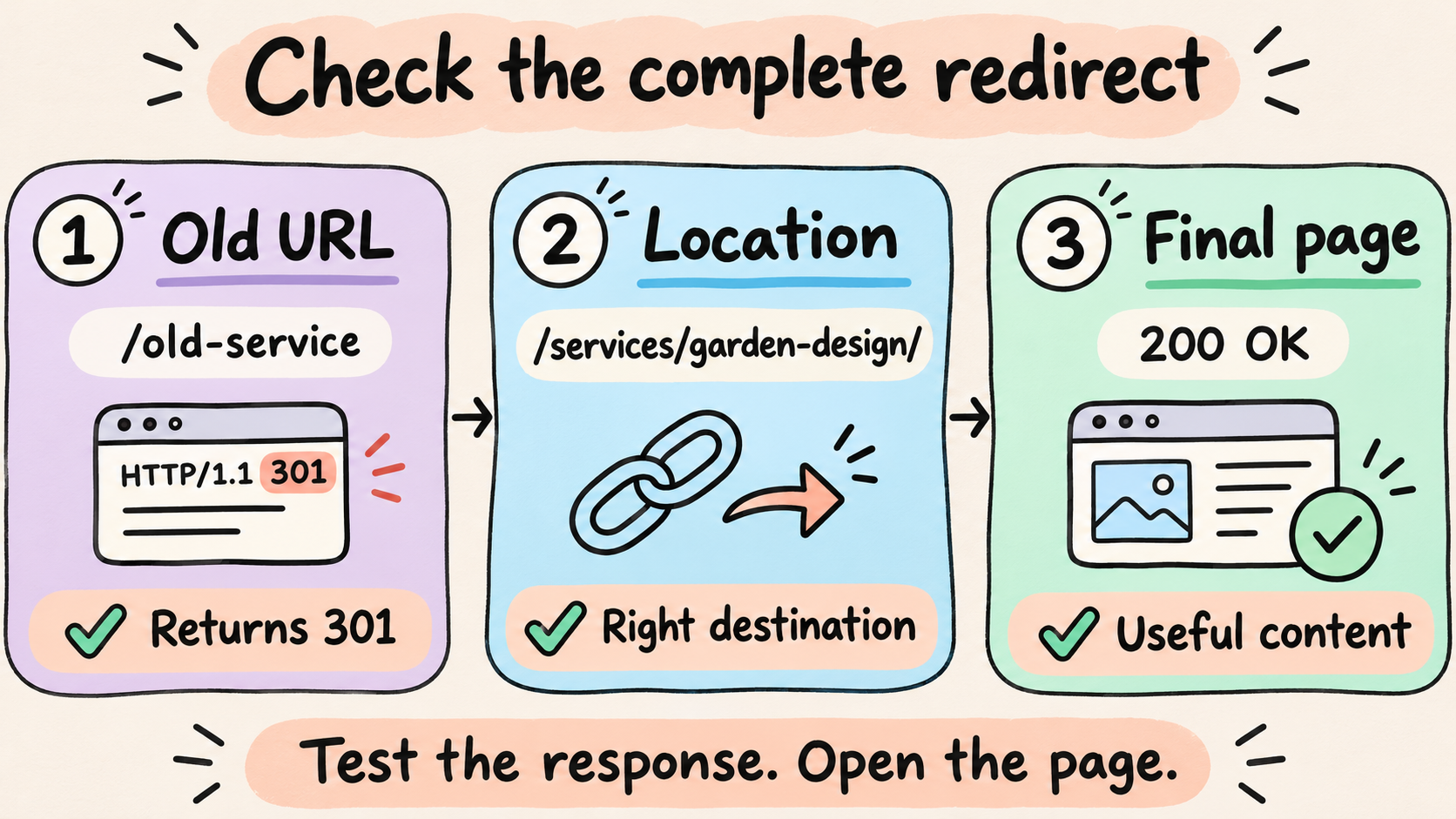
Check the original response, the Location target, and the final page content.
Inspect the first response and final destination
Open your browser's developer tools, select Network, and enable Preserve log before visiting the old URL. This keeps the request sequence visible as the browser loads the destination. Inspect each request's status and response headers.
For a command-line check, this illustrative command makes a GET request and prints the response headers while discarding the body:
curl -sS -D - -o /dev/null https://example.com/old-service
Look for 301 and a Location header pointing to the intended replacement. To follow the chain and display the headers from each response, use:
curl -sS -D - -o /dev/null \
  --location --max-redirs 5 \
  https://example.com/old-service
Replace the example URL with an address you manage. Using GET avoids assuming that the server handles HEAD requests identically.
For a moved public page, the intended sequence is usually:
GET /old-service → 301
GET /services/garden-design/ → 200
Then open the destination and check its content. A 200 response alone does not guarantee indexing or confirm that the replacement satisfies the original visitor's needs.
Resolve loops, chains, and incorrect matches
A redirect loop often means two rules disagree. One layer may force HTTPS while another sends requests back to HTTP. Alternatively, separate rules may alternate between www and the bare domain.
Check each place you've configured redirects: the application, host, CDN, and web server. Look for the rule that sends the request back. Agree on one destination, then correct the conflicting rule where it's defined.
For a redirect chain, update the original rule to point directly to the final destination when possible. Replace /old-service → /services/ → /services/garden-design/ with /old-service → /services/garden-design/. Check that the final address does not trigger another normalization redirect.
Try the old path with and without its trailing slash, add a query string, and visit a neighboring path that should stay put. You're looking for two failures: a rule that misses a URL you meant to move, or one that catches a page you meant to leave alone.
Use the symptom to narrow your investigation:
| What you see | What to check first |
|---|---|
| The old page still loads | Whether the rule was published and the source path matches |
| The browser reports too many redirects | Conflicting protocol, hostname, or path rules |
| The destination returns 404 | A mistyped target or a replacement page that is not live |
| Only some old URLs redirect | Exact versus prefix matching and trailing-slash variants |
| A campaign parameter disappears | Whether the rule carries the query string to its target |
Check cached responses after changing a rule
If a browser still follows an old destination after the configuration changes, compare the result in a fresh browser session and inspect relevant CDN cache settings. Permanent redirects can be cached, so a stale response may hide a corrected rule.
Fix the rule responsible, clear the relevant cache where appropriate, and repeat the same checks. Leave unrelated rules alone while you work through the problem. That makes it easier to tell whether your change helped.
Record the observed result beside the expected destination in your URL map. For larger migrations, automate response checks and review exceptions against the approved map rather than the live configuration.
Frequently asked questions
Is a 301 redirect an error?
No. A 301 is a redirection response indicating a permanent move. Investigate it when the destination is wrong, the chain loops, or the replacement page fails. An expected redirect to a relevant working page needs no repair.
Can you reverse a 301 redirect?
Yes, you can change or remove the rule, but cached responses can keep sending some visitors to the previous destination. Check browser and CDN caches, and verify both URLs after the change. Use a temporary redirect when you already expect to restore the original address.
Can I remove a 301 redirect after updating my internal links?
Updating internal links does not update bookmarks, external links, or every saved address. Keep useful redirects in place while those old URLs remain entry points, and consider maintaining them indefinitely when practical. Include redirect maintenance in your hosting plan rather than treating it as a temporary deployment task.
Do I need a redirect when only the page title changes?
No. A title edit alone does not change the URL. A redirect becomes relevant when the address changes or requests for one address should permanently resolve somewhere else. Confirm the actual URL before adding a rule.
Key takeaways
Use a 301 when you've permanently moved a page and have a relevant replacement ready. Choose the destination first, configure the rule, then follow the old link yourself. The visitor should reach the information they wanted without having to work out how you've reorganized the site.
Start with one important page. Write down its old and new addresses, make the replacement available, and check the complete journey. Once that works, use the same process for the rest of your URL map.
For a React project on a custom domain, Readdy's Route Rules let you manage the 301 redirect alongside your website. Pair that setup with a review of the destination's canonical URL, indexing, and sitemap inclusion, then check that visitors reach the intended replacement.

Kael
Kael is an editor and content strategist covering AI tools, website creation, and online growth. Interested in how people build and share on the internet, Kael writes practical content around digital products and modern web experiences.