






Domain vs hosting: what's the difference, and do you need both?
Domain vs hosting explained simply: what each one does, whether you need both, and how to go from idea to a live website in 2026.
Kael is an editor and content strategist covering AI tools, website creation, and online growth. Interested in how people build and share on the internet, Kael writes practical content around digital products and modern web experiences.
If you're planning to launch a website, you'll need a domain and web hosting. While these two are usually mentioned together, they serve different purposes and aren’t the same thing. A domain is your website’s address, while hosting is where your site’s files are stored.
Many platforms now bundle domain and hosting services together because both are essential for getting a website online. Understanding the difference between them can help you avoid unnecessary costs, reduce the risk of downtime, and choose the right setup for your project.
Quick answer: A domain is the website's URL or address that we type in the browser to open a website, such as readdy.ai. Web hosting is the server space your website uses to store its files and serve them to visitors. You need both a domain and hosting servers to have a live, working website. A domain without hosting points nowhere, and hosting without a domain gives visitors nothing but a raw IP address to type in the browser. Most people buy them together through a hosting company or an AI website builder that bundles both into a single dashboard.
What is a domain name?
A domain name is the readable URL or address people type into a browser to access a website, such as readdy.ai or wikipedia.org. It’s human-readable, which makes it much easier to use than memorizing strings of numbers.
Behind the scenes, every website is identified by an IP address, which is a numerical identifier. A domain name is a user-friendly label that points to that IP address, allowing browsers to locate and load the correct website.
A domain is to a website what an address is to a house. The house (your website’s files) exists somewhere, but the address is what allows visitors to find it.
Domain names have two main parts: the second-level domain (SLD) and the top-level domain (TLD). For example, in the website address "readdy.ai," "readdy" is the SLD, the unique part you choose, and ".ai" is the TLD, also called the domain extension. Some domains also use a subdomain, which appears before the main domain. It is usually used to separate a different section of a site, like a blog (such as "readdy.ai/blog") or a help center, without buying a second domain outright.
You can purchase domain names through accredited registrars such as GoDaddy, Namecheap, and others. The Internet Corporation for Assigned Names and Numbers (ICANN) oversees the domain name system. While it doesn’t sell domains directly, it accredits registrars and sets the rules that keep the system consistent worldwide.
When you register a domain, your details are stored in a database known as WHOIS, which can be publicly accessible or privacy-protected. But many registrars now offer domain privacy protection to keep your personal information hidden.
Buying a domain doesn’t automatically give you a website. It only gives you an address that you can use for your website. Domain registrations are typically purchased for a fixed term, usually one year. But you can renew it for as long as you want to keep the domain. It’s important to renew your domain on time, because if you don’t, it becomes available for anyone else to register. However, many providers offer a grace period and redemption period and also send expiration and renewal reminders.
What is web hosting?
Web hosting is a cloud-based service that provides the space to store your website's files and serves them to users when they visit your site or domain. It’s the actual space (server) where your web pages, images, code, and databases are stored.
When someone visits your site, their browser sends a request to your host's server. The server then sends back the files needed to show the page. Without hosting, there's nothing for a domain to point to, so if you open a domain with no hosting, you won’t get any actual web page.
Different hosting companies offer different hosting services, from shared-server to enterprise-grade cloud infrastructure, and the right choice depends mainly on the size and complexity of the site you're running.
Hosting is usually available as a subscription, where the costs depend on monthly visitor bandwidth, disk space for files and databases, and the number of separate sites or email accounts included. When choosing a hosting provider, it's also worth checking these limits against your actual traffic expectations instead of choosing on price alone.
Domain vs hosting: key differences at a glance
Domain is a label or address while hosting is storage. A domain without hosting is an address with nothing to point to. Hosting without a domain gives users a raw IP address to type in the browser.
Do you need both a domain and hosting?
Yes, you need both a domain and hosting to get a fully published professional website. If you don’t have either one, you’ll have a broken setup.
Here's what happens when you only have one:
- Domain without hosting: Your address is registered and reserved, but there's no website behind it. Visitors who type in your domain will hit an error page, a parked page from your registrar, or nothing at all. This is common when people buy a domain early to secure the name before they've built a website.
- Hosting without a domain: Your files live on a server, but visitors would have to type in a long, unmemorable IP address to reach them. There's no branded, shareable address, which makes the site effectively unusable for marketing or business cards.
A simple way to understand is to picture two columns side by side. On the left, a domain with no hosting shows a signpost standing in an empty field, pointing at nothing. On the right, hosting with no domain shows a fully built house with no street sign or address, so it’s invisible to anyone trying to find it. Only when there is a domain pointing at hosting do you get a website that visitors can actually reach.
This is also where a lot of first-time site owners lose money without realizing it. Many people buy a domain name as soon as they come up with a business name, even if their website isn’t ready yet. Then they forget about it while focusing on other parts of the business.
The domain just sits there, renewing each year, while setting up hosting gets delayed until right before launch. There’s nothing wrong with doing this, but it’s better to think of your domain and hosting as two parts of the same setup. Planning both together usually makes it much smoother to launch your website.
Can you buy a domain and hosting separately, or together?
You can choose any of the options: buy a domain or hosting separately or together, but the right choice depends on how much control you want versus how much simplicity you want.
Buying separately
Buying separately means registering your domain with one company, such as a dedicated registrar, and hosting your site with a different company. You can then point the domain at the host using DNS records. Developers and agencies who want flexibility to change hosting providers without touching their domain registration usually choose this path.
Pros of buying separately:
- More flexibility to choose the best registrar and the best hosting provider independently
- Easier to switch hosting providers later without a domain transfer
- Reduces the impact if one provider has an outage or security issue
Cons of buying separately:
- Slightly more setup work. You have to connect the two manually via DNS
- Two separate bills, logins, and renewal dates to track
Buying together
Buying together means registering your domain and hosting your site through the same provider. Platforms like no-code AI website builders now bundle domain connection and hosting directly into the publishing flow. Many hosting companies also offer a free domain for the first year when you sign up for a hosting plan.
Pros of buying together:
- Simpler setup, usually just a few clicks to connect everything
- One dashboard, one bill, easier to manage
- Usually comes with a discounted or free first-year domain
Cons of buying together:
- If the provider has downtime or a billing issue, both your domain and your site are affected
- Potentially higher long-term cost if the provider's renewal pricing is uncompetitive
When to choose which
Freelancers building a website for one client often choose an all-in-one setup because it’s simple and quick to manage. Agencies that handle many websites usually keep domains and hosting separate. This gives them more control and makes it easier to transfer just the domain to a client without giving access to the whole hosting account.
How domains and hosting work together (the technical basics, simplified)
Domains and hosting connect through a system called DNS (Domain Name System), which converts human-readable domain names into numeric IP addresses so your browser can find the right server and load the site. You don't need to be technical to understand the basic flow:
- A visitor types your domain into their browser. For example, someone enters readdy.ai into their browser.
- The browser looks up where your site lives. It asks the DNS, “Where should I go to find this website?”
- DNS points to the right place. It checks special settings (called nameservers) that tell it which server your website is on. Nameservers are set by whoever manages your domain's DNS, and they contain records, such as an A record or CNAME.
- The server sends your website's files. Once the browser has the correct server address, it requests your site's files, and the server sends back the page that the visitor sees.
This whole process usually takes less than a second, but for it to work, your domain settings (DNS) need to be set up correctly. Sometimes, right after you set up a domain or connect it to your website, it might not work immediately. That’s because the internet needs time to update domain settings everywhere. This is called DNS propagation, and it can take anywhere from a few minutes to 48 hours.
You don’t need to learn all the technical details like A records or CNAME records to launch a website. What matters practically is knowing that when you buy a new domain, switch hosting providers, or connect your domain to a website builder, there might be a short delay before everything works, and that delay is normal.
Types of web hosting (and which one fits your site)
There are various types of web hosting. Here's a quick breakdown of the main types:
Shared hosting
In shared hosting, your site shares server resources with many other websites. It's the cheapest option and easy to set up, but there can be performance issues if another site spikes in traffic. Shared hosting is the best choice for small blogs, portfolios, and low-traffic sites just starting out.
VPS (Virtual Private Server) hosting
In VPS hosting, you get your own portion of a server with dedicated resources like CPU and RAM, so your site performs better than shared hosting. However, you’re still technically sharing physical hardware with other users. VPS is a good choice for growing websites that need better performance and more control over server settings.
Cloud hosting
Cloud hosting means your website runs on a network of connected servers instead of just one physical machine. This makes it more reliable, because if one server has a problem, another can take over. It also makes it easy to adjust resources as your traffic changes, so your site can handle sudden spikes without slowing down.
This type of hosting is a good choice for websites with unpredictable or seasonal traffic, such as online stores or growing platforms.
Dedicated hosting
Dedicated hosting means you get an entire physical server just for your website. Nothing is shared with other users, which gives you full control over performance, security, and server settings. And because all the resources are yours, this setup is very powerful and stable.
Dedicated hosting is the best option for large websites, high-traffic applications, or businesses that need strong security and complete control over their website setup.
WordPress-specific hosting
WordPress hosting is designed specifically for websites built with WordPress. It usually comes with WordPress already installed, along with features like automatic updates, built-in security, and performance optimizations tailored for the platform so you don’t have to worry about the technical setup or maintenance.
WordPress hosting is ideal for anyone using WordPress who wants a simple setup and reliable performance without managing complex server settings.
For most small business owners and solo creators, shared hosting or cloud hosting is usually the best choice. These options give you everything you need without paying for extra resources you won’t use.
For a simple website like a portfolio or a small business site, basic hosting is enough. But if you’re running a bigger site like an online store with lots of products, you’ll benefit more from VPS or cloud hosting.
If you’re unsure, it’s usually better to start with a smaller plan and upgrade later so you don’t have to pay for resources you might not need yet.
Types of domain names (TLDs) worth knowing
There are different kinds of domain names or TLDs that you should know about:
- gTLDs (generic top-level domains): These include domains like .com, .org, .net, which are the most recognized and trusted extensions globally. .com is still the top choice for most businesses because it's the most popular extension and people usually type it from memory without thinking twice.
- ccTLDs (country-code top-level domains): These include domains like .us, .ca, .uk, and similar. They signal a specific country or region and are useful for businesses targeting a local audience or needing to establish local search relevance. However, some ccTLDs also get used informally for their letters alone, regardless of the country they're tied to.
- Newer specialty TLDs: Newer domain extensions like .shop, .io, .app, and many others are becoming popular as shorter .com names are harder to find. These options can help you get a name that fits your brand. Some of them also come with extra features. For example, .app domains require your website to use HTTPS, which makes it more secure.
While there is no rule that says you have to use a .com domain, it’s still the strongest choice because it’s most common and easiest for people to remember and type correctly. Other domain extensions can work well if they match what your business does or where it’s located.
If you’re having trouble choosing a name, you can use a domain name generator. It helps you check different name ideas and see which ones are available across multiple extensions, so you don’t have to search one by one.
Traditional setup vs modern all-in-one platforms
There are two popular ways to get from "I need a website" to "my website is live," and they involve very different amounts of manual setup.
Traditional setup
It involves:
- Separately buying a domain from a registrar
- Buying hosting from a hosting company
- Manually connecting the domain and the host through DNS
- Either coding a site from scratch or installing a CMS like WordPress on top of it
With this setup, you get maximum control, but it requires technical know-how and ongoing maintenance.
All-in-one website builders
Website builders like Wix and Squarespace simplify this process by offering domain connection and hosting in one drag-and-drop platform. This removes the DNS and server management steps for most everyday users.
AI website builders like Readdy make things even easier by allowing users to create a complete website from text prompts. So instead of dragging and dropping sections onto a page, you describe what you want, and the platform generates a working site, including a working backend, in one pass. Some tools only generate code or components that still need to be deployed and connected to hosting and a domain by a developer. However, tools like Readdy generate a fully deployed site with hosting and domain connection built directly into the publishing flow.
When an all-in-one builder is the smarter choice
An all-in-one website builder is the right choice when you want to skip the DNS configuration, server selection, and separate billing altogether and go straight from idea to a live site.
Readdy is a prominent example of how far all-in-one builders have come. Readdy is an AI-powered website builder that generates a full site from a text description, a screenshot, or an existing website's URL. It also lets you connect a custom domain and publish your site with hosting included, all inside the same dashboard.
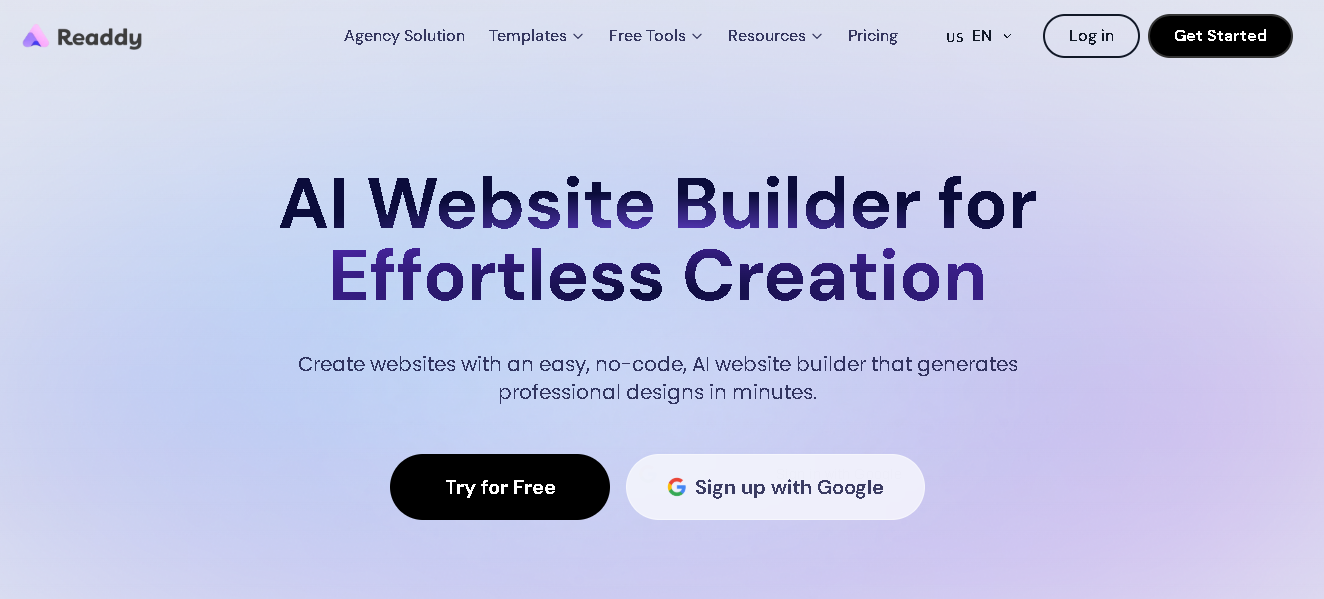
- AI-generated design and copy: You describe your business and target audience in plain language, and the platform generates a complete website with layout, content, and images in one pass, not just code.
- AI editing: Once you get your initial website, you can edit different sections or components quickly through simple text prompts or an easy-to-use visual editor. When you’re using the editor, you can simply click on the element you want to modify and make your desired changes.
- Built-in hosting and domain publishing: With Readdy, there's no need for a separate hosting or DNS setup. Readdy offers built-in hosting and lets you connect your site to a custom domain, so you can publish from the same place you built it.
- SEO and GEO-ready pages: When you build your website with Readdy, it automatically structures pages with the headings, metadata, and formatting that both traditional search engines and AI answer engines look for when indexing and citing content.
Readdy is one of the few AI website builders that offer AI-generated website building with a built-in backend, hosting, and domain connection in a single workflow, rather than handing you code that still needs to be deployed elsewhere.
This type of tool is a great choice for non-technical business owners and startups who don't have a dedicated developer to manage server configuration. With Readdy, anyone can create a complete website in minutes and then polish it so it meets their requirements.
Step-by-step: from idea to live website
Here's what the process usually looks like when you’re using an AI website builder like Readdy, compared to the traditional route:
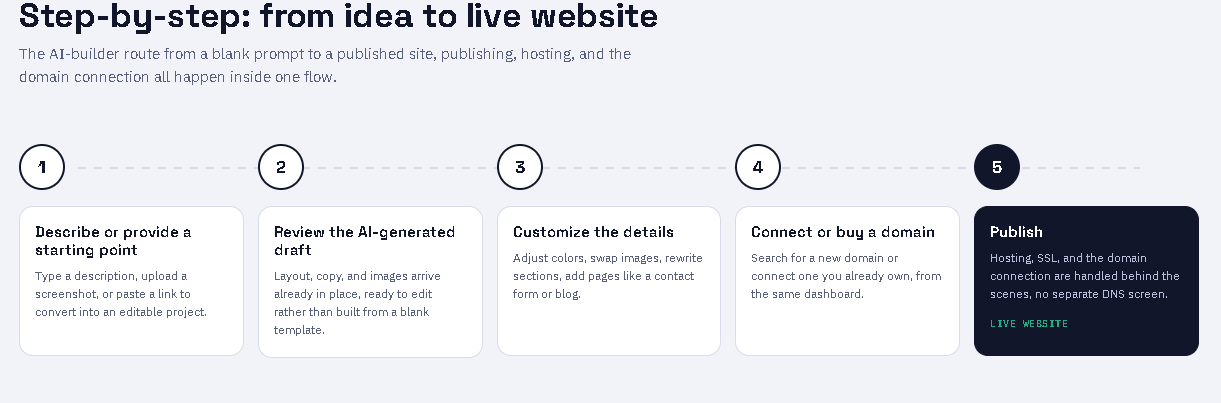
Describe your site or provide a starting point. Provide a description of your business and your target audience in plain language, and the AI-powered builder will use it as the input to create a professional website in minutes.
You can also upload a screenshot of a design you like, or use a URL as a starting point. This replaces the "pick a template and start clicking" step of older builders.
- Review the AI-generated draft. The platform provides a complete working site with layout, copy, and images already in place. You can then edit the site by clicking any element directly or asking the AI through prompts to make changes.
- Customize the details. You can adjust colors, swap images, rewrite sections, and add pages like a contact form or a blog, using the visual editor or through text prompts.
- Connect or buy a domain. Search for a new domain or connect one you already own, directly inside the builder's dashboard.
- Publish. One click puts the site live with hosting, SSL, and the domain connection all handled behind the scenes, no separate DNS screen required.
With the traditional route, you have to buy a domain from a registrar, buy hosting from a separate company, manually set nameservers or DNS records, install a CMS or write code, and then configure SSL yourself. Both paths get you to a live website, but they differ greatly in setup time and the amount of technical knowledge required.
Frequently asked questions
Can I buy domain and hosting together?
Yes. Many hosting companies sell bundled plans that include a free or discounted domain for the first year. Many AI website builders, including Readdy, let you connect or purchase a domain directly from the same dashboard used to build and host the site.
Can I move my domain later?
Yes. Domains can be transferred between registrars or shifted to a different host at any time, as long as the transfer window has passed and the domain isn't locked.
What happens if hosting expires?
If hosting expires and isn't renewed, your website's files typically become inaccessible and visitors see an error page, even though your domain registration may still be active. Most hosts give a grace period before deleting data, but policies vary, so it's worth checking your provider's specific terms.
Do AI website builders include hosting?
Some do, and some don’t. Tools that generate code or components typically leave hosting and deployment to you or a developer. Platforms like Readdy include hosting as part of the publishing flow, so there's no separate hosting purchase required.
Which is more important, the domain or the hosting?
Both are important because neither works without the other. A domain with no hosting is an address pointing at nothing, and hosting with no domain is a site nobody can find by name.
Final verdict
A domain is the address people use to find your website, while hosting is the space that stores your website files and resources and serves it to users. You need both to publish a fully working site. You can buy a domain and hosting separately for control or bundled for simplicity. For anyone who'd rather skip the DNS setup entirely, AI website builders like Readdy offer domain publishing and hosting into one flow, making it possible to go from a text description to a live, hosted website in minutes.
Kael
Kael is an editor and content strategist covering AI tools, website creation, and online growth. Interested in how people build and share on the internet, Kael writes practical content around digital products and modern web experiences.