








Agency client portal: How to choose and set one up
Published:
Updated:
Learn how to choose an agency client portal, compare essential features, and organize client communication, project reviews, and website delivery.
Kael is an editor and content strategist covering AI tools, website creation, and online growth. Interested in how people build and share on the internet, Kael writes practical content around digital products and modern web experiences.
An agency client portal is a private online workspace where clients can access project information and complete agreed tasks with your team. Depending on the platform, those tasks might include sharing files, reviewing deliverables, viewing reports, or accessing a website editor.
The right portal gives clients a clear place to act and a reliable record of what happens next. Choosing one starts with understanding your service: a website handover, a design subscription, and an ongoing marketing engagement each create different client needs.
This guide explains what to include, how to compare your options, and how to introduce a portal without adding unnecessary administration.
Quick answer
Choose an agency client portal around the work clients need to complete. Prioritize clear next actions, organized project materials, appropriate access, and a reliable way to record decisions. Add reporting, payments, or website editing when those functions support your service.
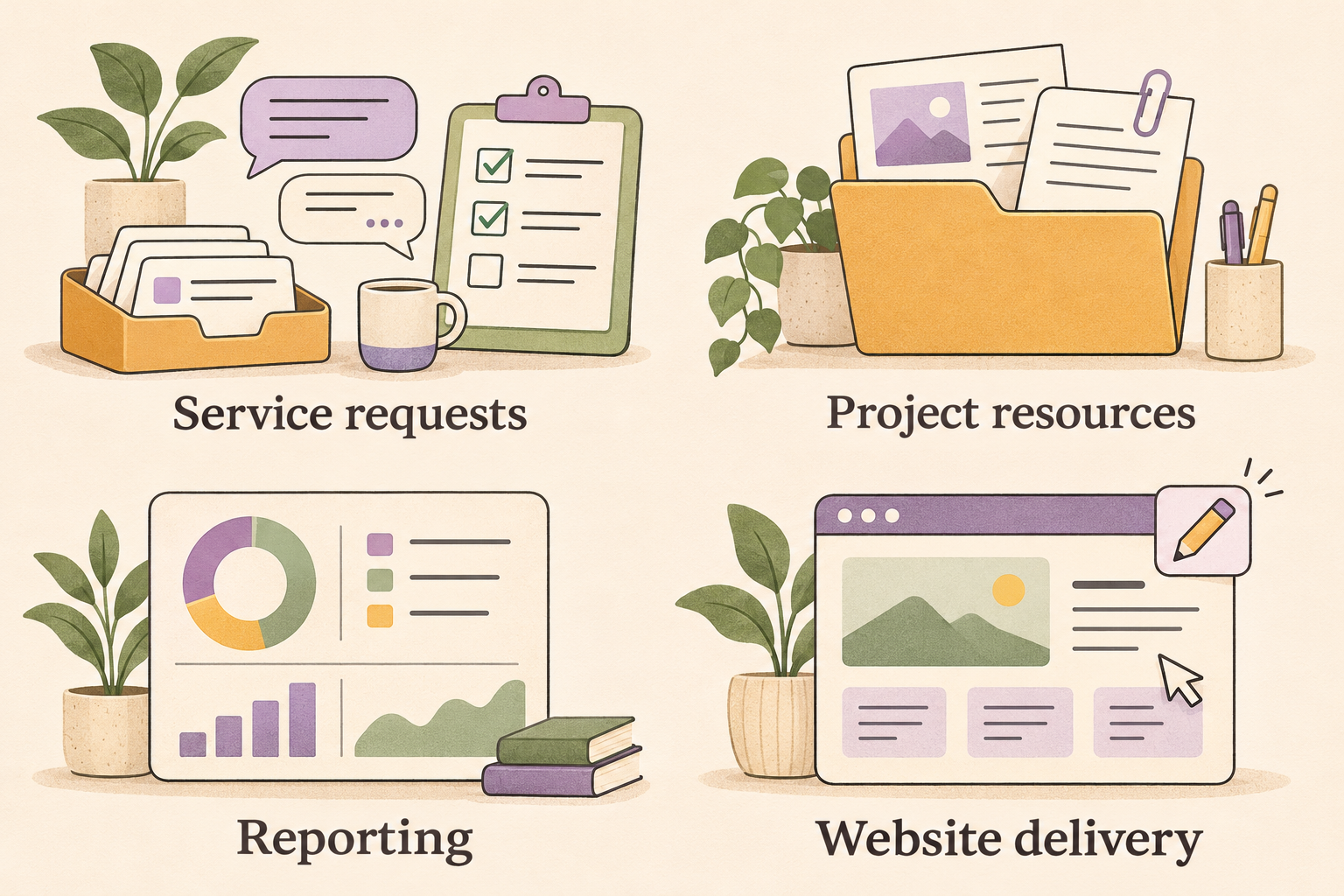
A dedicated service portal suits request-based client work. A WordPress portal can organize project resources within an existing website. Reporting portals focus on performance visibility, while website delivery platforms give clients access to their sites.
Readdy is an AI website builder whose White Label feature lets agencies provide branded client access to website dashboards and editors, helping agencies deliver websites under their own identity. White Label requires Agency Pro or a higher plan. Explore Readdy White Label.
Before committing, test a representative client journey. Confirm what works natively, what depends on another tool, and who will maintain the information clients see.
What is an agency client portal?
An agency client portal is the client-facing part of your delivery process. It organizes information and actions around an individual client or project, with access limited to the appropriate users.
Its scope depends on the agency. A web design agency might need content collection, review links, and handover resources. A marketing agency might prioritize campaign reports and service requests. A design subscription business might organize submitted requests, work in progress, and completed assets.
The useful question is: what should a client be able to accomplish after signing in?
Consider a hypothetical website project. The client needs to submit brand assets, review page content, and find instructions for managing the finished site. A portal could organize those activities into recognizable stages. Your team would still need a process for responding to submissions and keeping each stage accurate.
Several related tools can contribute to that experience:
| Tool | Primary job | Relationship to a client portal |
|---|---|---|
| Project management system | Organize your team's work | Can supply selected milestones or tasks for clients |
| CRM | Track contacts and commercial relationships | May provide account context or a portal module |
| Reporting dashboard | Present performance information | Can form one part of a broader portal |
| Website editor | Let authorized users update a site | Supports website delivery and ongoing editing |
| Client portal | Give clients a clear place to access information and act | Brings together the client-facing parts of your process |
These categories overlap. Some products combine several functions; others connect them through links, embeds, or integrations. Evaluate the actual experience rather than assuming a product label guarantees a particular workflow.
For example, a page containing links to reports and invoices can be a useful information hub. It does not necessarily record approvals, synchronize payment status, or route new requests to your team. Those functions need their own supporting process or software.
A portal becomes useful when it resolves a repeated coordination problem. If clients already find everything easily and complete their tasks through a simple process, another login may add little value. If your team repeatedly resends files, clarifies review requests, or reconstructs decisions from messages, you have a more concrete reason to introduce one.
What should an agency client portal include?
The most useful features help clients complete a task: send information, review work, approve a deliverable, or understand what happens next. Start with those tasks and work backward to the tools you need.
For a hypothetical website project, a client might enter the portal to upload brand assets, review page copy, approve a homepage design, and access the finished website. Each visit should have an obvious purpose. A long menu of features is less valuable if clients still need to email your team for instructions.

A clear project overview and next action
The opening screen should answer three questions: Where does the project stand? What does the client need to do? What will the agency do next?
Use plain status labels such as “Waiting for brand assets” or “Homepage ready for review.” Pair each status with a specific action and the person responsible. “Upload your approved logo files” gives a client clearer direction than “Complete onboarding.”
Include a short description of the current stage, links to relevant work, and any dependencies. If development cannot continue until the client approves the navigation, make that relationship explicit.
Clients rarely need your entire internal task board. Show the milestones and decisions that affect them, while keeping production details in the system your team already uses. An agency client portal should make progress easier to understand without creating a second project plan to maintain.
Organized files, feedback, and approvals
Group materials around recognizable project stages or deliverables. A website project could have areas for onboarding documents, brand assets, content, design reviews, and handover instructions.
Keep the current version easy to identify. If clients see several files named “homepage-final,” they may comment on an outdated design. Use clear version labels and put the active review item in a consistent location.
Separate feedback from approval. Feedback describes a requested change or raises a question. Approval confirms that an authorized person accepts a particular version for the next project stage. Define who can approve, what they are approving, and where that decision is recorded.
For example, a client might leave three comments on a homepage draft, then approve the revised version after those comments are addressed. The approval record should identify that revised version. A general message saying “looks good” can be ambiguous when several deliverables are under discussion.
Give clients a way to distinguish a correction from a new request. Fixing a misspelled heading and adding a booking system have different implications for delivery. Explain how your team evaluates requests outside the agreed scope, where any additional estimate appears, and who must accept it before work starts. The portal should make those boundaries visible without requiring clients to understand your internal production process.
Also decide how the portal will handle files that become outdated. An archive can preserve useful history without competing with the materials clients need now.
Appropriate access and account management
Ask how the platform keeps each client’s information separate. A page hidden from navigation is different from content that requires authorization before the server returns it.
During evaluation, ask whether access checks apply to project pages, uploaded files, and direct download links. Then test the experience using separate client accounts. Can one client open another client’s file by following its link? What happens after access is removed? A branded login screen alone does not answer these questions.
Consider permissions within each client organization, too. A business owner may need access to invoices, while a content contributor only needs to upload copy and review pages.
Make account administration manageable. Your team should know how to invite users, change responsibilities, recover access, and remove departing contacts. Include project closure in that process so completed work does not leave unnecessary accounts active indefinitely.
Billing, reporting, and branding where needed
Add these features when they support the service you sell.
An agency managing ongoing marketing campaigns may need reporting views with clear explanations of the metrics. A website agency may benefit more from invoice access, review requests, and handover resources.
Check what each integration actually does. A payment link can direct clients to checkout, but it may not update invoice status inside the portal. An embedded report can display data without supporting client-specific permissions or explanatory notes. Establish which system owns each record and who maintains it.
Branding can help clients recognize your agency’s workspace. Prioritize a familiar name, clear contact details, and consistent navigation before spending time on cosmetic customization. The portal earns its place when clients can finish their work with fewer questions.
How to choose the right portal for your agency
Compare platforms using one common engagement. Write down what the client must provide, what your team must deliver, and which decisions require a recorded response. This gives you a concrete sequence to evaluate instead of a list of disconnected features.
Match the platform to your service model
An agency delivering websites has different portal requirements from an agency managing ongoing advertising campaigns. Even within one business, a fixed-scope project and an ongoing service may need different client experiences.
The categories below provide a starting point. Individual products may cover more than one category, so verify the workflow you need.
| Portal category | Intended client job | Suitable situation | Question to validate |
|---|---|---|---|
| Dedicated service portal | Submit requests, discuss work, and manage service transactions | Your agency handles recurring requests or standardized services | Can a client follow one request from submission through completion without losing the conversation? |
| WordPress information hub | Find project documents, links, forms, and resources | Your agency needs an organized project home within a WordPress setup | Can clients find the correct materials, and can your team maintain access reliably? |
| Reporting portal | Review performance and understand results | Your agency provides ongoing marketing or measurement services | Can clients understand the figures and the action your team recommends? |
| Website delivery platform | Access the website creation or editing environment through an agency-branded experience | Website delivery is the main client interaction | Can clients access the appropriate site and complete the updates included in your service? |
Choose a portal based on how clients work with your agency. For a fixed-scope website project, an organized space for submitting content, reviewing pages, and finding handover instructions may be enough. An ongoing design service may need structured requests, clear statuses, and a record of feedback.
Marketing agencies should also distinguish between showing results and managing the work behind them. A reporting dashboard can help clients understand campaign performance, but they may still need a separate way to ask questions, approve changes, or request additional work.
Prioritize the tasks clients complete most often. Additional features are useful when they remove a specific obstacle; otherwise, they can create more setup and maintenance for your team.
Understand where Readdy fits
Readdy is an AI website builder worth evaluating for branded website delivery. Its white-label options cover the platform domain, published-site domains, and invitation or notification email branding. White Label requires Agency Pro or above. Platform login uses a subdomain; branded email setup requires a verified Resend account and sending domain.
For a website agency, evaluate the client journey from invitation through the website updates included in your service. If they expect contracts, formal creative approvals, and account-wide project tracking, evaluate those requirements separately. Keep the website workspace's role clear alongside any tools you use for those tasks.
Make the distinction clear in your service proposal. Describe what clients will use the branded workspace for, how they should request additional work, and where they can find contractual or billing information. A consistent identity helps, but clear expectations determine whether the experience makes sense.
Evaluate the complete operating cost
Compare the cost of running your workflow, including the subscription and the work required to support it. Ask each provider which charges apply to staff accounts, client accounts, storage, additional workspaces, branding, and any required add-ons. Check whether the arrangement still suits your agency when projects finish and clients need continued access.
Discuss the exit process before adopting a platform. Ask which files, conversations, and approval records you can export, in what format, and who retains access when an engagement closes. A downloadable document archive may be enough for a short website project; an ongoing service may need a more complete history. Confirm those needs before moving important records into the portal.
Include your team's time. Someone must organize each engagement, invite users, answer access questions, and remove permissions when relationships change. A lower subscription may offer little benefit if every project requires extensive manual setup.
Before committing, ask for a demonstration using a realistic example. Supply a short scenario: a client submits homepage copy, receives a question, reviews a revision, and confirms the final version. Replace those steps with reporting or website editing if that better reflects your service.
Watch where information moves and where a person must intervene. Ask the demonstrator to use the client's view, including a limited-access account. An administrator walkthrough cannot confirm that clients can complete the same tasks.
Set a few pass-or-fail requirements before comparing conveniences. Appropriate access to client information, a workable account-removal process, and support for your essential client task should carry more weight than optional visual customization.
Then compare the remaining candidates on everyday usability and operating effort. Record what each handles directly, what requires another tool, and what your team must manage manually. This gives you a decision based on the service you deliver, with clear tradeoffs to explain to colleagues and clients.
How to set up a portal clients will actually use
Build the first version around one representative project, then test it with the people who will use it. A focused rollout makes it easier to find missing instructions before you repeat the setup across your accounts.
Start with one repeatable client workflow
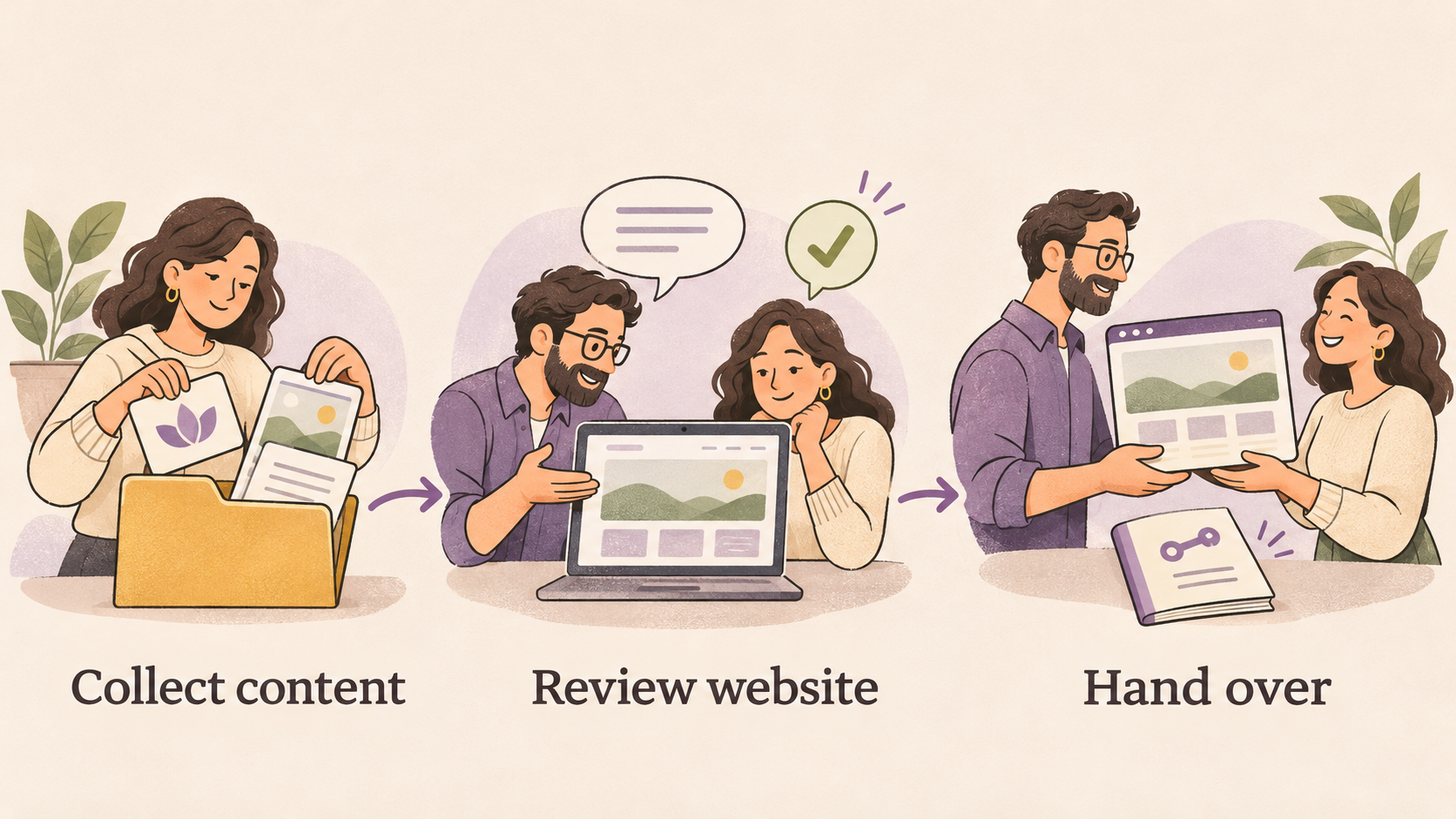
Choose a common service, such as a small business website project. Map the client’s journey from providing content to reviewing pages and receiving the finished website. For each stage, write down what the client needs to see, submit, or approve, and which team member is responsible for the response.
Turn that journey into a simple portal template:
- Content collection: Add a short welcome message, a list of required materials, and a clear place to submit copy, logos, and images. Explain what a complete submission looks like.
- Design and website review: Link to the relevant preview, identify the pages awaiting feedback, and explain how to submit comments. Keep the current review request easy to distinguish from previous feedback.
- Website handover: Provide the approved website link, access instructions, and guidance for requesting changes. Include any training materials the client needs to manage the website.
Use labels clients recognize, such as “Upload your logo” or “Review your homepage.” Internal terms like “asset intake” can make straightforward tasks harder to understand.
Assign one person to maintain each client’s portal. That person should check links, update the project status, and make sure requests reach the right colleague. A reusable template reduces setup work, but each portal still needs accurate project information.
Decide which communication belongs in the portal and explain that rule to your team. For example, you might record formal approvals there while using calls for broader discussions. Add a written decision after the call so the project record remains useful.
Test access and introduce the portal
Before inviting a client, test the portal using a client account with the intended permissions. An administrator’s view may hide problems that customers encounter.
Ask a colleague to complete three tasks without your guidance: submit a file, find the current review request, and locate the handover instructions. Check whether they can identify their next action and whether their submissions reach the correct person.
Start with a small pilot group. Send each client a direct invitation that explains why they are receiving it, how to sign in, and the first task to complete. A short walkthrough can help, especially when the workflow changes how clients normally provide feedback.
Agree on a few measures before expanding. You could track completed content submissions, requests for access help, feedback submitted through the agreed channel, and questions asking where to find project information.
Use the pilot to remove confusing labels, unnecessary steps, and missing instructions. Expand once clients can complete the core workflow with a reasonable level of support.
Frequently asked questions
Does a small agency need a client portal?
A small agency can benefit when repeated requests for files, updates, or instructions interrupt delivery. Start with the recurring problem you want to solve. If a shared folder and clear communication already work well, a larger platform may introduce more administration than it removes.
Is a client portal the same as a CRM?
No. A CRM primarily helps your team manage contacts, opportunities, and relationships. A client portal gives customers access to relevant information and actions. Some platforms combine both, but neither label confirms the exact workflow you need.
What does white label mean for a client portal?
White label means the platform lets you present specified parts of the experience under your agency's identity. Check the scope: a logo, login domain, published website domain, and email sender are separate settings. Branding does not establish which collaboration features or access controls a portal includes.
Can Readdy support an agency client portal?
Readdy fits the website delivery use case through branded access to website dashboards and editors on eligible plans. Evaluate any additional needs, such as contract signing or formal proof approval, separately. Readdy also supports AI-assisted and direct website editing, which can help with website revisions.
Key takeaways
A useful agency client portal gives customers a clear next action, the right project information, and an appropriate level of access. Choose the platform by testing the work your clients actually need to complete.
Start with one representative project. Identify the decisions and submissions that repeatedly slow delivery, then check whether a shortlisted tool handles them without creating duplicate records or excessive maintenance.
For website agencies, Readdy's white-label client access can support delivery under an agency's own brand, with Agency Pro or a higher plan required. If that matches your service, map a website handover journey and test the client experience before expanding it across your accounts.

Kael
Kael is an editor and content strategist covering AI tools, website creation, and online growth. Interested in how people build and share on the internet, Kael writes practical content around digital products and modern web experiences.