
Best Wix Alternatives in 2026: Top Website Builders Compared

Discover the best Wix alternatives in 2026, from AI website builders like Readdy to Webflow, Squarespace, Framer, and WordPress.

Frank Zhu
Frank is the founder of Readdy.ai. A developer-turned-founder with 10+ years of product experience, Frank loves great design, and he's building the tools he wishes he had when launching his first startup.
Wix has been around for over a decade and has helped millions of people get their first website live. It offers beginner-friendly features, such as the drag-and-drop editor and a large template library. You don't need any technical knowledge to get started, so it's easy to see why it became so popular.
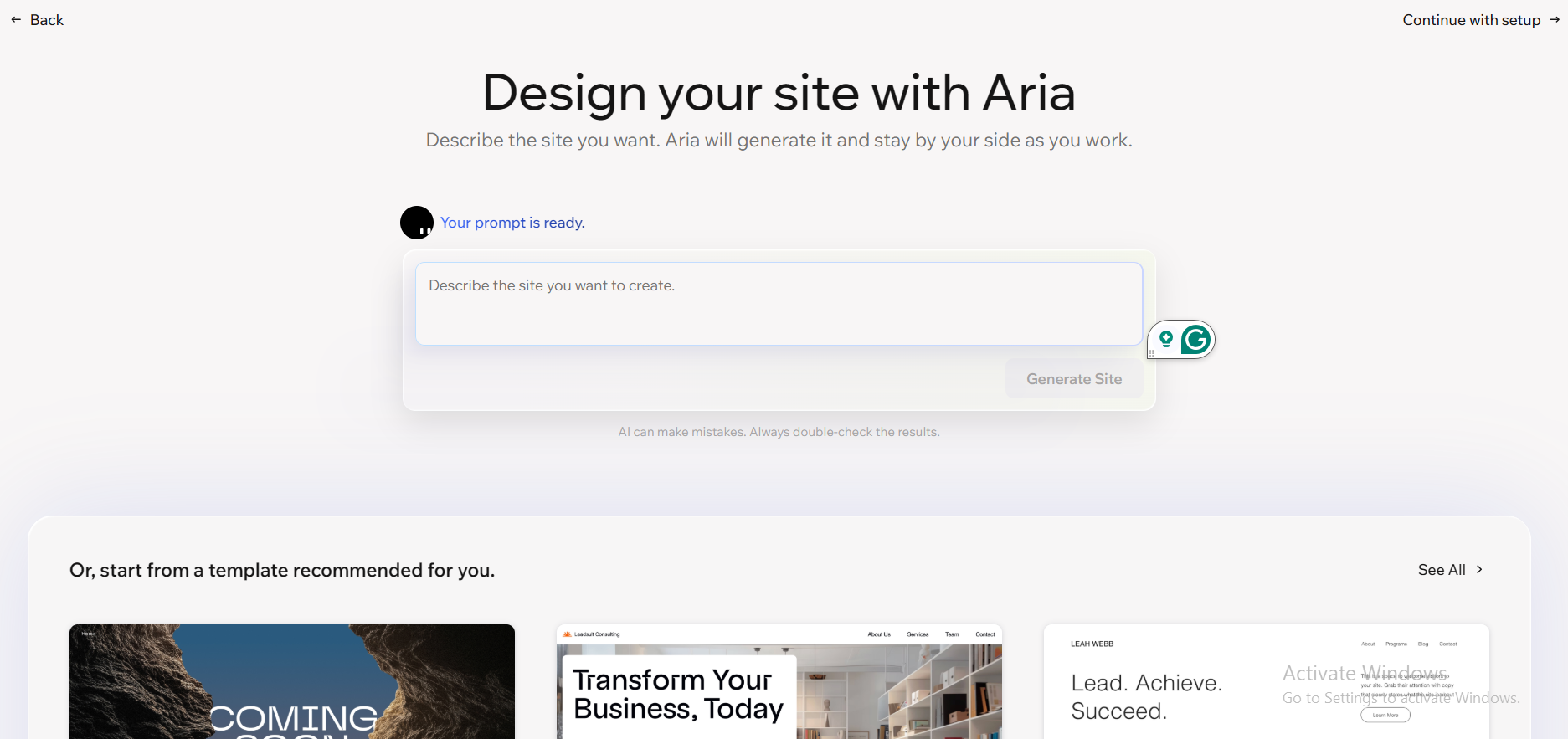
However, Wix is no longer serving many users. Some users are hitting storage limits or paying more than expected because features they assumed were included cost extra. Others want to export their code, move to a different host, or skip templates entirely and describe what they want in plain language. Wix doesn't do all of that well.
This guide identifies the best Wix alternatives available in 2026, with a focus on what each platform actually does well and who it works best for.
Quick Answer: What Is the Best Wix Alternative?
If you're short on time, here's a fast breakdown by use case:
- Best overall: Webflow – great for design quality, performance, and SEO control.
- Best AI website builder: Readdy – builds complete, deployable websites from a text description, URL sample, or screenshot, including a real backend and code you can export.
- Best for designers: Framer – pixel-level design control with fast, clean output.
- Best for e-commerce: Squarespace – solid built-in selling tools with a clean setup.
- Best for beginners: Squarespace or Readdy – both require zero technical background.
Wix Overview: A Look at the Platform
Wix is one of the most widely used website builders in the world, with over 200 million registered users. The platform gives you a drag-and-drop editor, a large template library, and AI tools for content and layout suggestions. It works for personal sites, small business pages, portfolios, and basic online stores.
Wix offers a free plan with no expiry date, but it puts Wix branding on your site and locks you to a Wix subdomain (yourname.Wixsite.com). Storage is capped at 500MB on the free tier, and there's no Google Analytics integration.
Paid plans start at $17 per month (billed annually) for the Light plan, which removes Wix branding and allows a custom domain. The pricing scales as you add more features like e-commerce, marketing tools, and more storage.
Wix's main strength is how easy it is to get started. The 2026 version of Wix's AI builder is more capable than earlier iterations. It can now generate a personalized site from a short conversation, complete with copy, images, and structure. For users who just want a basic site live without thinking too hard about the tech, Wix does the job.
Why People Look for Wix Alternatives
There's rarely one single reason people start researching Wix competitors. It tends to be a slow build-up of smaller frustrations, such as the following:
- Code exportation: The first thing many users notice is platform lock-in. Once you build a site on Wix, you can't export your code and take it somewhere else. If you want to move to a different platform or host, you're rebuilding from scratch.
- Storage limits: The Light plan gives you just 2GB, which fills up fast if you're uploading high-resolution images or video. Moving to Core ($29/mo) for 50GB feels like a significant jump in monthly cost for something that should be more standard.
- Limited backend: As businesses grow, Wix's backend starts to show its limits. There's no real built-in database or user authentication system. If you want users to log in, store data, or interact with the site beyond basic forms, you need third-party apps from the Wix App Market, many of which cost extra on top of your plan.
- E-commerce limitations: Wix's e-commerce is workable for simple selling, but the Core plan charges a 4% transaction fee. Even upgrading to Business still means you're locked to Wix's own hosting, so you can't move to a faster or cheaper server as your store scales.
Best Wix Alternatives Compared
Here's a quick side-by-side look before the detailed breakdowns:
| Platformm | Best For | Starting Price | Code Export | AI Native |
| Readdy | AI-built websites, SMBs, agencies | $25/month | Yes | Yes |
| Webflow | Design control, marketing sites | $14/month | Yes | Yes |
| Squarespace | Beginners, e-commerce | $25/month | No | Partial |
| Framer | Designers, animated pages | $10/month | No | Yes |
| Wordpress | Content, flexibility, custom builds | Free (+ hosting) | Yes | No |
5 Best Wix Alternatives in 2026
Readdy AI – Best AI-Native Wix Alternative for Fast Website Creation
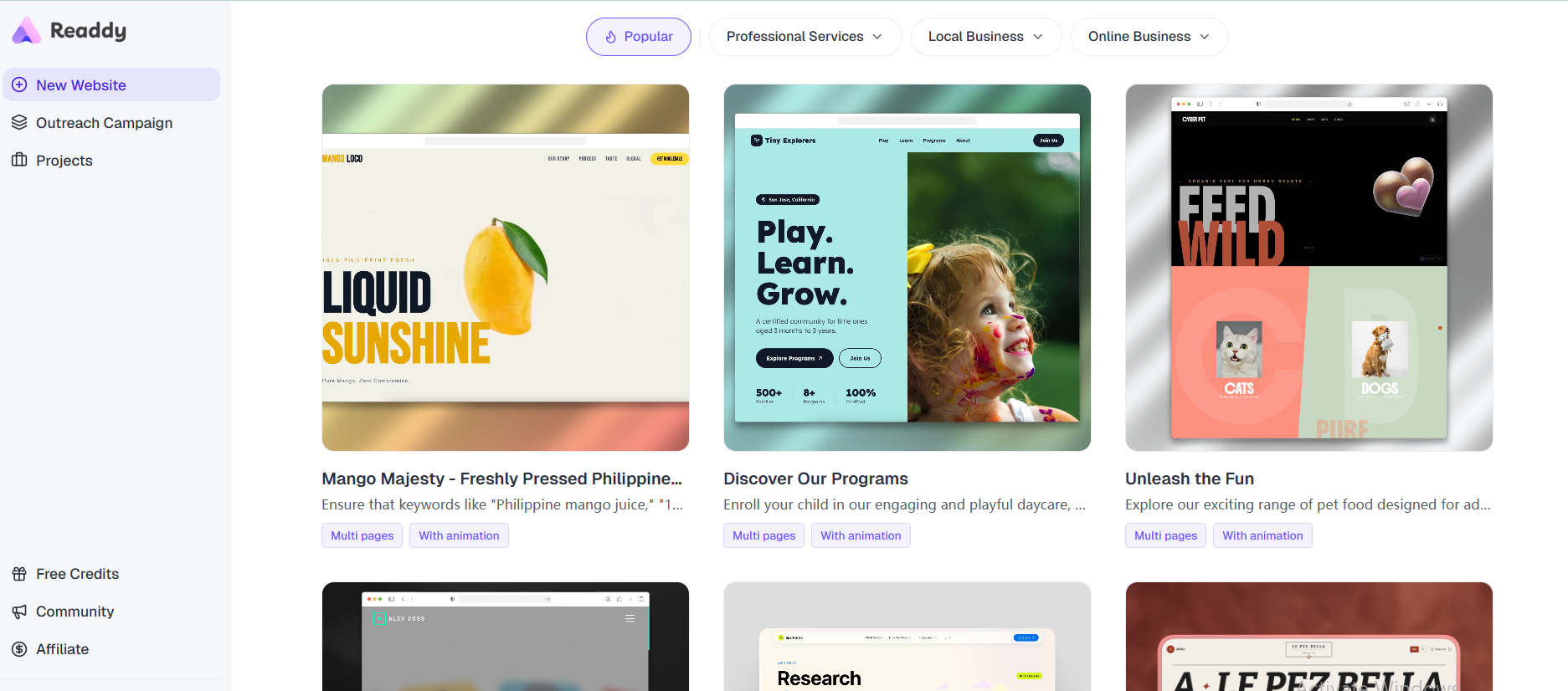
Readdy is a true AI-powered website builder. It allows you to build a website from text with AI, describing your layout, purpose, and brand in a prompt. The platform takes that and generates a complete, deployable website, design, backend, content, and hosting included. If you already have a reference site you like, Readdy can also convert a website link into an editable project, using that structure as a starting point. You can even build a website from a screenshot by sending an image of a layout you like, and it will translate that into a working build.
Readdy is an AI website builder for beginners. You don't need to understand CSS, React, or how hosting works. But it also gives technical users something valuable: full code export (React + Tailwind + TypeScript), GitHub sync, and the ability to self-host. It also includes a built-in database, authentication, and file storage. That means you can launch a site where users can sign in, submit forms, and interact with real data, all without connecting external services.
It's also the platform most focused on modern search visibility. Built-in SEO and GEO (generative engine optimization) tools help your site show up in Google and in AI search tools like ChatGPT and Perplexity, which are growing in importance for B2B discovery in 2026. Readdy also proactively surfaces improvements to your site's SEO, content, and structure without you having to ask.
Best for: People who want a complete, fully functional website fast without writing code.
Webflow – Best for High-Performance Marketing Sites
Webflow is the go-to platform for designers and marketing teams who want full visual control without relying on a developer. It lets you work directly with CSS, HTML, and interactions through a visual interface, producing clean, production-quality output without opening a code editor.
The biggest strength of Webflow is design quality. It's one of the only platforms where you can build a fully custom-looking site without writing a single line of code. Animations, scroll effects, and layout precision are all handled visually. The output is cleaner and faster than what you typically get from drag-and-drop template editors.
Webflow also offers strong SEO. It includes schema markup support, 301 redirects, sitemap control, and meta tag customization on all paid plans. In 2026, Webflow added AEO audit tools for Enterprise users.
The drawback is that Webflow has a steep learning curve. It's not beginner-friendly in the way Wix is, and the dual billing system (Site Plans plus Workspace Plans) confuses a lot of new users. The pricing becomes expensive when you add team seats, and the bandwidth-based overage system means costs can creep up as your site grows.
Webflow is also not the right call if you want a built-in backend. It's built for marketing sites and content operations. User accounts, real-time data, and complex storage require third-party tools like Memberstack or Supabase, which add to your total monthly cost.
Best for: Marketing teams, agencies, and designers who want pixel-level control and strong technical SEO.
Squarespace – Best for E-commerce and Beginners
Squarespace has been around since 2003 and has consistently focused on making beautiful, functional websites easy to build. In 2026, it's still one of the most polished options for anyone who wants a professional-looking site without spending much time on design decisions.
Plans start at $25 per month. All plans include hosting, SSL security, an AI site builder, and access to e-commerce tools, a notably broader entry offering than Wix's Light plan, which doesn't include selling at all. Even the base Squarespace plan gives you unlimited product listings and payment processing.
The e-commerce setup is solid. It includes inventory management, shipping integrations, in-person POS support, and multi-channel selling. The Core plan ($36/mo) and Advanced plan ($139/mo) add lower transaction fees and more advanced selling features as you move up.
Where Squarespace falls short is flexibility. It uses a template-based system that works well for standard layouts, but going beyond what the templates allow means writing CSS yourself. And like Wix, there's no code export. Moving away from Squarespace later means starting over.
The backend is also limited to anything beyond a standard website. There's no user authentication, no database layer, and no way to build functionality that requires server-side logic.
Best for: Small businesses, creatives, and first-time site builders who want a professional result without much technical investment.
Framer – Best for Designers Who Want Full Creative Control
Framer is a design-first website builder that appeals to people who think visually, designers, creative studios, and startup teams building high-impact marketing pages.
Framer's biggest strength is creative control. Unlike Squarespace's template-based approach, Framer gives you full control over layout, animation, and interaction. You can set exact spacing, add scroll-triggered effects, and build pages that feel more like motion design than standard web templates. Page speed is fast by default, Framer-built sites score well on Core Web Vitals, which matters for both SEO and conversion rates.
In 2026, Framer added Wireframer (text-to-layout generation), Workshop (brand-matched component generation), and a more capable CMS. These additions make it more useful for non-designers, but it's still a platform where some comfort with a design-first interface is required. The early learning period can feel steep if you're coming from a template-based builder.
Framer has SEO tools, but is manual-leaning. You get meta tag control and automatic sitemaps, but structured data and canonical tags need to be added through custom code. It’s also not a native e-commerce site. If you need to sell products, you'll need to integrate with an external solution.
Best for: Designers, creative studios, and teams building marketing-focused sites where visual quality and interaction design are the top priority.
WordPress – Best for Content-Heavy Sites and Maximum Flexibility
WordPress powers roughly 43% of all websites online as of 2026. It's open-source, meaning it's free to download and run on any hosting provider. That's a fundamentally different model from every other platform on this list. There's no subscription to a website builder. You pay for hosting, and any premium themes or plugins you want to add.
The flexibility is unmatched. You can build nearly anything with WordPress: blogs, membership sites, e-commerce stores, portfolios, news platforms, and complex web applications. The plugin ecosystem has tens of thousands of options covering virtually every feature you could want.
That flexibility comes with complexity, though. WordPress is not beginner-friendly. Setting it up properly means choosing a hosting provider, installing WordPress, selecting a theme, and then configuring plugins for SEO, security, caching, forms, and more. Each of those areas takes time to learn and maintain.
Ongoing maintenance is part of the deal. WordPress sites need regular updates to core software, themes, and plugins. Outdated installations are among the most common security vulnerabilities on the web. If you're not prepared to handle that yourself or pay someone who will, the open-source model becomes a burden rather than an advantage.
For SEO, WordPress with the right plugins (Yoast or Rank Math are the most common) is among the most powerful setups available. You have complete control over structured data, redirects, sitemaps, and on-page metadata.
Cost-wise, WordPress itself is free, but a reliable managed hosting plan runs $10 to $30 per month, depending on traffic. Add premium themes and plugins, and the total monthly cost can easily reach Webflow's price range, with more maintenance work on your end.
Best for: Teams comfortable managing technical setup, content-heavy sites like large blogs or media publications, and businesses that need maximum flexibility and plugin depth.
Should You Switch From Wix?
Switching platforms can be costly, and it's worth thinking through before you commit.
When switching makes sense
If you've hit Wix's storage limits repeatedly or keep running into backend limitations, that's a strong signal. Teams building with AI tools in 2026 will also find better options elsewhere. A no-code AI website builder like Readdy produces complete deployable sites that Wix's AI assistant simply can't match, such as full backends, real logic, and exportable code.
If your site has grown and you're already on the $159/month Business Elite plan, the cost may be too high for the value given. A higher-performing site on Webflow or a smarter AI-built setup on Readdy can cost less with more capability.
When staying on Wix is fine.
If your site is small, traffic is modest, and you're not planning to scale aggressively, Wix still works well. The editor is easy to use, and if you've already spent significant time customizing your site, the switching cost may not be worth it.
SEO migration considerations
Moving platforms always carries some SEO risk. The main concerns are URL structure changes (which require proper 301 redirects), differences in page speed and Core Web Vitals scores, and metadata porting. Most Wix alternatives listed here support redirects and sitemap control. Map your old URLs to new ones before going live, submit a fresh sitemap to Google Search Console after launch, and monitor crawl errors during the first few weeks.
Rebuilding effort expectations
On platforms without a migration tool, you're starting fresh. A small site with under 20 pages can typically be rebuilt in a few days on Webflow or Readdy. A large e-commerce or content site with custom integrations will take longer. A production-ready website generator like Readdy can meaningfully reduce rebuild time, since you're generating rather than recreating manually.
Frequently Asked Questions About Wix Alternatives
What is the best free Wix alternative?
The best free Wix alternative depends on what you need from the free tier. WordPress is free to download and run, though you'll pay for hosting separately. Framer has a free plan for basic personal use. Readdy offers a free tier to start building and testing. Webflow's Starter plan lets you prototype without paying. None of these is fully free for a professional site with a custom domain, but all provide a meaningful entry point before any payment is required.
Which Wix alternative is best for SEO?
Readdy stands out for its combination of standard SEO tools and built-in GEO (generative engine optimization), which improves visibility in AI-powered search results. Webflow and WordPress are the strongest options for technical SEO control. Both give you granular access to structured data, metadata, sitemaps, and redirects.
What is the best AI website builder in 2026?
Readdy is the strongest AI website generator for most use cases in 2026. It builds complete, deployable websites from text descriptions, including backend, design, and code. You can write a prompt, use a screenshot as input, or start from an existing URL. For teams that want a site to go live quickly without a developer, it covers more ground than any other option on this list.
Is Webflow better than Wix?
For design quality and SEO, yes. Webflow gives you far more visual control and outputs cleaner, faster code than Wix's template editor. But it has a steeper learning curve and a more complex pricing structure. Wix is more beginner-friendly and better for users who want a simple site without technical investment. Webflow is the stronger choice when design or site performance matters most.
Can I migrate my Wix website without losing SEO?
Yes, but it takes careful planning. Export all your content and document your existing URL structure before migrating. On the new platform, set up 301 redirects for every URL that changes. Rebuild your metadata, page titles, meta descriptions, and image alt text on the new site. Submit your new sitemap to Google Search Console after launch. A well-planned migration will have minimal ranking impact. The most common mistake is changing URL structures without setting up redirects.
Which Wix alternative is easiest for beginners?
Squarespace and Readdy are both excellent starting points for new users. Squarespace has a polished onboarding process and templates that look professional with very little adjustment. Readdy only needs you to describe what you want, and the AI builds it, removing the design decisions altogether. Squarespace guides you through structured templates, while Readdy handles the entire build from a single prompt.
What is the best Wix alternative for small businesses?
The best AI website builder for small businesses in 2026 is Readdy. It builds complete sites with real backends quickly, costs far less than hiring a developer, and includes SEO and GEO tools to help customers find you, including in AI-powered search. Squarespace is also a strong pick for small businesses that want reliable e-commerce and don't need anything beyond a well-designed storefront. Webflow fits small businesses with higher design expectations and the time to learn a more capable platform.
Final Thoughts
Wix earned its reputation on ease of use, and that still holds for basic websites. But in 2026, the most valuable website builders are the ones that go beyond templates, platforms that build complete, functional sites without requiring you to manage every detail manually.
If design control is the priority, Webflow remains the standard. If you want clean templates and reliable e-commerce, Squarespace is a dependable choice. If maximum flexibility is the goal, WordPress scales further than anything else on this list.
But if you want a site that a true AI-powered website builder creates from scratch, with design, backend, SEO, and exportable code included, Readdy AI is the strongest option available in 2026. You describe it, it builds it, and you own everything. That's a better fit for how most people actually want to work today.
Frank Zhu
Frank is the founder of Readdy.ai. A developer-turned-founder with 10+ years of product experience, Frank loves great design, and he's building the tools he wishes he had when launching his first startup.