
Best Online Form Builders: Top Tools, Features, and Use Cases

Compare the best online form builders, including AI form builders, and find the right tool for your use case, budget, and workflow.

Frank Zhu
Frank is the founder of Readdy.ai. A developer-turned-founder with 10+ years of product experience, Frank loves great design, and he's building the tools he wishes he had when launching his first startup.
Creating forms is now easier than ever, thanks to no-code online form builders that let you create any type of form quickly with drag-and-drop editors and pre-built templates.
However, not every form builder is the same. Some may lack the features you need, some are clunky to use, and some may be too pricey for your budget. The best online form builder in 2026 is the one that fits your workflow, is easy to use, and doesn't break your budget.
In this guide, we've rounded up the best online form builders available today, breaking down their top features, pricing, and use cases. We’ve also created a checklist for choosing the right form builder for your needs.
Quick Comparison Table of the Best Online Form Builders
| Tool | Best For | Free Plan | Starting Price | Key Features |
| Typeform | Conversational, high-UX forms | Yes (10 responses/mo) | $28/month | One-question-at-a-time UX and supports conditional logic and branching. |
| Google Forms | Simple, free data collection | Yes (unlimited) | Free | Unlimited forms and responses |
| Jotform | Advanced business forms | Yes (100 submissions/mo) | $19.5/month | 10,000+ templates, lots of advanced form features, such as conditional logic, payment processing, e-signature, approval workflows, and file uploads |
| Formstack | Workflow automation and compliance | No | $83/month | End-to-end workflow, HIPAA-ready workflows |
| Readdy AI | Forms integrated into the AI website creation | Yes | $15/month | Creates a complete website and all relevant forms through prompts within minutes |
What is Online Form Builder?
An online form builder is a tool that lets you create web-based forms and surveys to collect information from users without writing any code. Modern form builders provide a drag-and-drop editor to create forms. You pick your fields, set up your logic, style the design, and publish all through a visual interface. Some tools also provide pre-built templates for different use cases to speed things up further.
Before these form builders, collecting information online required writing custom code. For companies, it meant hiring a developer to write the code, process submissions, and store responses. The whole setup would take days, and if you needed any changes, you had to go back to the developer.
Today's form builders make all of this quite easy. They handle everything from hosting and storage to integrations, so you don’t have to spend time on technical setup.
Key Features to Look for in the Best Online Form Builder
Here are the key features that truly matter when evaluating form builders.
Ease of Use
A form builder shouldn’t slow you down. It should feel intuitive from the moment you open it. If a tool takes too long to create a basic form, it defeats the purpose of using a form builder in the first place.
Most modern form builders provide a drag-and-drop editor that lets you add fields, rearrange sections, preview changes in real-time, and customize styling without touching code.
Pre-Built Templates
A good form builder comes with pre-built templates for common use cases, such as contact forms, surveys, and registration forms. Templates speed things up by providing a ready-made structure, so you don’t have to start from scratch. You can then customize the template to fit your specific needs.
Advanced Form Design Features
Most form builders let you create basic forms with ease, but the best form builder also supports multi-step flows, conditional questions, and dynamic inputs. These features are important for advanced forms that need to show or hide fields based on previous answers or display personalized questions based on user input.
With a strong form builder, you can build anything from a basic lead form to a complex workflow, so you don’t have to use separate tools for different use cases.
Integrations
The data you collect from forms isn’t helpful on its own. You need to add it to platforms like your CRM or project management tools to make sense of it. For example, you can connect your “Contact us” or “Request a demo” form directly to your CRM to manage and track leads.
A form builder that integrates with your CRM, email marketing platform, payment processor, and project management tools saves a great deal of time on data entry. When a user submits a form, the data automatically goes into your system.
Mobile Optimization
With more than 50% of web traffic coming from mobile devices, your forms must be optimized for mobile screens. You can create responsive designs by default with modern form builders.
Scalability
Your form can receive hundreds of responses, and you should design it keeping this in mind right from the start. The right form builder can handle higher submission volumes and support multiple teams without performance issues.
Best Online Form Builders in 2026 (Compared)
Typeform — Best Form Builder for Conversational, High-UX Forms
Typeform is a feature-packed yet easy-to-use form builder that lets you create attractive forms quickly. When you sign up, it asks you some questions to provide a personalized experience. Once you’re ready to build a form, you simply choose the elements you want to add.
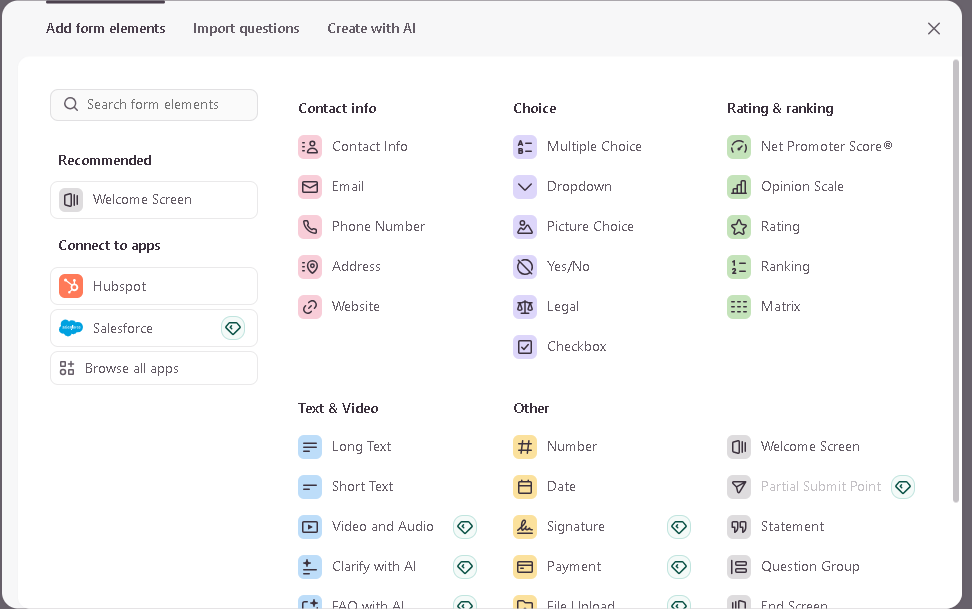
By default, the tool shows one question at a time, which creates a conversational flow that feels like a chat instead of a traditional form. The goal is to increase engagement, and the platform reports average form completion rates of over 47%.
On the feature side, Typeform gives you conditional logic and branching, hundreds of templates across industries, and response analytics with drop-off tracking. It also supports native integrations with HubSpot, Salesforce, Mailchimp, and Slack, and 500+ integrations through Zapier. You can even embed videos and images directly inside questions, which makes it a strong choice for product surveys and research studies where context matters.
There is also a “Create with AI” feature that lets you create forms with simple prompts. You describe what type of form you want to create in a few sentences, and the AI creates the complete form for you. You can then also make changes through prompts. But this feature is still in beta phase, so it’s still being tested.
The main limitation is the pricing structure. While the free plan lets you create as many forms as you want, it caps you at 10 responses per month, which runs out quickly if you're dealing with any real volume.
You'll need the Basic plan at $28/month (billed annually) for more. The Plus plan starts from $56/month (billed annually), and the Business plan costs $91/month (billed annually). For teams with a high response volume or enterprise integration needs, costs can climb fast.
Typeform is a strong choice for lead generation forms, customer feedback surveys, and any use case where the form experience itself impacts conversion.
Pros
- Beautiful, modern UI
- High completion rates due to conversational format
- Strong integration ecosystem
Cons:
- Free plan is very limited (10 responses/month)
- Gets expensive quickly as response volume grows
Google Forms — Best Free Form Builder
Google Forms is the simplest and most accessible tool on this list. It's completely free and requires no setup. It also connects directly to Google Sheets, so you can easily store responses in real-time. You can start from a blank form or choose from available templates, but the library is fairly limited, with only a few basic options for common use cases.
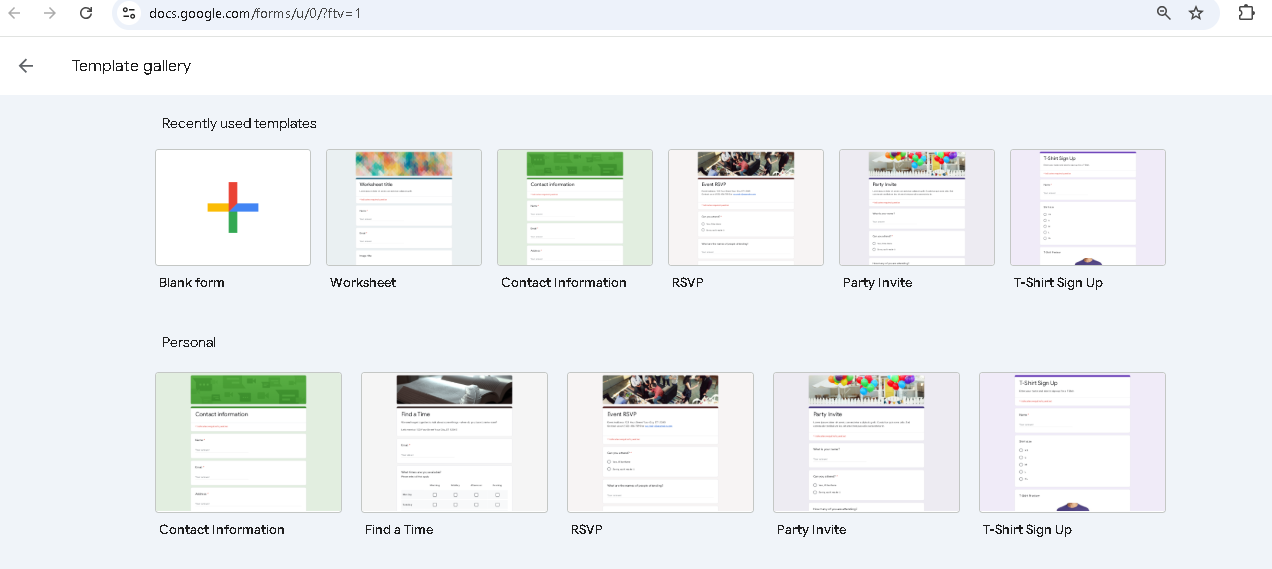
It supports supports unlimited responses on the free plan, basic conditional logic, file upload support, and multi-editor collaboration, which covers the requirements for most internal and basic data collection tasks. The sharing experience is also pretty simple: a link, an embed code, or a direct email invitation.
The trade-off is limited flexibility in form design. You can't add custom branding, there's no payment processing, and the analytics are limited to basic response summaries. The forms look like Google Forms, not visually appealing forms that drive engagement. If your form is customer-facing and you want to add custom branding, that's a real limitation.
Google Forms works great for internal surveys, event RSVPs, academic research, and quick data collection where design isn’t the top priority. For teams already using Google Workspace, it’s the best choice as it fits perfectly into the existing workflow without any additional accounts or subscriptions.
Pros
- Completely free
- Unlimited responses
- No learning curve
Cons
- Limited design customization; forms look basic
- No payment processing
- No custom branding or domain
Jotform — Best for Advanced Business Forms
With over 35 million users, Jotform is one of the most used form builders. It covers a wider range of use cases than any other tool here. You can create anything from simple contact forms to complex multi-step approval workflows. Payment processing, e-signature, approval workflows, file uploads, automated email notifications, PDF generation, and form analytics all come built in.
You can start with a traditional single-page form or choose a multi-page form. From there, you can use Jotform’s drag-and-drop editor to add custom fields, conditional logic, and field validation.
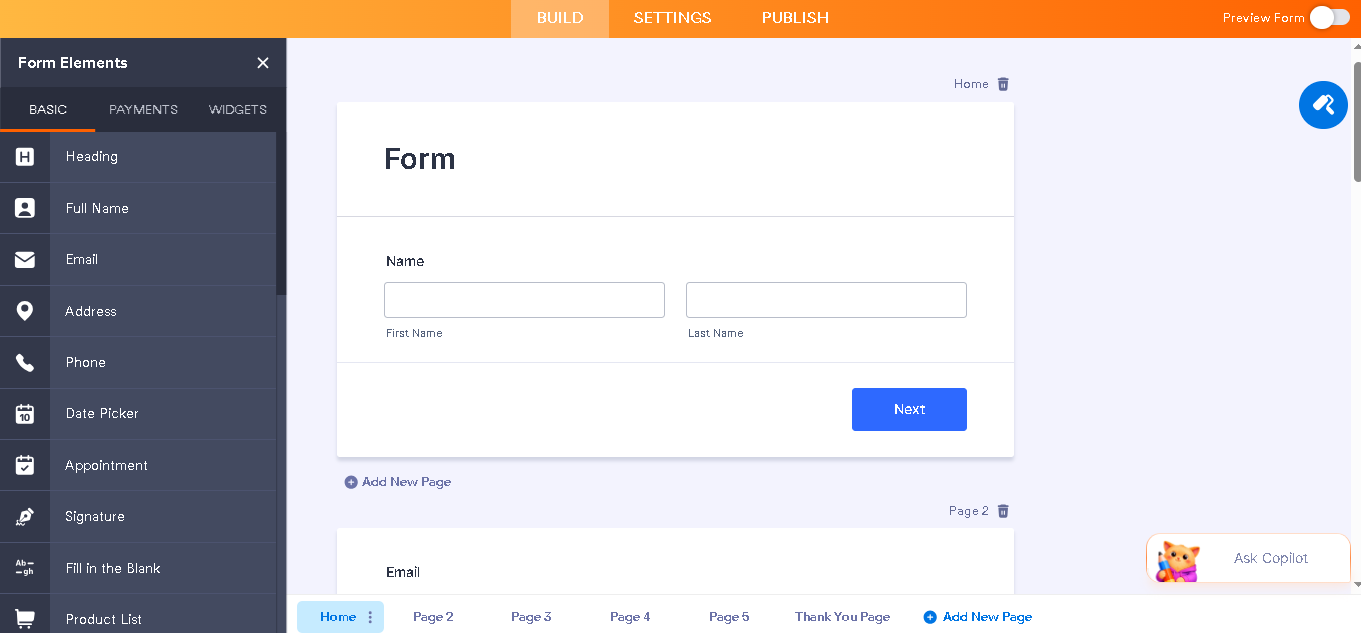
Jotform’s huge template library with over 10,000 pre-built templates is also worth noting. Most forms you would realistically need exist as a starting point. The platform also provides an AI Copilot that lets you modify forms or create complete forms with simple prompts in plain English.
On the integrations side, Jotform offers 150+ native integrations, including Salesforce, HubSpot, Airtable, Google Sheets, Mailchimp, Stripe, PayPal, Square, Slack, Trello, and Asana. Custom integrations through Zapier and Make are also available.
The downside is the learning curve. With so many features, the interface can feel overwhelming at first, and new users sometimes find it hard to navigate.
While Jotform offers a free plan that supports 100 monthly submissions, you can only create 5 forms. And it supports only 500 total submission storage. If you want more monthly submissions and want to remove Jotform branding, you need to upgrade to a paid plan, which starts at $19.5 per month billed annually.
Jotform is a solid choice for small to mid-sized businesses, nonprofits, healthcare organizations, and teams that need advanced form functionality.
Pros
- Huge template library
- Payment and e-signature features
- HIPAA compliance available for healthcare use cases
Cons
- Interface can feel overwhelming for new users
- Branding removal requires a paid plan
Formstack — Best for Workflow Automation
If you need a tool that handles more than just data collection, Formstack is the most complete workflow platform. Once it collects responses, it processes them through multi-step approval chains, generates documents from form data, collects e-signatures, and even logs everything with a full audit trail.
The platform supports HIPAA, GDPR, and SOC 2 standards, which makes it a strong choice for companies in regulated industries where data handling has real compliance requirements.
A huge number of integrations are also available, including Salesforce, Zoho CRM, Pipedrive, HubSpot, Mailchimp, Constant Contact, Stripe, PayPal, Dropbox, Google Drive, Trello, Airtable, and Slack.
Its integration with Salesforce is especially worth noting. The forms are built and managed directly inside your Salesforce org; they are not connected to it from the outside. You can connect forms to any Salesforce object, dynamically prefill fields with existing record data, and verify and update records without ever leaving Salesforce.
Automatic document generation is another standout feature that saves hours of manual work, especially for teams that create contracts, agreements, or reports from form inputs.
The trade-off is cost. Formstack starts at $83/month (billed annually) for the forms-only plan, and the full Suite that includes documents and e-signatures costs $250/month. For teams that only need basic form building, that's a lot to pay. Formstack earns its price when you're using it as an end-to-end workflow tool.
It’s the right tool for enterprise teams, healthcare organizations, and legal firms that need forms as part of a larger automated process.
Pros
- End-to-end workflow automation beyond just form collection
- Strong compliance support for regulated industries
Cons
- More expensive than alternatives
- Can be overkill for teams that only need basic form building
Readdy AI — Best for Forms Built Into Your Website
Readdy takes a different approach to form building. It’s an AI-powered website builder that lets you create complete websites from simple prompts within minutes. In terms of form generation, it doesn’t work as a standalone tool that you embed into a site, but it builds forms directly into your website.
When you generate a site with Readdy, you can simply mention in your prompt to add the relevant forms, such as a contact form and an onboarding form. All the forms are automatically styled to match your design and connected to a built-in submission dashboard.
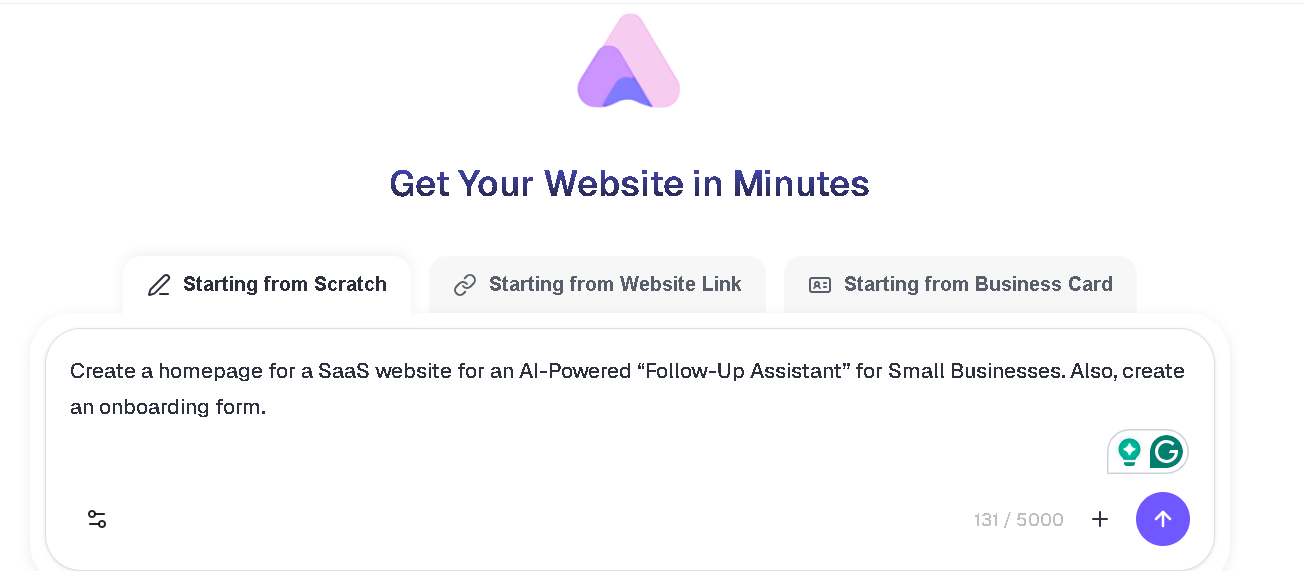
This matters more than it might seem. With a standalone form builder, you have to embed a third-party widget into your site, adjust the styling so it doesn't look out of place, manage a separate account, and keep the integration working across updates.
With Readdy, you don’t have to worry about these things. The form is part of the site. It has the same fonts, same colors, same design language.
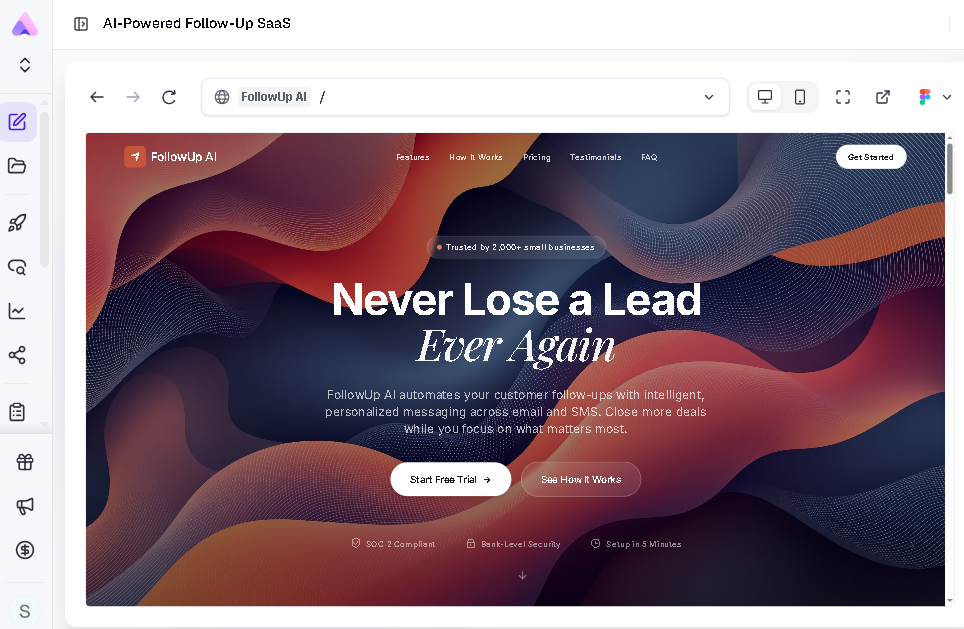
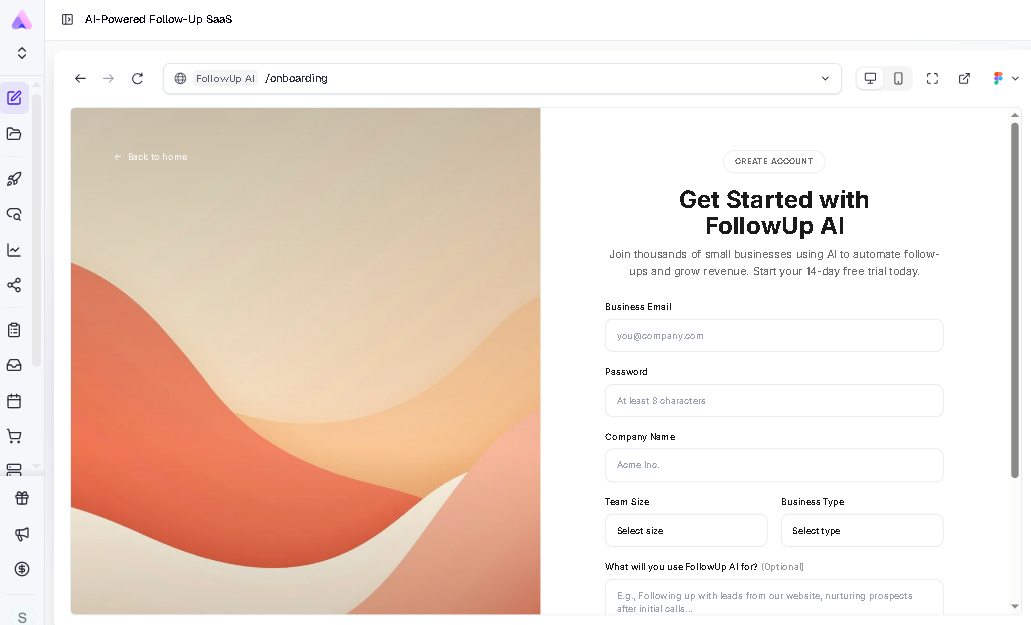
On the feature side, Readdy supports custom field types, data validation, and real-time submission notification. It also integrates with tools like Mailchimp and Calendly. All submissions are stored in a centralized dashboard inside the platform, and forms are also mobile-responsive by default.
Readdy offers a generous free plan with 250 credits/month, 2 projects, and 200 MB storage per project, which provides a starting point. Its pricing plans are also quite affordable, starting at $15/month (paid annually)
Readdy is the best form builder for businesses or individuals who want to create a website with forms without adding another tool to their stack.
Pros
- Forms are built and styled as part of your website
- No need to use a separate form builder tool
- AI generates complete websites and forms within minutes
Cons
- Not a standalone form builder
Use Cases of Online Form Builders
Businesses create different types of forms with online form builders for various purposes. Here’s how companies use form builders:
Lead Generation Forms for Marketing
Lead generation is the top priority of 34% of companies, so it’s no surprise that contact and demo request forms are among the most common use cases for form builders. In fact, a survey showed that 74% of businesses use web forms for lead generation.
Businesses create these forms to collect information such as names, email addresses, and company details from potential customers and convert them into qualified leads.
Survey Tools for Research
Surveys are great for getting insights into customer behavior, opinions, and satisfaction levels. Many businesses use online form builders to create structured questionnaires for customer feedback, product research, and market analysis. Form builders help them collect data through ratings, multiple-choice questions, and open-ended questions.
Order and Payment Forms
There are around 28 million e-commerce websites globally, and many of these websites use traditional order and payment forms to collect customer shipping and payment information.
Businesses that don’t have enough resources for a full eCommerce setup usually use form builders like Jotform that support direct payment processing through Stripe and PayPal.
Event Registration Forms
Many companies create event registration forms for webinars, conferences, workshops, and community events using online form builders. Features like automated confirmation emails, registration limits, calendar integrations, and multi-step registration flows make modern form builders a solid choice for these forms.
SaaS Onboarding Forms
Around 23% of customers stop using a SaaS product because of poor onboarding. To solve this issue, many SaaS companies use onboarding forms instead of a single registration step. With these forms, companies collect information like role or industry, product goals, team size, and setup preferences to provide a personalized product experience and reduce time-to-value.
Traditional Online Form Builder vs AI Online Form Builder
| Traditional Form Builder | AI Form Builder | |
| Setup | Manual; drag-and-drop, requires configuration | AI generates form structure from a prompt |
| Design | Template-based; manual styling | AI matches form to your brand automatically |
| Time to build | 15–60 minutes depending on complexity | Minutes or seconds |
| Customization | High; full manual control | High; AI-generated, you can then edit it manually through prompts or an editor |
| Learning curve | Moderate | Low to none |
| Integration with the website | Embedded via code or iframe | Native in AI website builders like Readdy |
| Best for | Teams with specific, complex form needs | Teams that want to create forms quickly without manual configuration |
How to Choose the Right Online Form Builder
Choosing an online form builder isn’t about picking the most popular tool. You need to choose a tool that fits your workflow and goals. Here’s what you need to consider when picking an online form builder:
Start With Your Use Case
Comparing the features of the best online form builders is important, but before that, you need to understand what you actually need the form for or what data you are collecting.
For collecting simple contact information, such as for lead generation, basic form-building features will get the job done. Sensitive health or financial data requires a tool that complies with regulations like HIPAA or GDPR. Payment collection forms need a tool with built-in payment processing.
Consider the Features You Need
When you know what type of form you’re creating, you’ll have a better understanding of the features you need. For capturing leads, simple single-page forms work best. Onboarding forms, detailed surveys, and payment forms, however, need advanced features such as conditional logic, multi-step layouts, and field validation.
Depending on your form type, choose a tool that offers the features you need.
Estimate the Number of Responses
Free plans are generally good for low-volume use cases. But if you're creating a lead generation form or SaaS onboarding form that could get hundreds of submissions, it’s better to start with a tool that can handle such responses instead of switching later when scalability becomes a real issue.
Check Integration Capabilities
Forms don’t provide much value on their own. The data needs to go into platforms like CRMs, email marketing tools, or payment gateways to get the most value out of it.
Check whether the form builder connects with your CRM, email platform, or project management tool. Having to manually export and import CSV files every week defeats the purpose of using a form builder.
Evaluate Pricing
Most form builders offer a free plan, but it has limited features. Free plans are good for individuals or small projects, but for a growing business, you usually need a paid tier.
Each form builder has its own pricing model, so it’s important to match cost with usage. It’s easy to start with a free plan, but many businesses have to upgrade faster than expected.
Why AI Website Builders Are Changing Form Creation
A few years ago, creating websites and forms were two different processes. You would build your site in one tool, then use a separate form builder, adjust the styling to match, and embed the form into your website.
While tools like Typeform and Jotform offer AI features, the forms still need to be embedded into websites. AI website builders like Readdy that include built-in form generation functionality make this process a lot easier. You describe what you need, and the AI does the heavy lifting: generating fields, applying styling, and integrating the form directly into your site. You refine from there. For most standard use cases, this is faster.
There's no separate account to manage, no embed code to deal with, and no styling issues between your site and your form. AI tools make it easier to create forms for people who don’t want to create forms in a standalone tool.
FAQs About Online Form Builders
What is the easiest online form builder?
Google Forms is the easiest to get started with. It requires zero setup. But if you want to create a form for your website, Readdy is the best option. It lets you create complete websites and relevant forms with simple prompts in plain English.
Can I create forms without coding?
Yes, modern online form builders let you create forms with drag-and-drop editors. AI form builders make this even easier by letting you create forms through prompts in natural language.
What is the best free form builder?
Google Forms is the most generous free option, with unlimited responses and unlimited forms. Readdy’s free plan is also a good starting point.
Are online form builders secure?
The best form builders encrypt data in transit and at rest. For regulated industries, look specifically for HIPAA compliance and GDPR compliance features.
Do they integrate with websites?
Yes, standalone form builders like Typeform and Jotform provide embed codes. Readdy AI makes this even easier. It builds forms directly into your website so you don’t have to embed them separately.
Conclusion
Whether you're collecting leads, running surveys, processing payments, or onboarding new clients, the right form builder can turn a manual process into a quick workflow. You can use traditional form builders with drag-and-drop editors or AI form builders to create forms with prompts.
Traditional form builders give you full control, which is great when you have specific requirements. But you have to start from a blank canvas or a template, configure every field manually, and then figure out how to embed the form on your website. AI form builders like Readdy make all of this easy by generating forms as a part of your website.
The best online form builder is the one that fits your use case, not the one with the longest feature list.
Want to create a production-ready website with relevant forms within minutes? Sign up for Readdy to get started!
Frank Zhu
Frank is the founder of Readdy.ai. A developer-turned-founder with 10+ years of product experience, Frank loves great design, and he's building the tools he wishes he had when launching his first startup.